
1. Introduction
This manual provides detailed instructions for the installation, operation, and maintenance of the Seco-Larm Enforcer SK-3523-SDQ Heavy-Duty Access Control Keypad. Please read this manual thoroughly before installation and operation to ensure proper functionality and safety.
The SK-3523-SDQ is a robust, outdoor-rated access control keypad designed for secure entry management. It supports up to 210 users and features a durable stainless steel faceplate and a rugged cast-aluminum housing.
2. Safety Information
Observe the following safety precautions to prevent damage to the unit and ensure user safety:
- Electrical Safety: Disconnect power before installation or servicing. All wiring should comply with local electrical codes.
- Environmental Conditions: Although designed for outdoor use, avoid direct exposure to extreme weather conditions if possible. Ensure proper sealing during installation to maintain its weather resistance.
- Authorized Personnel: Installation and maintenance should only be performed by qualified technicians.
- Power Supply: Use only the specified power supply voltage and current ratings to avoid damage.
3. Package Contents
Verify that all items are present in the package:
- Seco-Larm Enforcer SK-3523-SDQ Keypad Unit
- Mounting Screws and Anchors
- Diode (for inductive loads)
- User Manual (this document)
- Security Key (for accessing internal components)
4. Setup and Installation
Proper installation is crucial for the keypad's performance and longevity.
4.1 Mounting the Keypad
- Choose Location: Select a flat, secure surface for mounting, typically near the access point. Ensure adequate space for wiring.
- Prepare Surface: Use the keypad as a template to mark drilling points for mounting screws.
- Drill Holes: Drill pilot holes for the mounting screws and a larger hole for wiring access.
- Secure Keypad: Mount the keypad securely using the provided screws and anchors. Ensure the unit is level.
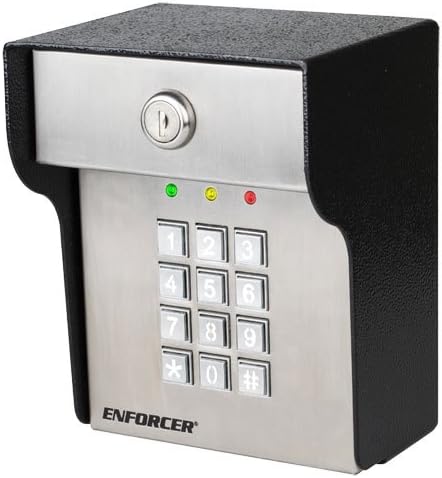
Image 1: Front view of the Seco-Larm Enforcer SK-3523-SDQ Heavy-Duty Access Control Keypad. It features a stainless steel faceplate with a 12-button numeric keypad, a key lock at the top, and three indicator LEDs (green, yellow, red) above the keypad. The housing is black and rugged.
4.2 Wiring Connections
Refer to the wiring diagram provided with the product for specific connections. General steps include:
- Power Connection: Connect the keypad to a stable 12-24 VDC power supply. Observe polarity.
- Lock Connection: Connect the keypad's output relays to the electric lock or gate operator. Use the provided diode for inductive loads to prevent back-EMF damage.
- Exit Button: Connect an optional exit button to the designated terminals.
- Alarm/Auxiliary Output: Connect to an alarm system or other auxiliary devices if required.
Note: Always ensure power is disconnected before making any wiring changes.
5. Operating Instructions
5.1 Programming Modes
The keypad operates in two main modes: Normal Mode (for access) and Programming Mode (for configuration).
- Entering Programming Mode: Enter the Master Code followed by '#'. The yellow LED will illuminate.
- Exiting Programming Mode: Press '#' or wait for 10 seconds of inactivity.
5.2 User Code Management
The keypad supports up to 210 user codes.
- Adding a User Code:
- Enter Programming Mode.
- Press '1' (Add User Code).
- Enter a 4-8 digit User Code.
- Press '#'. The green LED will flash to confirm.
- Deleting a User Code:
- Enter Programming Mode.
- Press '2' (Delete User Code).
- Enter the User Code to be deleted.
- Press '#'. The red LED will flash to confirm.
5.3 Granting Access
To gain access, users must enter their valid user code followed by '#'.
- Successful Entry: The green LED will illuminate, and the lock will activate for the programmed duration.
- Unsuccessful Entry: The red LED will flash, and access will be denied.
6. Maintenance
The SK-3523-SDQ keypad is designed for minimal maintenance. However, regular checks can extend its lifespan:
- Cleaning: Wipe the keypad surface with a soft, damp cloth. Avoid abrasive cleaners or solvents.
- Wiring Inspection: Periodically check wiring connections for corrosion or damage, especially in outdoor environments.
- Functionality Test: Test the keypad's operation and lock activation regularly to ensure proper function.
7. Troubleshooting
| Problem | Possible Cause | Solution |
|---|---|---|
| Keypad does not power on. | No power supply; incorrect wiring; faulty power supply. | Check power connections; verify power supply voltage; ensure correct polarity. |
| Keypad accepts code but lock does not activate. | Incorrect lock wiring; faulty lock; relay issue. | Verify lock wiring; test the lock independently; check keypad relay output. |
| Cannot enter Programming Mode. | Incorrect Master Code; keypad malfunction. | Ensure correct Master Code is used; reset keypad to factory defaults (refer to full manual for procedure). |
| Keypad buttons are unresponsive. | Physical damage; internal fault. | Inspect for damage; contact technical support if issue persists. |
8. Specifications
- Model: SK-3523-SDQ
- Brand: Seco-Larm Enforcer
- Input Voltage: 12-24 VDC
- Current Draw: Standby: 20mA, Active: 80mA
- User Capacity: 210 (1 Master, 209 User Codes)
- Output Relays: 1 (NO/NC, 2A @ 30VDC)
- Housing: Cast-aluminum, stainless steel faceplate
- Environment: Outdoor rated
- Dimensions: (Refer to product diagram for exact measurements)
9. Warranty and Support
Seco-Larm products are warranted against defects in material and workmanship under normal use for a period of one (1) year from the date of sale to the original customer. For technical support or warranty claims, please contact Seco-Larm customer service or visit their official website.
Website: www.seco-larm.com


