
Introduction
This manual provides comprehensive instructions for the setup, operation, and maintenance of your Singing Machine ISM990BT Bluetooth Karaoke System. Please read this manual thoroughly before using the product to ensure proper function and to maximize your enjoyment.
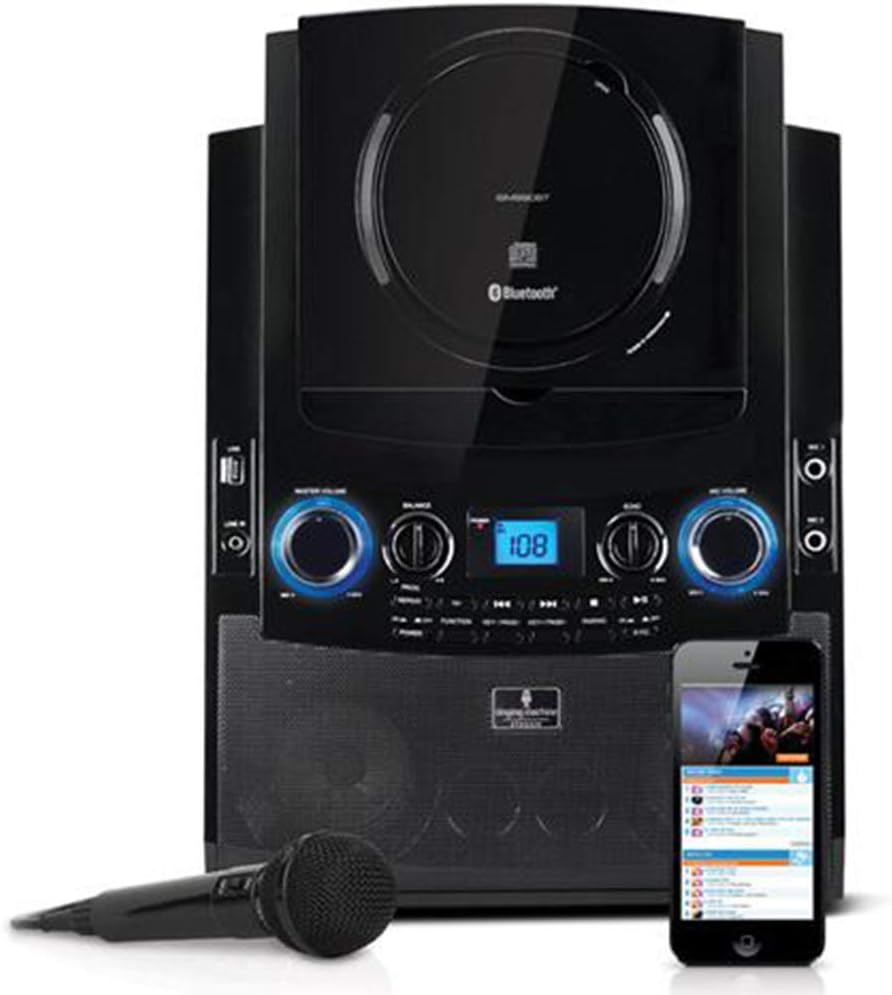
Image: Front view of the Singing Machine ISM990BT Bluetooth Karaoke System, showcasing its main unit, a wired microphone, and a smartphone displaying the mobile app interface.
Package Contents
Verify that all items are present in the package:
- Singing Machine ISM990BT Karaoke System
- One Wired Microphone
- Power Adapter
- RCA Cables (for TV connection)
- 5 Bonus Song Downloads (voucher or code)
- User Manual (this document)
Setup Instructions
1. Power Connection
- Connect the power adapter to the DC IN jack on the back of the unit.
- Plug the other end of the power adapter into a standard wall outlet.
2. Microphone Connection
- Insert the microphone plug into either the MIC 1 or MIC 2 jack on the front of the unit.
- The system supports two microphones for duets.
3. Connecting to a TV (Optional)
To display lyrics on your television, use the provided RCA cables:
- Connect the RCA output jacks (Video Out, Audio L, Audio R) on the karaoke system to the corresponding input jacks on your television.
- Select the correct input source on your TV (e.g., AV1, Video 1).
4. Device Cradle Setup
The adjustable portable device cradle is designed to hold your iPad or iPhone securely.

Image: Angled view of the karaoke system with an iPad securely placed in the adjustable cradle, displaying song lyrics.
Operating Instructions
1. Powering On/Off
Press the POWER button to turn the unit on or off.
2. Bluetooth Pairing
To wirelessly stream music from a Bluetooth-compatible device:
- Ensure the karaoke system is powered on.
- Activate Bluetooth on your mobile device (iPad, iPhone, etc.).
- Select "Singing Machine" from the list of available devices.
- Once paired, you can stream audio from your device to the karaoke system.
3. Using the Singing Machine Mobile App
The system is designed to work seamlessly with the Singing Machine Mobile Karaoke App.
- Download the official Singing Machine Mobile Karaoke App from the App Store.
- Place your iPad or iPhone in the adjustable cradle.
- Use the app to access a library of karaoke tracks and display lyrics.

Image: Screenshot of the Singing Machine Mobile Karaoke App, showing song selections and the app's branding.
4. CD+G Player Operation
The unit features a hidden CD+G player for karaoke discs.
- Open the CD compartment.
- Insert a CD+G disc with the label side facing up.
- Close the compartment. The system will begin playing automatically or you may need to press the Play button.
- Lyrics will display on a connected TV.
5. USB Playback (MP3+G)
Play downloaded MP3+G files from a USB drive.
- Insert a USB drive containing MP3+G files into the USB port.
- Use the navigation controls to select and play your desired tracks.
6. Aux Input
Connect other audio devices using the Aux In port.
- Connect an audio cable (not included) from your external device's headphone jack or audio out to the AUX IN port on the karaoke system.
- Select the AUX input mode on the system.
7. Controls and Adjustments

Image: Detailed view of the control panel, showing knobs for Master Volume, Balance, Echo, Mic Volume, and various function buttons.
- MASTER VOLUME: Adjusts the overall sound output level.
- MIC VOLUME: Controls the volume of the connected microphones.
- ECHO: Adds an echo effect to the microphone vocals.
- BALANCE: Adjusts the balance between the vocal track and the music on multiplex CD+G discs.
- AUTO VOICE CONTROL (AVC): Automatically reduces the main vocal track on multiplex CD+G discs when you sing into the microphone.
Maintenance
Cleaning the Unit
- Wipe the exterior of the unit with a soft, dry cloth.
- Do not use abrasive cleaners or solvents.
- For the CD lens, use a specialized CD lens cleaner disc.
Storage
When not in use, store the unit in a cool, dry place away from direct sunlight and extreme temperatures.
Troubleshooting
| Problem | Possible Cause | Solution |
|---|---|---|
| No power | Power adapter not connected or outlet not active. | Ensure power adapter is securely connected to the unit and a working power outlet. |
| No sound from speakers | Master Volume is too low or muted. Incorrect input source selected. | Increase MASTER VOLUME. Verify the correct input source (Bluetooth, CD, USB, AUX) is selected. |
| Microphone not working | Microphone not connected properly. MIC VOLUME is too low. | Ensure microphone is fully plugged into MIC 1 or MIC 2 jack. Increase MIC VOLUME. |
| Bluetooth pairing issues | Bluetooth not enabled on device. Device too far from unit. | Enable Bluetooth on your device. Move device closer to the karaoke system. Ensure no other devices are currently paired. |
| No lyrics on TV | RCA cables not connected correctly. Incorrect TV input selected. Not a CD+G disc. | Check RCA cable connections. Select the correct AV input on your TV. Ensure you are playing a CD+G disc or MP3+G file. |
Specifications
- Model: ISM990BT
- Dimensions (H x W x D): 16.5 x 12.1 x 7.5 inches (approximate)
- Weight: 0.01 ounces (Note: This listed weight appears to be a data entry error. The actual weight of a karaoke system of this size would be considerably higher.)
- Connectivity: Bluetooth, USB, AUX In, RCA Output
- Media Playback: CD+G, MP3+G (via USB)
- Microphone Jacks: 2
- Power Source: Battery Powered
- Compatible Devices: Smartphone, Television
- Included Components: Karaoke Machine, Microphone, 5 Bonus Song Downloads
Warranty and Support
Information regarding product warranty and customer support was not available in the provided data. Please refer to the product packaging or the manufacturer's official website for details on warranty coverage and how to obtain support.
For additional information, you may visit the Singing Machine Store on Amazon.


