
Product Overview
The Jebao Submersible LED Pond Light kit provides efficient and vibrant illumination for your pond or water garden. This set includes 3 low-voltage 1.6-watt cool white LED lights, a transformer (12-volt power supply), a 20-foot light cable, and interchangeable red, yellow, green, and blue lenses. The lights feature high-quality waterproof housing for durability in aquatic environments.
Product Features
- Complete submersible light kit for ponds and water gardens.
- Includes red, yellow, blue, and green interchangeable lenses for varied lighting effects.
- Cool White LED with clear lens for bright illumination.
- High-quality waterproof housing ensures longevity and reliability.
Package Contents
Before installation, please ensure all components are present:
- 3 x LED Submersible Lights
- 1 x 12-Volt Transformer (Power Supply)
- 1 x 20-Foot Light Cable
- 4 x Color Lenses (Red, Yellow, Green, Blue)

Image Description: A top-down view of the Jebao Submersible LED Pond Light kit components, including three black LED lights with clear lenses, a power adapter, and a coiled 20-foot cable. The lights are connected in a series.
Setup and Installation
Follow these steps to set up your Jebao Submersible LED Pond Lights:
- Unpack Components: Carefully remove all lights, cables, and the transformer from the packaging.
- Connect Lights: Connect the lights in series using the provided 20-foot cable. Ensure all connections are secure.
- Attach Color Lenses (Optional): To change the light color, twist off the clear lens cover on each light and insert the desired red, yellow, green, or blue lens. Re-attach the clear lens cover securely.
- Position Lights: Place the lights in your pond or water garden. The weighted base of each light helps it sink and stay in position. You can adjust the angle of each light to direct illumination as desired.
- Connect to Power: Plug the transformer into a suitable outdoor power outlet. Ensure the outlet is protected from water.

Image Description: A close-up view of a single black Jebao submersible LED pond light. The light features a clear lens with multiple small LED bulbs visible inside, and a textured ring for twisting. A black power cable extends from the base of the light.
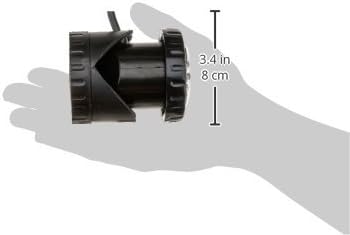
Image Description: A hand holding a single black Jebao LED pond light, illustrating its compact size. A graphic overlay indicates the light's dimensions, showing a height of 3.4 inches (8 cm).
Operating Instructions
Once installed, the Jebao Submersible LED Pond Lights are designed for simple operation:
- The lights will turn on automatically when connected to power.
- If using an optional light sensor (sold separately), the lights will activate at dusk and deactivate at dawn.
- For models with remote control functionality, refer to the separate remote control manual for detailed instructions on changing colors, modes, and brightness.
Video Demonstrations
Video Description: A seller-provided video demonstrating the Jebao LED pond lights in an aquarium, showcasing various color changes and effects. The lights illuminate the water and plants, highlighting their versatility for underwater use.
Video Description: A short seller-provided video showing the Jebao LED pond lights installed in a pond, demonstrating their illumination capabilities in a natural water environment. The lights cast a warm glow, enhancing the pond's nighttime aesthetic.
Video Description: A seller-provided video showcasing the Jebao LED pond lights in a vertical orientation, demonstrating their bright output and how they can be used to highlight water features. The video emphasizes the visual impact of the lights.
Maintenance
To ensure the longevity and optimal performance of your Jebao Submersible LED Pond Lights, regular maintenance is recommended:
- Cleaning: Periodically clean the light lenses to remove algae or debris that may accumulate and reduce light output. Use a soft cloth and fresh water.
- Seal Integrity: Regularly inspect the waterproof seals around the lenses and cable entry points. While designed for durability, applying a marine-grade silicone sealant to the lens area can further enhance water resistance, as suggested by some users.
- Cable Inspection: Check the power cable for any signs of damage, nicks, or wear. Replace if necessary to prevent electrical hazards or water ingress.
- Transformer Care: Ensure the transformer is kept in a dry, protected location, away from direct exposure to water or extreme weather conditions.
Troubleshooting
If you encounter issues with your pond lights, consider the following troubleshooting steps:
- Lights Not Turning On:
- Check if the transformer is securely plugged into a working power outlet.
- Verify that all cable connections between the lights and the transformer are tight and correct.
- Inspect the power cable for any visible damage.
- Dim or Uneven Lighting:
- Clean the light lenses to remove any accumulated dirt or algae.
- Ensure the lights are positioned correctly and not obstructed by pond features or plants.
- Water Inside Light Housing:
- Immediately disconnect power.
- Inspect the lens seals and cable entry points for damage. If water ingress is confirmed, the light may need replacement or professional repair.
Specifications
| Attribute | Detail |
|---|---|
| Brand | Jebao |
| Model Number | PL1LED-3 |
| Size | Set of 3 |
| Light Source Type | LED |
| Number of Light Sources | 12 per light |
| Wattage | 1.6 watts per light |
| Voltage | 12 Volts |
| Brightness | 180 lumen |
| Light Color | Cool White, Red, Yellow, Blue, Green (with included lenses) |
| Control Method | Remote |
| Water Resistance Level | Waterproof (IP68) |
| Product Dimensions | 7"L x 4"W x 3"H |
| Item Weight | 2 Pounds |
| Included Components | Transformer, 20 foot light cable, Red lens, Yellow lens, Blue lens, Green lens |
Warranty and Support
For warranty information and customer support, please refer to the documentation included with your product or contact Jebao customer service directly. Specific warranty terms may vary.

