
Introduction
The AC Infinity MULTIFAN S5 is an ultra-quiet, UL-certified dual 80mm USB fan system designed to provide efficient cooling for various electronics and components. This manual provides detailed instructions for setting up, operating, and maintaining your MULTIFAN S5 to ensure optimal performance and longevity of your devices.
Key Features
- Ultra-quiet UL-certified USB fans designed to cool various electronics and components.
- Features a multi-speed controller to set the fan’s speed to optimal noise and airflow levels.
- Dual-ball bearings have a lifespan of 67,000 hours and allows the fans to be laid flat or stand upright.
- USB plug can power the fan through USB ports found behind popular AV electronics and game consoles.
- Dimensions: 3.2 x 3.2 x 1 in. per fan | Total Airflow: 52 CFM | Total Noise: 18 dBA | Bearings: Dual Ball.
Package Contents
Your AC Infinity MULTIFAN S5 package should include the following items:
- 2 x 80mm USB Fans
- 1 x Multi-Speed Controller with USB Cable
- 8 x Silicone Rubber Feet (pre-installed or separate)
- 1 x User Manual
Setup and Installation
Follow these steps to properly set up your AC Infinity MULTIFAN S5:
- Determine Placement: Identify the area on or near your electronic device that requires cooling. The fans can be positioned to either exhaust hot air away from the device or intake cooler air towards it.
- Attach Rubber Feet: If not already installed, attach the included silicone rubber feet to the corners of each fan. These feet help absorb vibrations and provide stability.
- Position Fans: Place the fans in the desired location. They can be laid flat or stood upright. Ensure the airflow direction is appropriate for your cooling needs.
- Connect USB Cable: Plug the USB connector from the fan system into an available USB port on your device (e.g., receiver, game console) or a standard USB power adapter.
- Utilize Pass-Through USB (Optional): The USB connector features an additional pass-through USB port, allowing you to power another USB device or daisy-chain up to four MULTIFAN units from a single USB source.
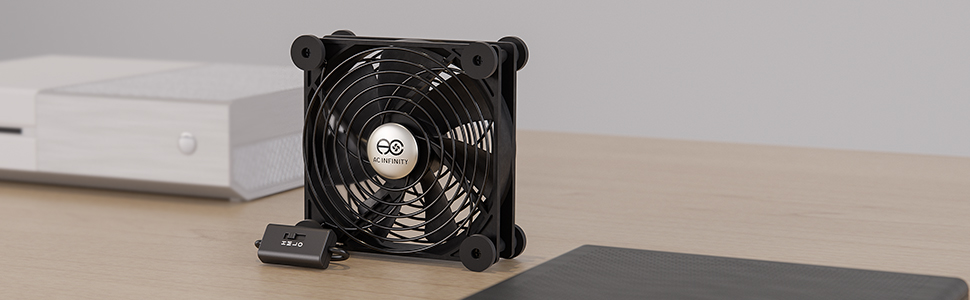
Figure 1: The AC Infinity MULTIFAN S5 is designed to quietly cool various electronics such as Xboxes, PlayStations, Roku devices, Apple TVs, receivers, modems, routers, DVRs, and computers.
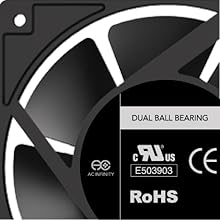
Figure 2: Silicone feet are included to absorb noise and reduce vibrations, ensuring stable placement and quiet operation. These feet can be removed to reduce the fan's overall height.
Video 1: This video provides an unboxing and initial overview of the AC Infinity MULTIFAN S5, demonstrating its components and basic functionality.
Video 2: Watch this video to see how the AC Infinity MULTIFAN S5 can be effectively used to cool a NAS or home server, highlighting its quiet operation and efficient airflow.
Operating Instructions
The MULTIFAN S5 features a convenient multi-speed controller to manage fan performance:
- Speed Settings: Use the switch on the controller to select between High (H), Medium (M), Low (L), or Off (O). Adjust the speed based on your cooling requirements and desired noise level.
- Airflow Direction: The fans can be oriented to either push air away from a device (exhaust) or pull air towards it (intake). Experiment with placement and orientation to achieve the most effective cooling for your specific setup.
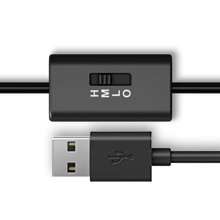
Figure 3: The integrated multi-speed controller allows adjustment of fan speed to High, Medium, Low, or Off, balancing airflow and noise levels.
Maintenance
To ensure optimal performance and extend the lifespan of your MULTIFAN S5, regular maintenance is recommended:
- Cleaning: Periodically clean the fan blades and grilles to prevent dust buildup, which can reduce airflow and efficiency. Use a soft cloth or compressed air.
- Inspection: Check the USB cable and connections for any signs of wear or damage.
Troubleshooting
If you encounter issues with your MULTIFAN S5, try the following troubleshooting steps:
- Fan Not Turning On: Ensure the USB cable is securely plugged into a powered USB port. Check the speed controller switch is not in the 'Off' position. Try a different USB port or power adapter.
- Low Airflow: Verify the fan speed is set to 'High' or 'Medium'. Check for any obstructions blocking the fan blades or grilles. Clean any dust buildup.
- Excessive Noise: Ensure the silicone rubber feet are properly installed to absorb vibrations. Adjust the fan speed to 'Low' or 'Medium' if high speed is not critical.
Specifications
| Specification | Detail |
|---|---|
| Product Dimensions | 3.2"L x 1"W x 3.2"H (per fan) |
| Brand | AC Infinity |
| Power Connector Type | USB |
| Voltage | 7.2 Volts |
| Wattage | 1.1 watts |
| Cooling Method | Air |
| Compatible Devices | Amplifier, Receiver, DVR, PlayStation, Xbox, Computer Cabinet |
| Noise Level | 18 Decibels |
| Material | Rubber (feet), Metal (grilles) |
| Maximum Rotational Speed | 2.8 RPM (Note: This value seems unusually low for a fan, typically RPMs are much higher. Please refer to product packaging for exact fan RPM if critical.) |
| Air Flow Capacity | 52 Cubic Feet Per Minute (CFM) |
| Bearings | Dual Ball |
| Lifespan | 67,000 hours |
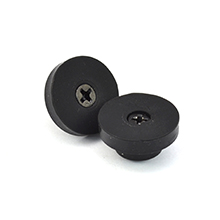
Figure 4: Each fan measures 3.2 x 3.2 x 1 inches. The USB plug can power the fan from standard USB ports, and an additional USB port allows for daisy-chaining up to four fans.

Figure 5: Each fan utilizes a PWM-motor for ultra-quiet operation and high airflow. Dual-ball bearings ensure a long lifespan of 67,000 hours and allow horizontal or vertical positioning.
Warranty and Support
AC Infinity products are designed for quality and reliability. For specific warranty information or technical support, please refer to the warranty card included with your product or visit the official AC Infinity website. You may also contact AC Infinity customer service for assistance with any product-related inquiries.


