
1. Introduction
Thank you for choosing the Zumex Essential Pro Citrus Juicer. This professional-grade juicer is designed for efficient and reliable citrus juice extraction in commercial settings. Please read this manual thoroughly before operating the appliance to ensure safe and correct usage, and to maximize its performance and lifespan.
2. Safety Instructions
Important: Always follow basic safety precautions when using electrical appliances to reduce the risk of fire, electric shock, and injury.
- Read all instructions before use.
- Ensure the power supply matches the voltage specified on the appliance.
- Do not immerse the motor unit, cord, or plug in water or other liquids.
- Unplug from the outlet when not in use, before assembling or disassembling parts, and before cleaning.
- Keep hands and utensils away from moving parts during operation to prevent injury.
- Do not operate any appliance with a damaged cord or plug, or after the appliance malfunctions or has been damaged in any manner.
- Use only attachments recommended or sold by the manufacturer.
- This appliance is not intended for use by persons (including children) with reduced physical, sensory, or mental capabilities, or lack of experience and knowledge, unless they have been given supervision or instruction concerning use of the appliance by a person responsible for their safety.
- Do not use outdoors.
- Do not let the cord hang over the edge of a table or counter, or touch hot surfaces.
3. Product Overview
The Zumex Essential Pro is a robust citrus juicer featuring an integrated high-capacity feeder and an intuitive digital display. Familiarize yourself with the main components before operation.
Key Components:
- Feeder Basket: Holds multiple citrus fruits for continuous juicing.
- Juicing Mechanism: Internal components that cut and press the fruit.
- Control Panel: Digital display with 'Touch Control' for operation and settings.
- Juice Spout: Where the extracted juice is dispensed.
- Waste Bins: Collects the squeezed fruit peels.
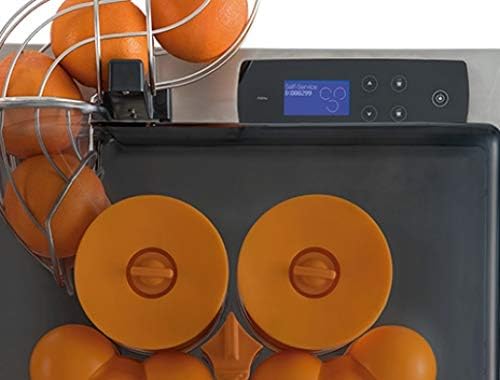
Image: Top view of the juicer, highlighting the feeder basket, juicing cones, and the digital control panel.
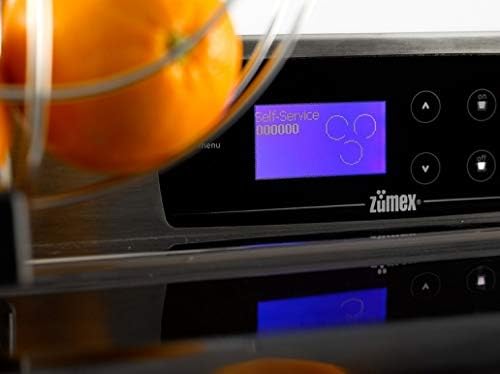
Image: Detailed view of the 'Touch Control' digital display, showing operational status and fruit count.
4. Setup
Before first use, ensure all packaging materials are removed and the juicer is placed on a stable, level surface.
- Unpack: Carefully remove the juicer from its packaging. Retain packaging for future transport if needed.
- Position: Place the juicer on a sturdy, flat, and dry countertop or table. Ensure there is adequate space around the unit for ventilation and operation.
- Assemble Components: Ensure all removable parts, such as the feeder basket, juicing cones, and waste bins, are correctly installed according to the assembly diagrams (refer to product diagrams if available).
- Connect Power: Plug the power cord into a grounded electrical outlet.
- Initial Cleaning: Before first use, clean all parts that will come into contact with fruit or juice. Refer to the 'Cleaning and Maintenance' section for detailed instructions.

Image: The feeder basket, designed to hold multiple oranges, ready for juicing.
5. Operating Instructions
The Zumex Essential Pro is designed for intuitive operation. Follow these steps to extract fresh citrus juice.
- Prepare Fruit: Use fresh, firm citrus fruits (oranges, lemons, limes, grapefruits). Wash the fruits thoroughly. The juicer is optimized for citrus fruits as indicated in its specifications.
- Load Feeder: Place the prepared fruits into the high-capacity feeder basket. The juicer can hold 4-5 fruits at a time.
- Power On: Ensure the juicer is plugged in. Use the 'Touch Control' digital display to power on the unit.
- Select Mode (if applicable): The 'Touch Control' display may offer various settings or modes. Refer to the on-screen prompts for options like 'Self-Service' or specific juicing programs.
- Start Juicing: The juicer will automatically begin processing the fruits from the feeder. For models with a 'PRESS' button, activate the juicing cycle as indicated.
- Collect Juice: Position a container under the juice spout to collect the fresh juice.
- Monitor Waste: The juicer automatically separates pulp and peels into designated waste bins. Monitor these bins and empty them as they fill to prevent blockages.
- Finish Juicing: Once all fruits are processed or you have enough juice, turn off the juicer using the control panel.

Image: The 'PRESS' button, used to initiate or control the juicing process.
6. Cleaning and Maintenance
Regular cleaning and maintenance are crucial for the hygiene, performance, and longevity of your Zumex Essential Pro juicer. Note: The manufacturer states this item is NOT dishwasher safe.
- Unplug: Always unplug the juicer from the power outlet before cleaning or performing any maintenance.
- Disassemble: Carefully disassemble all removable parts: feeder basket, juicing cones, juice collection tray, and waste bins.
- Rinse: Rinse all removable parts under warm running water to remove large pulp and peel residues.
- Wash: Hand wash all removable parts using a mild detergent and a soft brush or sponge. Pay special attention to areas where pulp can accumulate.
- Clean Main Unit: Wipe the main motor unit and exterior surfaces with a damp cloth. Do not use abrasive cleaners or immerse the main unit in water.
- Dry: Ensure all parts are thoroughly dried before reassembling or storing the juicer. Air drying is recommended.
- Reassemble: Reassemble the juicer components, ensuring they are correctly fitted.
7. Troubleshooting
If you encounter issues with your Zumex Essential Pro juicer, refer to the following common problems and solutions.
- Juicer does not turn on:
- Check if the power cord is securely plugged into a working outlet.
- Ensure all safety switches and covers are correctly closed and engaged.
- Poor juice extraction or excessive pulp:
- Ensure you are using fresh, firm citrus fruits. Overripe or soft fruits may yield less juice.
- Check if the juicing components are clean and free from blockages.
- Unusual noise during operation:
- Turn off and unplug the juicer. Check for any foreign objects or fruit pieces lodged in the juicing mechanism.
- Ensure all parts are correctly assembled.
- Digital display not responding:
- Try unplugging the unit for a few minutes and then plugging it back in to reset the system.
- Ensure the control panel is clean and dry.
If the problem persists after attempting these solutions, please contact Zumex customer support.
8. Specifications
| Feature | Specification |
|---|---|
| Brand | Zumex |
| Model | Essential Pro |
| Material | Stainless Steel |
| Finish Type | Painted |
| Special Feature | Portable |
| Wattage | 150 watts |
| Power Source | Corded Electric |
| Controller Type | Touch Screen |
| Recommended Uses | Citrus Fruits |
| Capacity | 0.6 Liters |
| Dishwasher Safe | No |
9. Warranty and Support
For warranty information, technical support, or service inquiries, please contact Zumex customer service directly. Keep your purchase receipt and product serial number handy when contacting support.
Zumex Contact Information:
Please refer to the official Zumex website or your purchase documentation for the most current contact details.