
1. Introduction
Thank you for purchasing the Hotone Nano Legacy Purple Wind 5-Watt Compact Guitar Amp Head. This ultra-compact amplifier head is designed to deliver premium guitar tones, inspired by the legendary Marshall Plexi Super Lead 1959, in a portable format. This manual provides essential information for safe and effective use of your amplifier.
2. Safety Information
- Power Source: Use only the specified power adapter (18V DC, center negative).
- Ventilation: Ensure proper ventilation to prevent overheating. Do not block ventilation openings.
- Moisture: Do not expose the unit to rain, moisture, or excessive humidity.
- Handling: Handle with care. Avoid dropping or subjecting the unit to strong impacts.
- Servicing: Do not attempt to service this unit yourself. Refer all servicing to qualified personnel.
- Speaker Connection: Always connect the amplifier to a speaker cabinet with the correct impedance (4-16Ω) before powering on to prevent damage.
3. Product Overview
The Hotone Nano Legacy Purple Wind is a compact 5-watt guitar amplifier head featuring a 3-band EQ and an FX loop. Its design is inspired by classic British rock tones.
Front Panel Controls

- INPUT: 1/4" mono jack to plug in your guitar.
- BASS: Controls the low frequency response.
- MIDDLE: Controls the mid frequency response.
- TREBLE: Controls the high frequency response.
- GAIN: Controls the gain level.
- VOLUME: Controls the output volume.
- ON/OFF Switch: Powers the unit on or off.
Rear Panel Connections
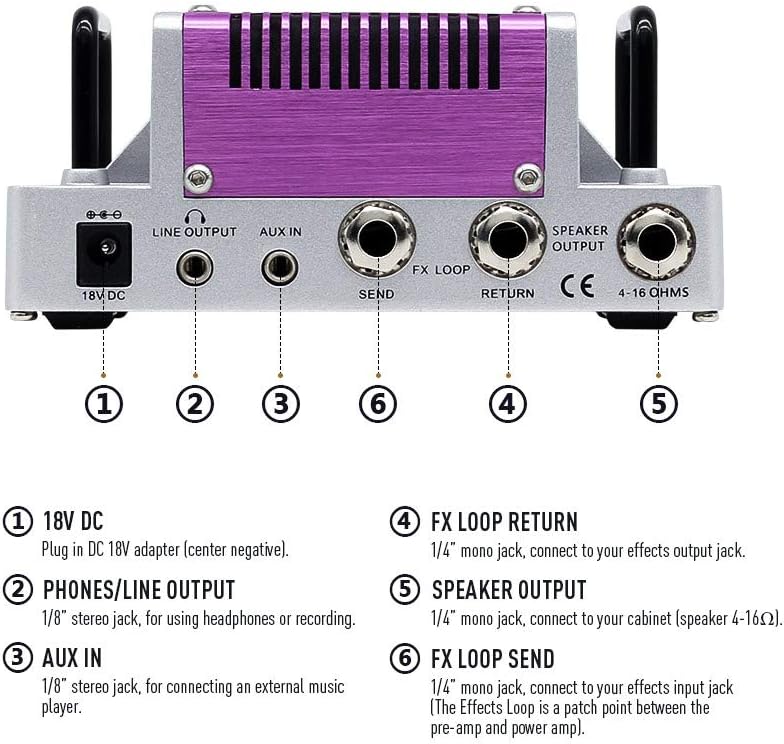
- 18V DC: Plug in DC 18V adapter (center negative).
- PHONES/LINE OUTPUT: 1/8" stereo jack, for using headphones or recording.
- AUX IN: 1/8" stereo jack, for connecting an external music player.
- FX LOOP RETURN: 1/4" mono jack, connect to your effects output jack.
- SPEAKER OUTPUT: 1/4" mono jack, connect to your cabinet (speaker 4-16Ω).
- FX LOOP SEND: 1/4" mono jack, connect to your effects input jack (The Effects Loop is a patch point between the pre-amp and power amp).
4. Setup
- Connect Speaker Cabinet: Before powering on, connect a speaker cabinet (4-16Ω impedance) to the SPEAKER OUTPUT jack on the rear panel using a 1/4" mono speaker cable. Failure to connect a speaker cabinet before powering on can damage the amplifier.
- Connect Power: Plug the included 18V DC power adapter into the 18V DC input on the rear panel, then plug the adapter into a suitable power outlet.
- Connect Guitar: Plug your guitar into the INPUT jack on the front panel using a 1/4" mono instrument cable.
- Initial Settings: Turn the VOLUME and GAIN knobs to their minimum (counter-clockwise) positions before powering on.
- Power On: Flip the ON/OFF switch to the 'ON' position. The indicator light will illuminate.
5. Operating Instructions
- Adjusting Tone: Use the BASS, MIDDLE, and TREBLE knobs to shape your desired tonal characteristics. Experiment with different settings to find your preferred sound.
- Adjusting Gain: The GAIN knob controls the amount of overdrive and distortion. Turn clockwise for more aggressive tones.
- Adjusting Volume: The VOLUME knob controls the overall output level of the amplifier. Adjust to your desired listening level.
- Using the FX Loop: Connect external effects pedals between the FX LOOP SEND and FX LOOP RETURN jacks to integrate them into your signal chain after the preamp section.
- Headphone/Line Out: For silent practice or direct recording, connect headphones or a line-level device to the PHONES/LINE OUTPUT. This output includes speaker cabinet simulation.
- AUX IN: Connect an external audio source (e.g., MP3 player, smartphone) to the AUX IN jack to play along with backing tracks.
6. Maintenance
- Cleaning: Use a soft, dry cloth to clean the amplifier's exterior. Do not use liquid cleaners or solvents.
- Storage: Store the amplifier in a dry, cool place away from direct sunlight and extreme temperatures.
- Tube Care: As a hybrid amplifier, the preamp tube may eventually need replacement. If you notice a significant change in tone or performance, consult a qualified technician.
7. Troubleshooting
| Problem | Possible Cause | Solution |
|---|---|---|
| No sound | Power not connected, speaker not connected, volume/gain too low, faulty cable. | Check power connection, ensure speaker is connected, increase volume/gain, test with different cables. |
| Weak or distorted sound | Faulty cable, incorrect impedance, worn preamp tube. | Test cables, ensure correct speaker impedance, consult technician for tube replacement. |
| Excessive hum/noise | Ground loop, faulty power supply, interference from other electronics. | Try different power outlets, use a power conditioner, move away from other electronic devices. |
8. Specifications
- Output Wattage: 5 Watts
- Power Source: Corded Electric (18V DC, center negative)
- Item Weight: 15.5 ounces
- Product Dimensions: 2.34 x 5.03 x 2.95 inches
- Compatible Devices: Guitar
- Connector Type: 6.35mm Jack (Input, Speaker Output, FX Loop Send/Return), 3.5mm Jack (Phones/Line Out, AUX IN)
- Speaker Impedance: 4-16 Ohms
- Model Number: TANLA2
9. Product Videos
OriPure 5W Tube Guitar Amplifier Head
Video Description: This video showcases the OriPure 5W Tube Guitar Amplifier Head, demonstrating its features and sound. It highlights the tube components and various controls, providing an overview of its performance capabilities.
The Joyo Jackman II Is Like A Tiny Marshall JCM 800.
Video Description: This video provides a detailed review and demonstration of the Joyo Jackman II amplifier head, comparing its sound characteristics to a Marshall JCM 800. It covers clean and dirty tones, control adjustments, and overall performance.
OriPure 15W Tube Guitar Amplifier Head OA-H15
Video Description: This video demonstrates the OriPure 15W Tube Guitar Amplifier Head (Model OA-H15), showcasing its sound quality and features. It includes various guitar riffs and tone adjustments to illustrate its versatility.
JOYO Meteor II BanTamp XL Series Mini Amp Head 20 Watt
Video Description: This video presents the JOYO Meteor II BanTamp XL Series Mini Amp Head, a 20-watt hybrid tube amplifier. It demonstrates the amplifier's clean and overdrive channels, tone controls, and built-in Bluetooth functionality for playing backing tracks.
Valeton Guitar Amplifier Head TAR-20G Amp Pedal Platform Studio Desktop with CAB SIM
Video Description: This video showcases the Valeton Guitar Amplifier Head TAR-20G, highlighting its features as an amp pedal platform and desktop studio amplifier with built-in cab simulation. It demonstrates various tones and connectivity options.
JOYO 20W Amplifier Head BanTamP Series ATOMIC
Video Description: This video features the JOYO 20W Amplifier Head from the BanTamP Series, specifically the ATOMIC model. It demonstrates the amplifier's sound characteristics and features, designed for AC lovers.
10. Warranty and Support
For warranty information and technical support, please refer to the official Hotone website or contact your authorized dealer. Keep your purchase receipt as proof of purchase.


