Introduction
Thank you for choosing the MVMT Classic Men's 45 MM Analog Black Tan Watch. This manual provides essential information for the proper setup, operation, and maintenance of your timepiece. Please read it thoroughly to ensure optimal performance and longevity of your watch.
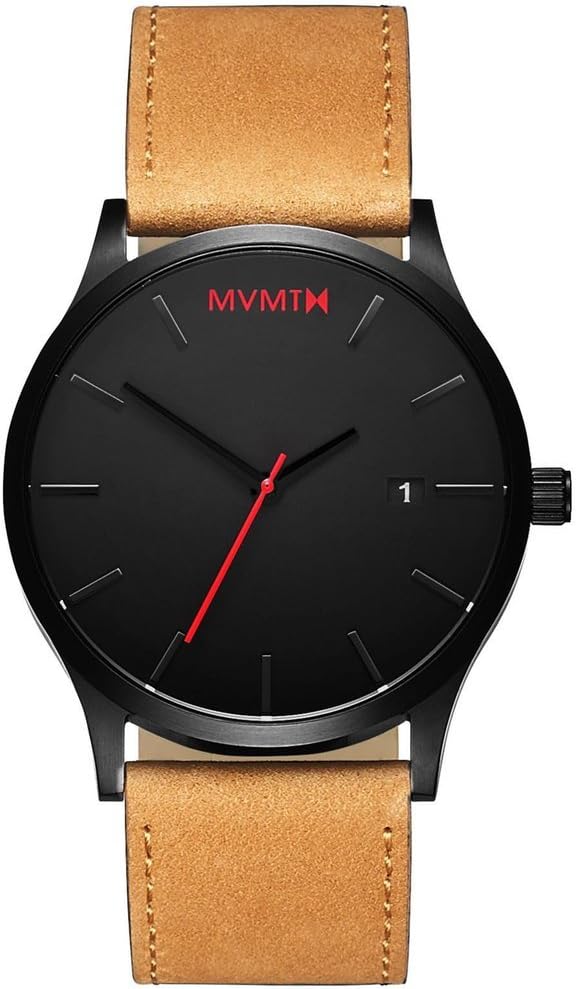
Front view of the MVMT Classic watch, showcasing its minimalist black dial and tan leather strap.
Setup
Setting the Time
- Gently pull the crown (the small knob on the side of the watch) out to the second click position.
- Rotate the crown clockwise or counter-clockwise to set the hour and minute hands to the desired time.
- Once the time is set, push the crown back in completely to its original position. The second hand will begin to move, indicating the watch is running.
Setting the Date
- Gently pull the crown out to the first click position.
- Rotate the crown clockwise to advance the date. If the date changes around noon, it means the watch is set to PM. Continue rotating past 12 to set the correct AM/PM.
- Once the date is set, push the crown back in completely to its original position.

Angled view of the watch, highlighting the crown used for time and date adjustments.
Operation
Your MVMT Classic watch features a simple analog display with hour, minute, and second hands, along with a date window. The watch is powered by a reliable Miyota Quartz movement, ensuring accurate timekeeping.
Reading the Time and Date
- The longer, thicker hand indicates the hour.
- The longer, thinner hand indicates the minute.
- The red, sweeping hand indicates the seconds.
- The small window on the right side of the dial displays the current date.
An official MVMT video showcasing the watch from various angles, demonstrating its design and features.
Maintenance
Water Resistance
Your MVMT Classic watch is water resistant up to 3 ATM (30 meters / 100 feet). This rating means the watch is suitable for everyday use and can withstand splashes, rain, or brief immersion in water. It is not suitable for showering, swimming, diving, or any activities involving prolonged water exposure. Avoid operating the crown while the watch is wet.
Cleaning Your Watch
- Case and Crystal: Wipe the watch case and mineral crystal with a soft, damp cloth. Avoid using harsh chemicals or abrasive materials.
- Leather Strap: The tan leather strap is durable but can be sensitive to excessive moisture. Clean with a dry, soft cloth. For stains, use a specialized leather cleaner sparingly and follow its instructions. Allow the strap to air dry completely.
Battery Replacement
The watch uses a Lithium Ion battery. When the second hand begins to skip or the watch stops running, it indicates a low battery. Battery replacement should be performed by a qualified watch technician to ensure proper sealing and water resistance integrity.

The stainless steel caseback of the watch, indicating water resistance and material.
Troubleshooting
- Watch Not Running: Ensure the crown is fully pushed in. If it still doesn't run, the battery may need replacement.
- Time is Inaccurate: Check if the crown is fully pushed in. If the watch is consistently losing or gaining time, the battery may be low, or the movement may require servicing.
- Date Not Changing: Ensure the time is set correctly for AM/PM. The date typically changes around midnight. If it changes at noon, adjust the time by advancing the hour hand by 12 hours.
For issues not covered here, please refer to the warranty and support section for assistance.
Specifications
| Feature | Detail |
|---|---|
| Model Number | L213.5L.351 |
| Movement | 3-hand Miyota Quartz with date function |
| Case Diameter | 45 MM |
| Case Material | Stainless Steel |
| Crystal Material | Hardened Mineral Crystal |
| Strap Material | Leather |
| Water Resistance | 3 ATM (30 Meters / 100 Feet) |
| Battery Type | Lithium Ion (included) |
| Package Dimensions | 5.71 x 4.21 x 3.43 inches |
| Item Weight | 8.47 ounces |

The MVMT Classic watch worn on a wrist, demonstrating its size and aesthetic.
Warranty and Support
Two-Year Guarantee
MVMT offers a two-year guarantee on this product from the date of purchase. This warranty covers manufacturing defects in materials and workmanship under normal use. It does not cover damage resulting from improper handling, accidents, unauthorized repairs, or normal wear and tear (e.g., battery, strap, crystal damage).
Customer Support
For warranty claims, technical assistance, or any questions regarding your MVMT watch, please visit the official MVMT website or contact their customer service department. Please have your proof of purchase and model number (L213.5L.351) ready when contacting support.

The MVMT watch comes in a sleek black box, ensuring protection during transit and providing a premium unboxing experience.


