
1. Product Overview
The Monoprice Stage and Studio Patch Cable (Model 601297) is an 8-channel audio snake cable designed for connecting professional audio equipment. It features 1/4-inch TRS male connectors on one end and XLR male connectors on the other, allowing for versatile connections between devices with different jack types. Each channel is color-coded for easy identification and setup.

Image 1: Monoprice 8-channel Stage and Studio Patch Cable, coiled, displaying both 1/4-inch TRS and XLR male connectors.
2. Key Features
- 8-Channel Design: Connects up to eight individual audio signals.
- Connector Versatility: Features 1/4-inch TRS male plugs on one end and XLR male plugs on the other.
- Color-Coded Wires: Each of the eight lines is color-coded (red, white, green, yellow, black, blue, gray, brown) for easy channel identification.
- High-Quality Conductors: Constructed with 26 AWG conductors for reliable signal transmission.
- Aluminum Foil Shielding: Provides protection against electromagnetic (EM) and radio frequency (RF) interference, ensuring clear audio.
- Balanced/Unbalanced Support: Supports both balanced mono and unbalanced stereo lines.
3. Setup Instructions
This cable is designed for straightforward connection between audio devices. Follow these steps for proper setup:
- Identify Connectors: Locate the 1/4-inch TRS male plugs and the XLR male plugs on the cable.
- Connect TRS Ends: Insert the 1/4-inch TRS male plugs into the corresponding 1/4-inch TRS input/output jacks on your equipment (e.g., audio interface, mixer, patch bay). Ensure each color-coded cable matches the intended channel.
- Connect XLR Ends: Insert the XLR male plugs into the corresponding XLR input/output jacks on your other audio equipment (e.g., microphones, preamps, powered speakers). Again, match the color-coded cables to maintain channel integrity.
- Secure Connections: Ensure all connections are firm and fully seated to prevent signal loss or intermittent audio.
- Cable Management: Route the cable neatly to avoid tripping hazards and reduce strain on the connectors.
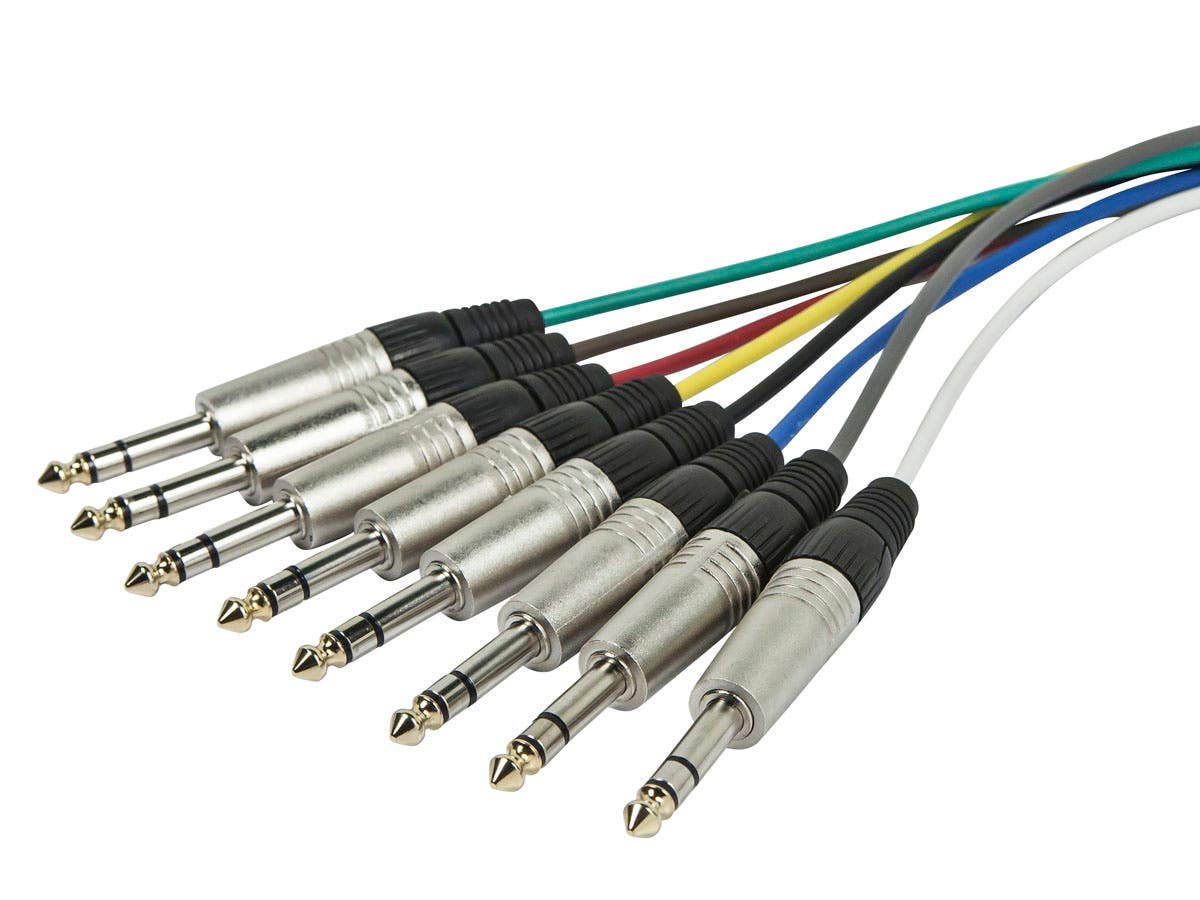
Image 2: Detailed view of the 1/4-inch TRS male connectors, showing their individual color-coded cables.

Image 3: Detailed view of the XLR male connectors, each connected to a color-coded cable.
4. Operating Instructions
Once the cable is properly connected, it facilitates the transmission of audio signals between your devices. This cable is suitable for various professional audio applications:
- Audio Recording Sessions: Connect microphones, instruments, or other audio sources to recording interfaces or mixers.
- Live Stage Performances: Route multiple audio signals from stage equipment to a front-of-house mixer.
- Studio Production Work: Integrate various studio components, such as preamps, compressors, and effects units.
The aluminum foil shielding helps maintain signal integrity by protecting against external interference, which is crucial in environments with multiple electronic devices.
5. Maintenance
Proper care and maintenance will extend the life of your Monoprice Stage and Studio Patch Cable:
- Storage: When not in use, coil the cable loosely. Avoid tight coiling or sharp bends, which can damage the internal conductors and shielding.
- Cleaning: Keep connectors free of dust and debris. Use a dry, lint-free cloth to wipe down the cable and connectors. Avoid using liquid cleaners directly on the connectors.
- Inspection: Periodically inspect the cable for any signs of wear, cuts, or damage to the jacket or connectors.
- Environmental Conditions: This cable is suitable for both indoor and outdoor use. However, avoid prolonged exposure to extreme temperatures or moisture.
6. Troubleshooting
If you encounter issues with your patch cable, consider the following troubleshooting steps:
- No Signal:
- Ensure all connectors are fully seated in their respective jacks.
- Verify that the correct input/output channels are selected on your audio equipment.
- Test the cable with different equipment or use a known working cable to isolate the issue.
- Intermittent Signal:
- Check for loose connections at both ends of the cable.
- Inspect the cable for any visible damage or kinks that might be causing internal breaks.
- Hum or Noise:
- Ensure the cable is not running parallel to power cables or other sources of electromagnetic interference.
- Verify that all equipment in the signal chain is properly grounded.
- Confirm that you are using balanced connections where appropriate, as TRS and XLR connectors support balanced signals which are less susceptible to noise.
7. Specifications
| Feature | Detail |
|---|---|
| Brand | Monoprice |
| Model Number | 601297 |
| Item Type Name | Stage And Studio Patch Cable |
| Cable Length | 10 Feet |
| Number of Channels | 8 |
| Connector Type (End 1) | 1/4-inch TRS Male |
| Connector Type (End 2) | XLR Male |
| Connector Gender | Male-to-Male |
| Wire Gauge | 26 AWG |
| Shielding | Aluminum Foil |
| Recommended Uses | Audio recording sessions, live stage performances, studio production work |
| Indoor/Outdoor Usage | Indoor, Outdoor |
| Item Weight | 2.7 Pounds |
8. Warranty and Support
Monoprice offers a Lifetime Warranty on all cables, including this Stage and Studio Patch Cable. This warranty ensures that Monoprice stands behind the quality and durability of its products.
For technical support, warranty claims, or further assistance, please visit the official Monoprice website or contact their customer service department directly. Refer to your purchase documentation for specific contact details.

