
Introduction
Thank you for choosing the Calor FV9960C0 Freemove Cordless Steam Iron. This appliance is designed to provide efficient and comfortable ironing with its cordless design and powerful steam features. This manual provides essential information for safe and effective use, setup, operation, maintenance, and troubleshooting.
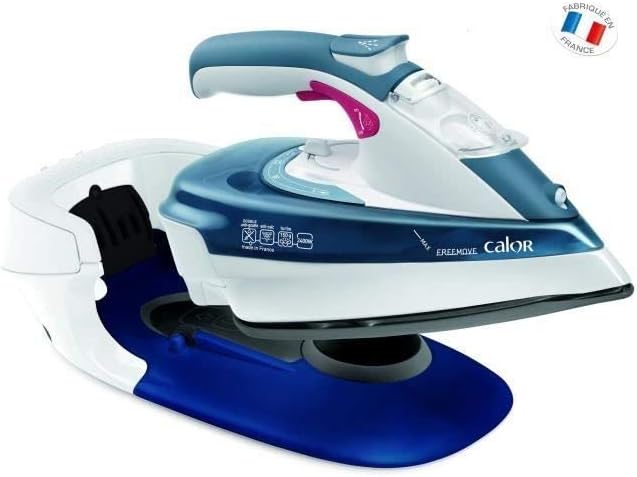
Image: The Calor FV9960C0 Freemove Cordless Steam Iron resting on its charging base, ready for use.
Important Safety Instructions
Please read all instructions carefully before using the iron and retain them for future reference. Failure to follow these instructions may result in electric shock, fire, or serious injury.
- Always ensure the voltage indicated on the iron matches your mains supply voltage.
- Do not leave the iron unattended while it is switched on or connected to the mains.
- Keep the iron and its cord out of reach of children.
- Never immerse the iron, its base, or the power cord in water or any other liquid.
- Unplug the iron from the power outlet before filling with water, cleaning, or when not in use.
- Do not operate the iron if it has been dropped, if there are visible signs of damage, or if it is leaking. Contact an authorized service center.
- Use the iron only for its intended purpose: ironing clothes and textiles.
- The soleplate of the iron can become extremely hot and cause burns. Avoid direct contact.
- Place the iron on a stable, heat-resistant surface when resting.
Setup
1. Unpacking
Carefully remove the iron and all accessories from the packaging. Retain the packaging for storage or transport if needed. Check for any damage.
2. Positioning the Charging Base
Place the charging base on a stable, flat, and heat-resistant surface, such as an ironing board. Ensure the power cord is fully extended and not tangled. The base can be secured to the ironing board using the provided clamp for added stability.
3. Filling the Water Tank
- Ensure the iron is unplugged from the mains.
- Open the water filler cap located on the top of the iron.
- Using a measuring cup, carefully pour tap water into the water tank up to the 'MAX' level indicator. Do not overfill.
- Close the water filler cap securely.

Image: A close-up view of the iron's water tank being filled with water through the designated opening.
4. First Use Preparation
Before the first use, or after a long period of storage, it is recommended to iron an old piece of fabric to remove any manufacturing residues from the soleplate. This prevents staining your garments.
Operating Instructions
1. Powering On and Heating
- Plug the charging base into a suitable power outlet (220V).
- Place the iron onto the charging base. The indicator light on the base will illuminate, signaling that the iron is heating.
- Wait for the indicator light to become steady, indicating the iron has reached the desired temperature. This usually takes a few seconds due to the 2400W power.
2. Temperature and Steam Selection (Auto Steam)
The FV9960C0 features an auto steam function. Simply select the fabric type on the thermostat dial (e.g., silk, wool, cotton, linen). The iron will automatically adjust the temperature and steam output (continuous steam of 35 g/min) suitable for the chosen fabric.
3. Cordless Ironing
Once heated, lift the iron from its base. You now have complete freedom of movement for ironing. When you need to adjust your garment or pause, simply return the iron to its base for reheating. The base will beep to indicate when the iron needs to be recharged.

Image: The cordless iron in action, demonstrating its freedom of movement above a stack of ironed shirts.
4. Steam Boost Function
For stubborn creases, press the steam boost button (typically located under the handle or on top). This delivers an extra burst of steam up to 150 g/min for effective wrinkle removal.
5. Anti-Drip System
The anti-drip system prevents water from leaking from the soleplate when ironing at low temperatures, protecting delicate fabrics from water stains.
6. Automatic Shut-off
For safety and energy saving, the iron is equipped with an automatic shut-off feature. If left unattended on its base for a certain period, it will automatically turn off.
Maintenance
1. After Each Use
- Unplug the iron from the mains and allow it to cool down completely.
- Empty any remaining water from the tank.
2. Cleaning the Soleplate
The Durilium soleplate is designed for durability and easy cleaning. If necessary, clean the soleplate with a damp cloth and a non-abrasive cleaner specifically designed for iron soleplates. Do not use abrasive pads or metallic scourers.
3. Anti-Calc System
The iron features an anti-calc system to reduce limescale buildup. For optimal performance, regularly perform the self-cleaning function as described in the full product manual (if available) or by following general descaling procedures for steam irons. This typically involves filling the tank with water, heating the iron, and then pressing a self-clean button to flush out mineral deposits.
4. Storage
Once the iron is cool and empty, store it vertically on its base in a safe, dry place, out of reach of children.
Troubleshooting
- Iron not heating: Ensure the charging base is securely plugged into a working power outlet and the iron is correctly placed on the base. Check the power indicator light.
- No steam or insufficient steam: Check if the water tank is filled. Ensure the temperature setting is appropriate for steam generation (steam function typically requires higher temperatures). The iron must be sufficiently hot.
- Water leaking from soleplate: This may occur if the temperature is too low for steam ironing. Increase the temperature setting. The anti-drip system should prevent this at lower temperatures, but extreme low settings might still cause minor drips.
- White flakes coming from soleplate: This indicates limescale buildup. Perform the anti-calc or self-cleaning procedure.
- Iron beeps frequently: This is normal for a cordless iron, indicating it needs to be returned to the base for reheating to maintain optimal temperature.
If problems persist, consult the full product manual or contact Calor customer support.
Specifications
- Model Number: FV9960C0
- Power: 2400 Watts
- Voltage: 220 Volts
- Continuous Steam Output: 35 g/min
- Steam Boost: Up to 150 g/min
- Soleplate Material: Durilium (Metal)
- Special Features: Cordless, Automatic Shut-off, Anti-Drip, Anti-Calc
- Product Dimensions (L x W x H): 36.2 x 23 x 18.6 cm
- Item Weight: 1.8 Kilograms
- Color: Blue
- Manufacturer: Calor
- Manufacturing Year: 2016
- International Article Number (EAN/UPC): 03121040050088
Warranty and Support
This Calor product is covered by a manufacturer's warranty. Please refer to the warranty card included with your purchase for specific terms and conditions, including the warranty period and coverage details. For technical assistance, spare parts, or service, please contact your local Calor customer service center or visit the official Calor website. Keep your proof of purchase for warranty claims.
Online Support: www.calor.fr (Please note: website may vary by region)