
1. Introduction
This manual provides instructions for the proper use, maintenance, and care of your Wera 056490 Tool-Check Plus Bit Ratchet Set. This comprehensive set is designed for a wide range of fastening applications, offering versatility and precision in a compact format. It includes a bit ratchet, bit holder, various bits, and sockets, all organized for easy access.
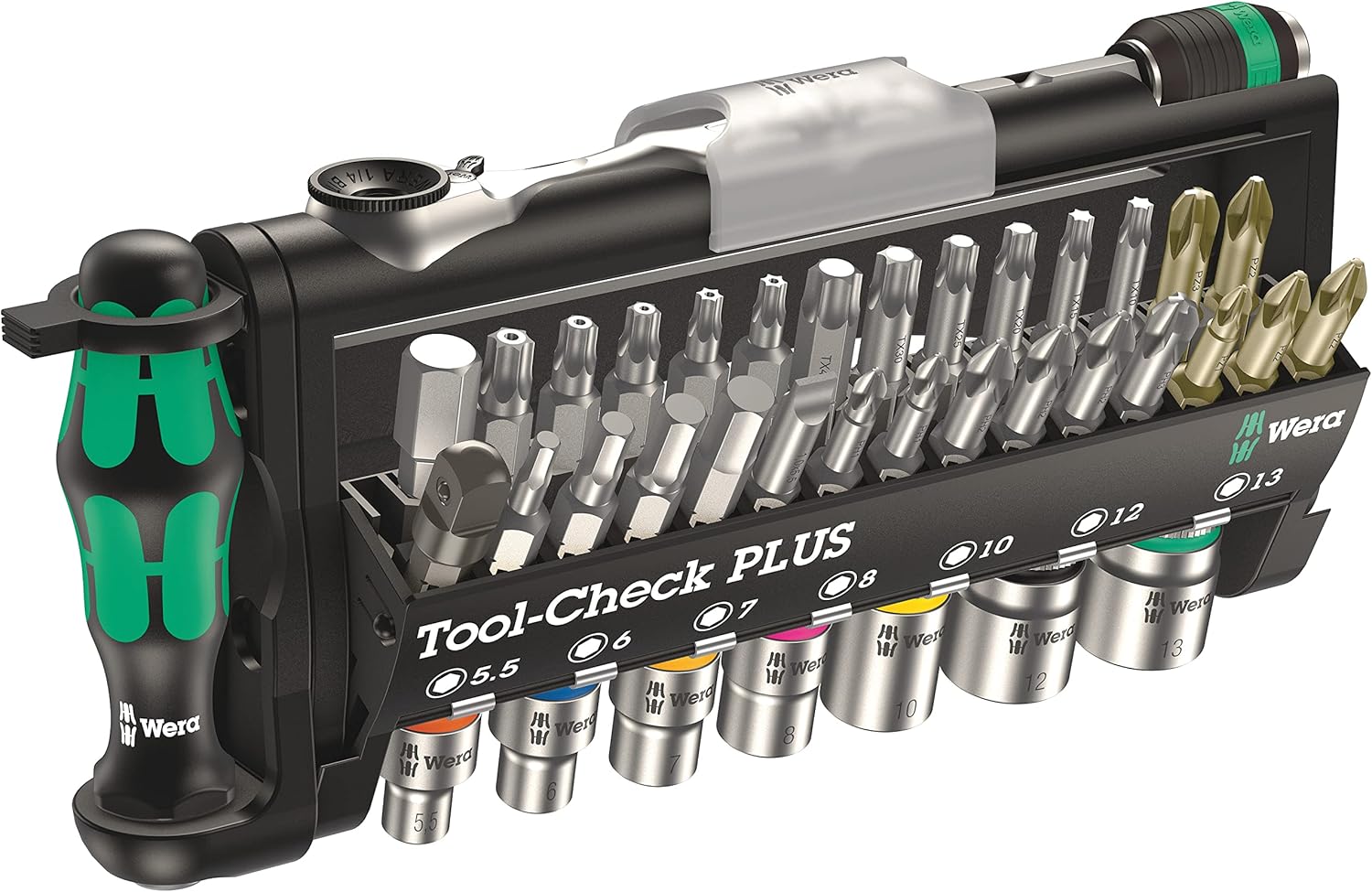
Image 1: The complete Wera Tool-Check Plus Bit Ratchet Set with Sockets.
2. Components Overview
The Wera Tool-Check Plus set includes 39 pieces, meticulously organized within a durable case. Key components are:
- Bit Ratchet: A fine-tooth ratchet for precise fastening in confined spaces.
- Bit Holder: A magnetic bit holder for secure bit retention.
- Bits: A variety of screwdriver bits (Phillips, Pozidriv, Torx, Hex, Slotted) in different sizes.
- Sockets: Metric sockets ranging from 5.5mm to 13mm.
- Adaptor: For connecting sockets to the bit holder or ratchet.

Image 2: Front view of the Wera Tool-Check Plus set, displaying the various bits, sockets, and the ratchet.
3. Setup and Assembly
The Tool-Check Plus is designed for quick and easy assembly of its components for various tasks.
- Selecting a Bit: Open the bit holder section of the case. Select the required bit type and size.
- Attaching to Bit Holder: Insert the selected bit into the magnetic bit holder. Ensure it is seated firmly.
- Using with Ratchet: The bit holder can be directly inserted into the bit ratchet for use in tight spaces. Alternatively, the bit holder can be used with the main screwdriver handle for more leverage.
- Using Sockets: Select the appropriate metric socket. Attach it to the adaptor, then connect the adaptor to the bit ratchet or screwdriver handle.

Image 3: Close-up view of the bit holder and screwdriver handle, demonstrating how bits are attached.
4. Operating Instructions
The Tool-Check Plus offers multiple configurations for optimal performance in various situations.
4.1 Using the Bit Ratchet
The bit ratchet is ideal for working in confined areas where a standard screwdriver or larger ratchet cannot fit. Its fine-tooth mechanism allows for small return angles, enabling efficient fastening with minimal movement.
- Insert the desired bit directly into the ratchet head or use the bit holder for extended reach.
- To change direction (tighten/loosen), use the small lever on the ratchet head.

Image 4: The compact bit ratchet in use, demonstrating its utility in tight spaces.
4.2 Using the Screwdriver Handle
For tasks requiring more grip and leverage, attach the bit holder (with a bit inserted) to the main screwdriver handle. This provides a comfortable and ergonomic grip for sustained use.
4.3 Using Sockets
The included metric sockets can be used with the bit ratchet or the screwdriver handle via the adaptor. This allows for fastening and loosening nuts and bolts.

Image 5: A selection of metric sockets from the Wera Tool-Check Plus set.
4.4 Product Demonstration Video
Video 1: Official product demonstration of the Wera Tool-Check Plus, showcasing its features and versatility.
5. Maintenance
To ensure the longevity and optimal performance of your Wera Tool-Check Plus set, follow these maintenance guidelines:
- Cleaning: After each use, wipe down all components with a clean, dry cloth to remove dirt, grease, or debris. For stubborn grime, a mild cleaning solution can be used, followed by thorough drying.
- Lubrication: Periodically apply a small amount of light machine oil to the ratchet mechanism to ensure smooth operation. Avoid over-lubrication.
- Storage: Always store the tools in their original case in a dry environment to prevent rust and corrosion. Ensure all bits and sockets are securely placed in their designated slots.
- Inspection: Regularly inspect bits and sockets for wear, damage, or deformation. Replace any worn or damaged components to maintain safety and effectiveness.
6. Troubleshooting
If you encounter issues with your Wera Tool-Check Plus set, consider the following:
- Bits Slipping: Ensure the correct bit size and type are used for the fastener. Check the bit for wear or damage. Ensure the bit is fully seated in the bit holder or ratchet.
- Ratchet Mechanism Sticking: Clean the ratchet head and apply a small amount of lubricant as described in the maintenance section. Avoid applying excessive force if the mechanism is stiff.
- Sockets Not Gripping: Verify that the correct metric socket size is being used for the fastener. Inspect the socket for internal wear or damage.
For issues not resolved by these steps, please contact Wera customer support.
7. Specifications
| Feature | Specification |
|---|---|
| Brand | Wera |
| Model Number | 05056490001 |
| Item Weight | 1 pounds |
| Item Length | 19 Centimeters |
| Material | Blend |
| Finish Type | Brushed |
| Number of Pieces | 39 |
| Drive System | Hex |
| Head Style | Flare Nut |
| Measurement System | Inch, Metric |
| Included Components | TOOL-CHECK PLUS BITS ASSORTMENT WITH RATCHET + SOCKETS |
8. Safety Information
Always observe basic safety precautions when using hand tools:
- Wear appropriate personal protective equipment, such as safety glasses.
- Ensure the tool is in good condition before use.
- Use the correct size and type of bit/socket for the fastener to prevent damage to the fastener or tool.
- Do not use excessive force that could cause the tool to slip or break.
- Keep tools out of reach of children.
9. Warranty and Support
For warranty information, product support, or to inquire about replacement parts, please refer to the official Wera website or contact their customer service department. Keep your purchase receipt as proof of purchase.


