
Introduction
This manual provides detailed instructions for the TAMIYA Multi-Function Control Unit (MFC-03), Model 56523. This unit is designed as an accessory for 1:14 scale RC Tractor Trucks, enhancing the realism of your model with various functions.
The MFC-03 unit integrates sound, light, and vibration effects, offering a comprehensive control experience for your remote-controlled truck.
Product Overview
The TAMIYA Multi-Function Control Unit (MFC-03) is a sophisticated system that brings your RC truck to life. It includes components for realistic engine sounds, lighting effects, and chassis vibration.

Figure 1: Packaging of the TAMIYA Multi-Function Control Unit (MFC-03), illustrating the main components included in the kit.
Key Features:
- Realistic engine sounds and operational sounds.
- Integrated lighting control for headlights, taillights, turn signals, and hazard lights.
- Vibration unit for realistic chassis movement.
- Designed for 1:14 scale TAMIYA RC Tractor Trucks.
What's in the Box:
- Multi-Function Control Unit (MFC-03)
- Speaker Unit
- Vibration Unit
- Control Unit (for light and sound selection)
- Various cables and connectors for lights and power
- Mounting hardware
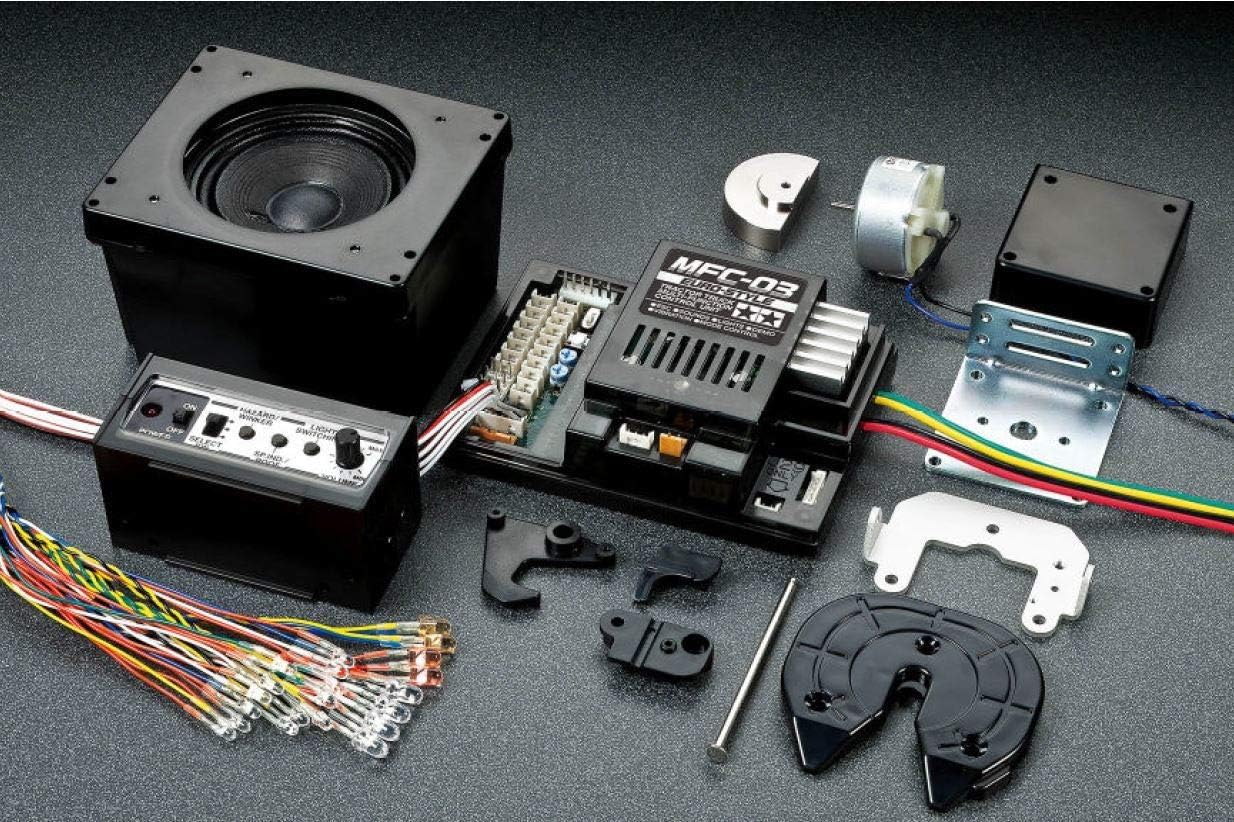
Figure 2: All components of the MFC-03 kit laid out, including the main control unit, speaker, vibration unit, and wiring harness.
Setup and Installation
Installation of the MFC-03 unit requires careful attention to wiring and placement within your RC truck chassis. It is recommended to refer to both this manual and your RC truck's original instruction manual for specific chassis modifications.
Pre-Installation Checklist:
- Ensure your RC truck is powered off and the battery is disconnected.
- Gather necessary tools: small screwdrivers, wire cutters, possibly a soldering iron (if custom wiring is needed).
- Identify suitable mounting locations for the MFC-03 unit, speaker, and vibration unit within the truck's cab or chassis.
Wiring Diagram Overview:
The MFC-03 unit connects to your RC receiver, battery, and various light components. A detailed wiring diagram is provided in the included pamphlet. Key connections include:
- Power Input: Connects directly to the main battery pack.
- Receiver Connections: Multiple channels are used for throttle, steering, and auxiliary functions to control sounds and lights.
- Light Outputs: Dedicated ports for headlights, taillights, turn signals, and other optional lights.
- Speaker Output: Connects to the included speaker unit.
- Vibration Unit Output: Connects to the included vibration motor.

Figure 3: A closer view of the MFC-03 main unit, showing the various connection ports for lights, speaker, and receiver inputs.
Operating Instructions
Once installed, the MFC-03 unit is controlled via your RC transmitter. Specific stick movements and switch assignments will activate different functions.
Basic Operation:
- Power On: Connect the battery to the MFC-03 unit. The unit will perform a self-test, indicated by a series of beeps and light flashes.
- Engine Start/Stop: Typically controlled by a specific stick movement (e.g., full throttle then full brake) or an assigned switch on your transmitter.
- Throttle Control: Engine sounds will synchronize with throttle input, increasing RPM sounds as throttle is applied.
- Brake Sounds: Braking will activate air brake sounds.
- Turn Signals: Activated by steering input.
- Headlights/Taillights: Controlled by an auxiliary channel or specific stick movement.
Advanced Functions:
The MFC-03 offers various advanced functions, including horn sounds, gear shift sounds, and different light patterns. Refer to the detailed function list in the included manual for specific activation methods.
Maintenance
The TAMIYA MFC-03 unit is designed for durability, but proper maintenance ensures its longevity and optimal performance.
- Cleaning: Keep the unit free from dust, dirt, and moisture. Use a soft, dry cloth for cleaning. Avoid using solvents or harsh chemicals.
- Connections: Periodically check all wiring connections to ensure they are secure and free from corrosion. Loose connections can lead to intermittent operation.
- Storage: When not in use, store the MFC-03 unit and your RC truck in a dry, cool environment, away from direct sunlight and extreme temperatures.
- Battery Care: Always disconnect the battery from the MFC-03 unit when not in use to prevent deep discharge.
Troubleshooting
If you encounter issues with your MFC-03 unit, refer to the following common problems and solutions:
| Problem | Possible Cause | Solution |
|---|---|---|
| No power/Unit does not turn on. | Battery not connected, low battery, faulty wiring. | Check battery connection and charge level. Inspect all power wires for damage. |
| No sound from speaker. | Speaker not connected, damaged speaker, volume too low. | Ensure speaker is securely connected. Check speaker for physical damage. Adjust volume settings on the control unit. |
| Lights not functioning. | Loose light connections, damaged LEDs, incorrect wiring. | Verify all light connections. Test individual LEDs if possible. Review wiring diagram for correct connections. |
| Vibration unit not working. | Vibration unit disconnected, motor fault. | Check connection to the vibration unit. Inspect the motor for any obstructions or damage. |
| Functions not responding to transmitter. | Incorrect receiver connections, transmitter not properly configured, signal interference. | Ensure receiver channels are correctly connected to the MFC-03. Verify transmitter settings and calibration. Operate in an area free from strong radio interference. |
If the problem persists after attempting these solutions, please contact TAMIYA customer support.
Specifications
| Attribute | Detail |
|---|---|
| Product Model Number | 56523 |
| Product Dimensions | 15.16 x 10.16 x 3.07 inches |
| Item Weight | 2.2 pounds |
| Manufacturer | TAMIYA |
| Recommended Age | 14 months and up (Note: This is likely a general product age, actual RC hobby age is typically higher) |
| Compatibility | Designed for 1:14 scale TAMIYA RC Tractor Trucks |
Warranty Information
TAMIYA products are manufactured to high standards. For specific warranty details, please refer to the warranty card included with your product or visit the official TAMIYA website. Keep your proof of purchase for any warranty claims.
Customer Support
For further assistance, technical support, or spare parts inquiries, please contact TAMIYA America, Inc. customer service.
Website: www.tamiyausa.com
Please have your product model number (56523) and purchase details ready when contacting support.


