
1. Introduction
The Rice Lake IB-15KL is an advanced precision weighing instrument designed for laboratory and industrial applications. It utilizes a high-precision electronic tuning fork sensor, ensuring stable and accurate measurements over extended periods. This manual provides essential information for the proper setup, operation, and maintenance of your IB-15KL balance.
2. Safety Information
- Always operate the balance on a stable, level surface free from vibrations and drafts.
- Do not overload the balance beyond its maximum capacity of 15 kg.
- Use only the provided AC adapter (120V) to power the unit.
- Avoid exposing the balance to extreme temperatures, humidity, or direct sunlight.
- Keep the balance clean and free from dust and corrosive substances.
- Do not attempt to disassemble or repair the balance yourself. Refer servicing to qualified personnel.
3. Components and Controls

Figure 3.1: Front View
This image displays the front of the Rice Lake IB-15KL balance. Key features visible include the stainless steel weighing pan, the digital display showing '0.0', and three control buttons labeled 'P', 'F', and 'T'. Indicator lights for 'SLEEP' and 'LOW-BATT' are also present.

Figure 3.2: Rear View
This image shows the rear of the Rice Lake IB-15KL balance. The power input port is clearly visible, along with a product label providing details such as the model number (IB-15KL), serial number, and power requirements.
Control Buttons:
- P (Print/Mode) Button: Used for printing data or selecting different operating modes.
- F (Function) Button: Used for various function settings and selections.
- T (Tare/Zero) Button: Used to zero the display or tare the weight of a container.
4. Setup
- Unpacking: Carefully remove the balance from its packaging. Retain all packaging materials for future transport or storage.
- Placement: Place the balance on a firm, level, and vibration-free surface. Ensure it is away from direct sunlight, heat sources, air currents (e.g., from air conditioners or open windows), and strong electromagnetic fields.
- Leveling: Use the adjustable feet at the bottom of the balance to level the unit. Check the bubble level indicator (if present) to ensure proper leveling.
- Power Connection: Connect the supplied AC adapter to the power input port at the rear of the balance (refer to Figure 3.2). Plug the adapter into a suitable 120V power outlet.
- Initial Power On: Press the power button (usually integrated with one of the control buttons or a separate switch) to turn on the balance. Allow a warm-up period of at least 30 minutes for optimal stability and accuracy.
5. Operating Instructions
5.1. Basic Weighing Mode
- Ensure the balance is level and powered on. The display should show '0.0' (refer to Figure 3.1). If not, press the T button to zero the display.
- Gently place the item to be weighed on the center of the weighing pan.
- Wait for the display to stabilize. The stable weight reading will be shown.
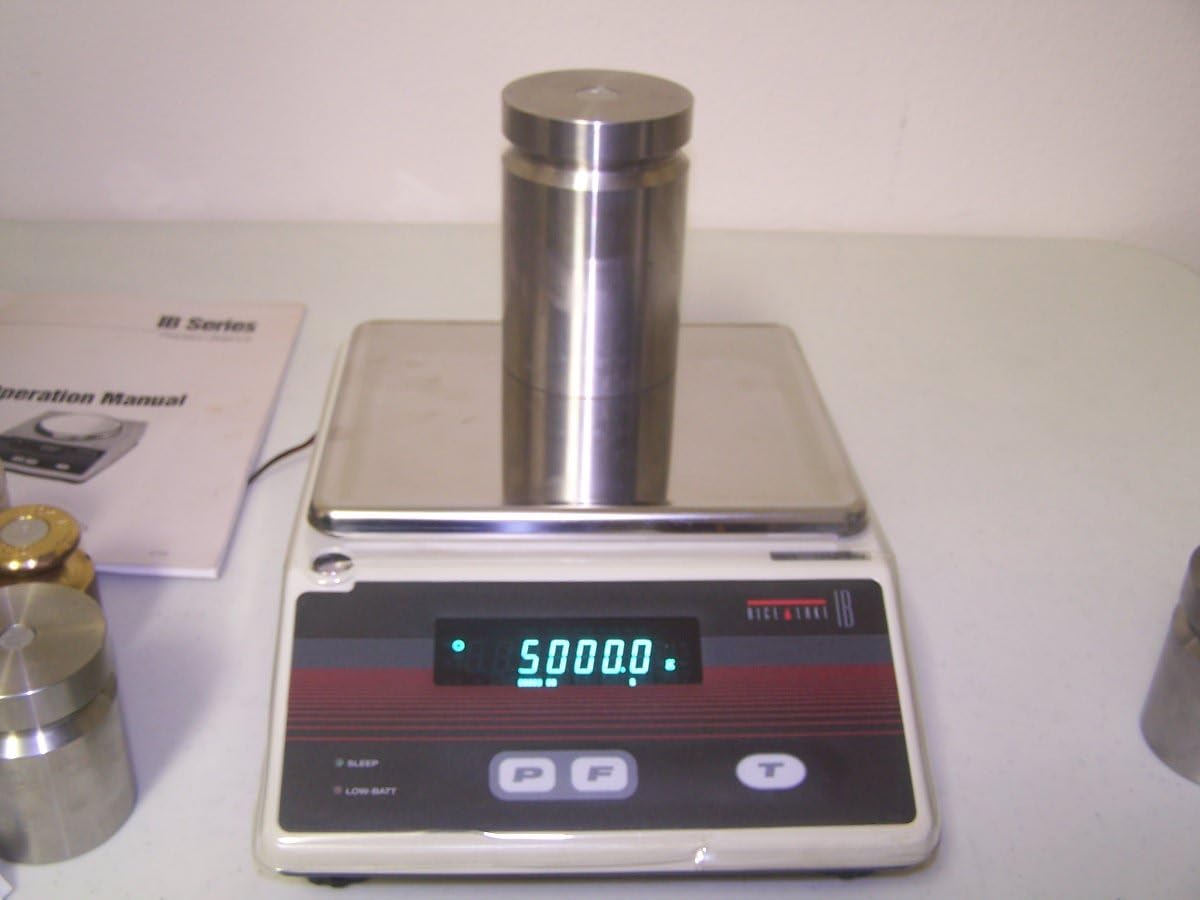
Figure 5.1: Weighing Example (5 kg)
This image shows the balance with a 5 kg calibration weight placed on the pan, and the display accurately reads '5000.0' grams.

Figure 5.2: Weighing Example (15 kg)
This image illustrates the balance at its maximum capacity, with multiple weights totaling 15 kg on the pan. The display shows '15000.0' grams.
5.2. Unit Selection
The IB-15KL supports 13 different weighing units. To change the weighing unit:
- Press the F button repeatedly to cycle through the available units: grams (g), kilograms (kg), carats (ct), ounces (oz), pounds (lb), troy ounces (ozt), pennyweights (dwt), grains (gr), Hong Kong tael (HK tael), Singapore tael (SIN tael), Taiwan tael (TW tael), and mommes.
- Stop pressing the button when the desired unit is displayed.
5.3. Counting Mode
This mode allows for accurate counting of a large number of identical items based on their average piece weight.
- From weighing mode, press the P button to enter counting mode.
- The display will prompt for a sample size (e.g., 10, 20, 50, 100 pieces).
- Place the specified number of sample pieces on the pan.
- Confirm the sample size using the F button. The balance will calculate the average piece weight.
- Remove the sample and then place the bulk quantity of items to be counted on the pan. The display will show the total count.
5.4. Percentage Mode
This mode allows for weighing items as a percentage of a reference weight.
- From weighing mode, press the P button until Percentage Mode is selected.
- Place the reference item on the pan. The display will show '100.00%'.
- Remove the reference item. Subsequent items placed on the pan will be displayed as a percentage of the original reference weight.
5.5. Calculation Factor Mode
This mode allows the balance to display a calculated value based on a user-defined factor and the measured weight.
- Access Calculation Factor Mode via the P button.
- Set the desired calculation factor using the F button and numerical input (refer to the detailed operation manual for specific steps on setting the factor).
- Once the factor is set, place items on the pan, and the display will show the calculated value (weight x factor).
6. Calibration
Regular calibration is crucial for maintaining the accuracy and precision of your Rice Lake IB-15KL balance. The tuning-fork sensor provides inherent stability, but environmental changes and prolonged use can necessitate recalibration.
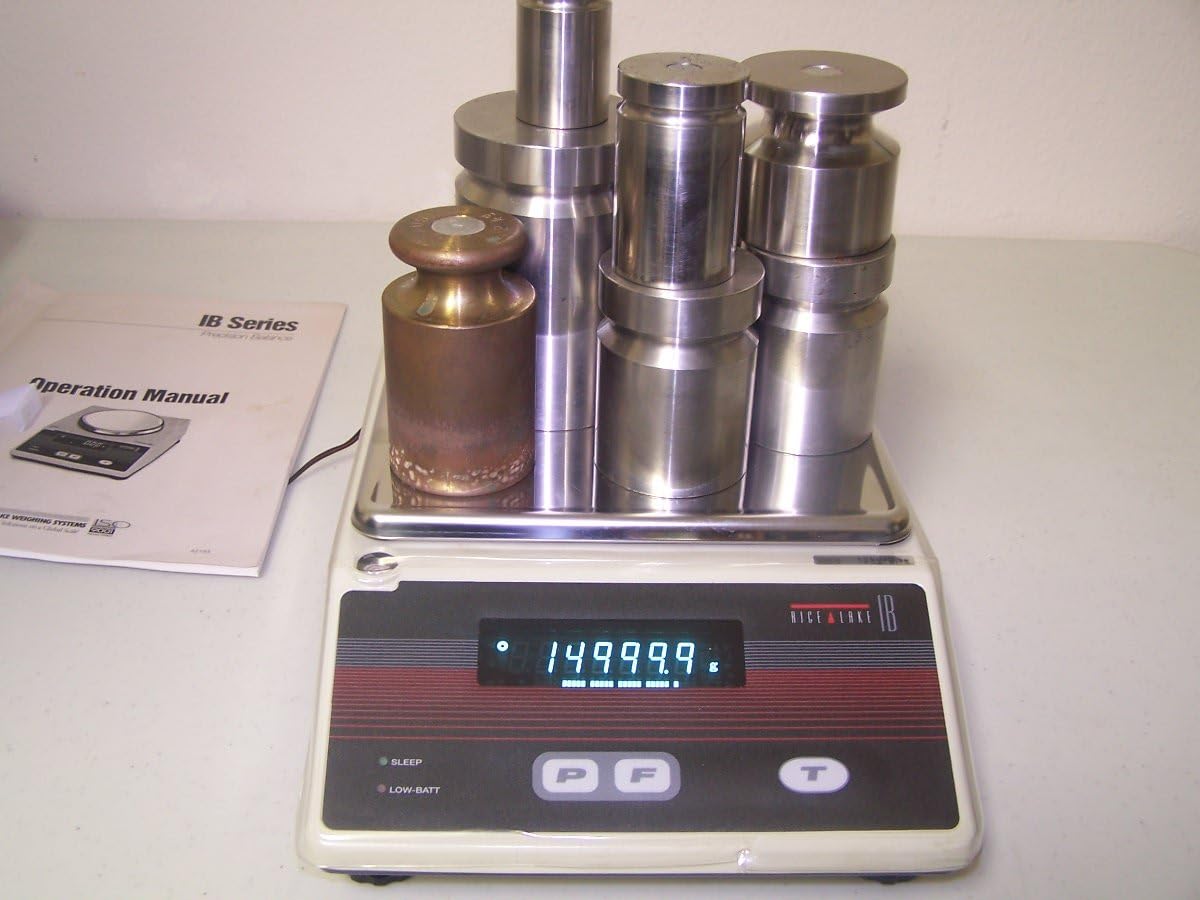
Figure 6.1: Precision Measurement
This image shows the balance displaying '14999.9' grams, demonstrating its high precision and sensitivity to small weight variations, which is critical for accurate calibration.
Note: Calibration weights are not included with the balance. Refer to the detailed operation manual for specific calibration procedures and recommended calibration weights. It is generally recommended to use certified calibration weights appropriate for the balance's capacity and accuracy.
7. Maintenance
- Cleaning: Disconnect the power before cleaning. Use a soft, damp cloth with a mild, non-abrasive detergent to clean the exterior of the balance and the weighing pan. Do not use harsh chemicals, solvents, or abrasive materials.
- Pan Removal: The stainless steel weighing pan can be carefully removed for thorough cleaning. Ensure it is dry before re-placing it.
- Storage: When not in use for extended periods, store the balance in a dry, dust-free environment, preferably in its original packaging.
- Inspection: Periodically inspect the power cord for any damage.
8. Troubleshooting
| Problem | Possible Cause | Solution |
|---|---|---|
| Balance does not turn on. | No power supply; faulty adapter; power outlet issue. | Check power cord connection. Ensure AC adapter is working. Test power outlet with another device. |
| Unstable readings. | Vibrations; air currents; unlevel surface; temperature fluctuations. | Place balance on a stable, level surface. Avoid drafts. Allow warm-up time. Recalibrate if necessary. |
| Inaccurate readings. | Needs calibration; pan not centered; foreign material under pan. | Perform calibration. Ensure pan is correctly seated. Clean under the pan. |
| Display shows 'OVERLOAD'. | Weight exceeds maximum capacity. | Remove excess weight immediately. Do not exceed 15 kg. |
9. Specifications
| Model | IB-15KL |
| Capacity | 15 kg (15000 g) |
| Accuracy (Readout) | 0.1 g |
| Weighing Pan Size | 7" x 9" |
| Units of Measure | g, kg, ct, oz, lb, ozt, dwt, gr, HK tael, SIN tael, TW tael, mommes |
| Operating Modes | Weighing, Counting, Percentage (%), Calculation Factor |
| Power Supply | AC Adapter 120V (included) |
| ASIN | B00I7EFMMC |
| UPC | 617209532579 |
| Date First Available | February 2, 2014 |
10. Warranty and Support
For warranty information, technical support, or service inquiries regarding your Rice Lake IB-15KL balance, please refer to the warranty card included with your product or contact Rice Lake customer service directly. Ensure you have your model number (IB-15KL) and serial number ready when contacting support.


