
Introduction
This manual provides detailed instructions for the installation, operation, and maintenance of your Power Acoustik PD-344B in-Dash Single DIN DVD AM/FM Receiver. Please read this manual thoroughly before using the product to ensure proper function and to prevent damage.
Safety Information
- Warning: Do not operate the unit in a manner that distracts you from driving.
- Ensure proper grounding of the parking brake wire to enable video playback.
- Avoid exposing the unit to moisture or extreme temperatures.
- Refer to a qualified technician for installation if you are unsure.
Package Contents
Verify that all items are present before installation:
- Power Acoustik PD-344B Receiver Unit
- Detachable Faceplate
- Wiring Harness
- Mounting Hardware
- Remote Control
- User Manual (this document)
Setup and Installation
Wiring Diagram
Refer to the following diagram for proper wiring connections. Incorrect wiring can cause damage to the unit or vehicle electrical system.
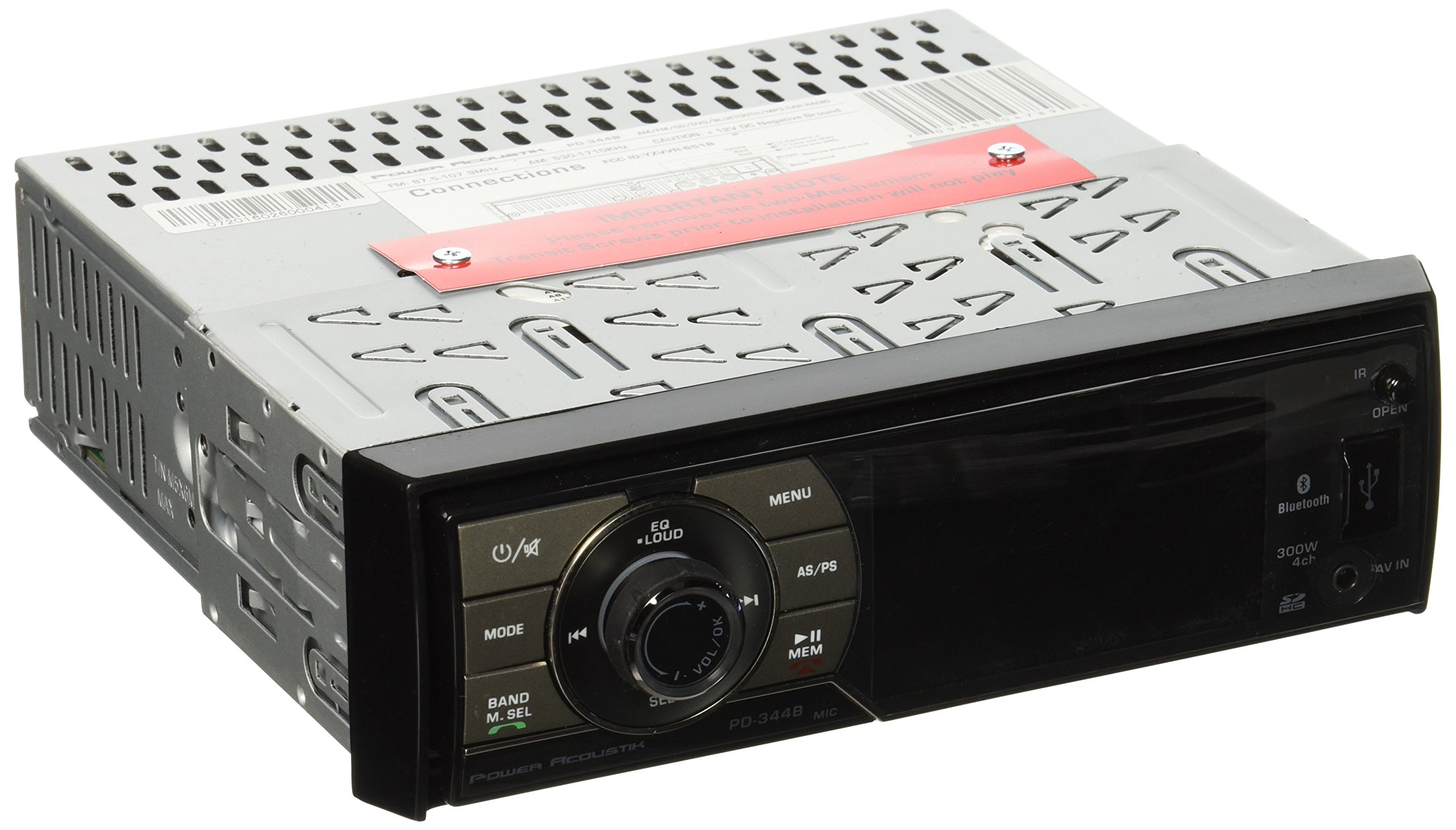
Image: Example wiring diagram for the Power Acoustik PD-344B receiver. This image illustrates the various connections required for power, speakers, and auxiliary inputs/outputs.
- Power Connection: Connect the yellow wire to a constant 12V power source, the red wire to an accessory 12V power source, and the black wire to ground.
- Speaker Connections: Connect speaker wires according to their positive (+) and negative (-) terminals to the corresponding vehicle speakers.
- Parking Brake Wire: Connect the light green wire to the vehicle's parking brake switch. This connection is essential for video playback functionality.
- Antenna Connection: Connect the vehicle's antenna cable to the antenna input on the receiver.
- RCA Outputs: For external amplifiers or monitors, connect RCA cables to the Audio & Video RCA Outputs.
- Subwoofer Output: Connect a subwoofer amplifier to the fixed subwoofer RCA output.
Mounting the Unit
Insert the single DIN chassis into the vehicle's dashboard opening. Secure it using the provided mounting hardware. Ensure the unit is firmly in place to prevent vibration and movement.
Operating Instructions
Detachable Faceplate
To attach the faceplate, align it with the receiver chassis and gently push until it clicks into place. To detach, press the release button and pull the faceplate away. This feature acts as a theft deterrent.
Basic Controls
- Power Button: Press to turn the unit on or off.
- Volume Knob: Rotate to adjust the audio volume.
- Mode Button: Press to cycle through available sources (FM/AM, DVD, USB, SD, Bluetooth, AUX).
- Menu Button: Access system settings and options.
- Display: The 3.4-inch LCD HD monitor displays current status and video content.
Radio Operation (AM/FM)
- Press the MODE button until "RADIO" or "TUNER" is displayed.
- Press the BAND button to select between FM1, FM2, FM3, AM1, and AM2.
- Use the SEEK buttons to automatically search for strong stations.
- To manually tune, press and hold the SEEK buttons.
- To save a station, tune to the desired frequency, then press and hold a preset number button (1-6) until you hear a beep.
DVD/CD Playback
- Insert a DVD or CD into the disc slot. The unit will automatically switch to DVD/CD mode.
- Ensure the parking brake is engaged for video playback.
- Use the on-screen controls or remote control for playback functions (Play, Pause, Stop, Skip, Fast Forward/Rewind).
- The unit supports playback from DVDR/RW & CDR/RW of MP3, MP4, & DivX files.
USB/SD Card Playback
- Insert a USB drive into the USB port or an SD card into the SD card slot.
- The unit will automatically detect the media and switch to USB/SD mode.
- Navigate through folders and files using the unit's controls or remote.
- Supports playback of MP3, MP4, & DivX files from up to 32GB SD cards or USB drives.
- MP3 ID3 Tag Reading is supported for MP3 files.
Bluetooth Operation
The unit features Bluetooth 2.0 with A2DP wireless streaming for hands-free calling and audio playback.
- Pairing:
- Ensure Bluetooth is enabled on your mobile device.
- On the receiver, select Bluetooth mode. The unit will enter pairing mode.
- Search for "PD-344B" or "Power Acoustik" on your device and select it to pair.
- Once paired, the unit will display a confirmation.
- Hands-Free Calling:
- When a call comes in, the unit will display the caller ID.
- Press the ANSWER button on the unit or remote to accept the call.
- Press the END CALL button to terminate the call.
- Use the unit's microphone for communication.
- Audio Streaming (A2DP):
- After pairing, select Bluetooth Audio mode.
- Play music from your paired device. Audio will stream wirelessly to the receiver.
- Use the unit's controls or remote to Play/Pause, Skip tracks.
AUX Input
Connect personal media devices to the front panel AUX audio input using a 3.5mm stereo cable. Select AUX mode on the receiver to play audio from the connected device.
Maintenance
- Cleaning the Unit: Use a soft, dry cloth to clean the unit's surface and display. Do not use abrasive cleaners or solvents.
- Disc Care: Handle discs by their edges. Keep them clean and free of scratches.
- Faceplate Care: When detached, store the faceplate in a protective case to prevent scratches and damage.
Troubleshooting
| Problem | Possible Cause | Solution |
|---|---|---|
| No power | Incorrect wiring; Blown fuse | Check power and ground connections. Verify vehicle fuse and unit fuse. |
| No sound | Speaker wires disconnected; Volume too low; Mute engaged | Check speaker wiring. Increase volume. Disable mute function. |
| No video playback | Parking brake not engaged; Incorrect video format | Ensure parking brake wire is correctly connected and parking brake is applied. Verify video file format (MP4, DivX). |
| Bluetooth not pairing | Bluetooth not enabled on device; Unit not in pairing mode; Device too far | Enable Bluetooth on your device. Ensure unit is in pairing mode. Keep devices within range. |
| Poor radio reception | Antenna not connected; Weak signal area; Damaged antenna | Check antenna connection. Try a different location. Consider an aftermarket antenna if issues persist. |
| Disc stuck or won't eject | Foreign object in slot; Mechanical error | Do not force. Consult a qualified technician. |
Specifications
- Model: PD-344B
- Display: 3.4-inch LCD HD Monitor (720x420 Widescreen Resolution, 400 NIT LED Brightness)
- Bluetooth: Version 2.0 with A2DP Wireless Streaming
- Media Playback: DVDR/RW, CDR/RW, USB (up to 32GB), SD Card (up to 32GB)
- Supported Formats: MP3, MP4, DivX (with MP3 ID3 Tag Reading)
- Audio Outputs: Audio & Video RCA Outputs, Fixed Subwoofer RCA Output
- Speaker Outputs: 52W x 4 MOSFET
- Audio Input: AUX Audio Input (3.5mm)
- Connectivity: Auxiliary, Bluetooth, USB
- Control Method: Touch
- Item Weight: 8 ounces
- Manufacturer: Epsilon Electronics Inc.
Warranty Information
Power Acoustik products are designed and manufactured to the highest quality standards. For specific warranty terms and conditions, please refer to the warranty card included with your product or visit the official Power Acoustik website. Keep your proof of purchase for warranty claims.
Customer Support
If you encounter any issues not covered in this manual or require further assistance, please contact Power Acoustik customer support. You can find contact information on the official Power Acoustik website or through your retailer.
Online Resources: Visit the Power Acoustik Store on Amazon


