
1. Introduction
This manual provides instructions for the safe and effective use of your Connex COXB364013 Telescopic Ratchet Screwdriver. This tool is designed for various fastening tasks, featuring a telescopic extension, a ratchet mechanism, and an integrated bit storage system. Please read these instructions carefully before first use and retain them for future reference.
2. Product Features
- Telescopic Extension: Retractable shaft, extending approximately 125 mm for increased reach.
- Ratchet Function: Allows for clockwise, counter-clockwise, and locked (neutral) operation, controlled by a red contact ring.
- Magnetic Bit Holder: Universal 1/4" magnetic bit holder for secure bit retention.
- Integrated Bit Magazine: Removable handle compartment stores 12 silicon-molybdenum steel (S2) bits.
- Ergonomic Handle: 2-component handle designed for comfortable grip and efficient power transfer.
- Color-Coded Bits: Bits are color-coded for easy identification of types and sizes.
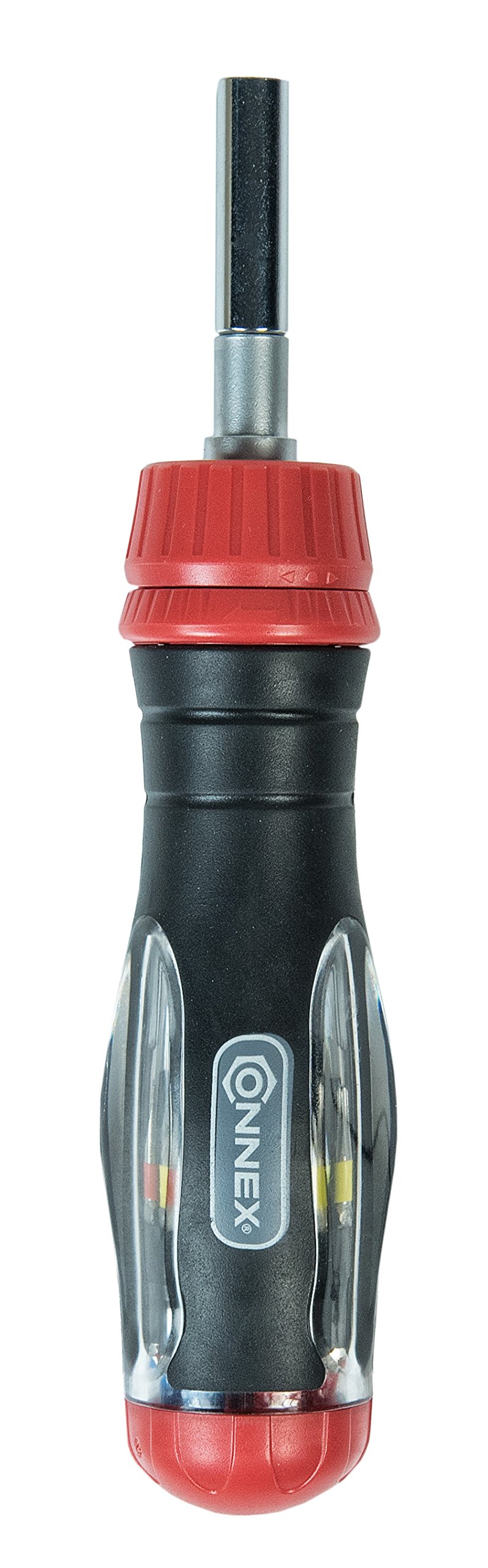
Image 1: The Connex COXB364013 Telescopic Ratchet Screwdriver with its integrated bit storage and telescopic shaft.
3. Package Contents
The package includes:
- 1 x Connex COXB364013 Telescopic Ratchet Screwdriver
- 12 x Silicon-Molybdenum Steel (S2) Bits (stored in the handle)
4. Setup
4.1 Accessing and Storing Bits
- To access the bits, gently pull the red cap at the bottom of the handle. This will reveal the removable bit magazine.
- Select the required bit from the magazine.
- After use, return the bit to its designated slot in the magazine and reinsert the magazine into the handle, securing it with the red cap.

Image 2: View of the integrated bit magazine, showing the stored bits within the handle.
4.2 Inserting a Bit
- Ensure the telescopic shaft is fully retracted or extended as desired.
- Insert the chosen 1/4" bit firmly into the magnetic bit holder at the end of the shaft. The magnetic holder will secure the bit in place.

Image 3: Close-up view of the magnetic 1/4" bit holder at the end of the screwdriver shaft.
5. Operating Instructions
5.1 Adjusting the Ratchet Function
The red contact ring located below the shaft allows you to select the ratchet direction or lock the shaft.
- Rotate the red ring to the left for counter-clockwise (loosening) ratchet action.
- Rotate the red ring to the right for clockwise (tightening) ratchet action.
- Position the red ring in the middle for a locked (neutral) position, allowing the screwdriver to function as a standard fixed screwdriver.
5.2 Extending the Telescopic Shaft
To extend the shaft, pull the metal shaft outwards from the handle until it reaches the desired length, up to approximately 125 mm. To retract, push the shaft back into the handle. Ensure the shaft is securely locked in position before applying torque.

Image 4: The Connex COXB364013 screwdriver with its telescopic shaft fully extended for increased reach.
6. Bit Selection and Usage
The included S2 bits are color-coded for quick identification:
- Blue: Flat bits (4 mm, 6 mm)
- Yellow: Phillips (PH1, PH2, PH3)
- Orange: Pozi (PZ1, PZ2, PZ3)
- Red: Torx (TX10, TX15, TX20, TX25)
Always select the correct bit type and size for the fastener to prevent damage to the fastener head or the bit.

Image 5: A selection of the color-coded S2 bits included with the screwdriver, showing various types and sizes.
7. Maintenance
- Cleaning: Wipe the screwdriver and bits with a clean, dry cloth after each use to remove dirt, grease, or debris. Do not use abrasive cleaners or solvents.
- Storage: Store the screwdriver in a dry place, away from direct sunlight and extreme temperatures. Ensure all bits are securely stored in the handle's magazine.
- Inspection: Periodically inspect the bits for wear or damage. Replace worn or damaged bits to ensure optimal performance and prevent damage to fasteners. Check the telescopic mechanism and ratchet function for smooth operation.
8. Troubleshooting
| Problem | Possible Cause | Solution |
|---|---|---|
| Bit slips or does not engage fastener | Incorrect bit size/type; Worn bit; Fastener head stripped. | Ensure correct bit for fastener. Replace worn bits. If fastener is stripped, use a different method for removal. |
| Ratchet mechanism does not engage or slips | Red contact ring not fully engaged in a position (left/right/middle); Internal mechanism obstruction. | Ensure the red contact ring is firmly clicked into the desired position. Clean any debris from the mechanism. If problem persists, the tool may require professional inspection. |
| Telescopic shaft feels loose or does not lock | Internal locking mechanism issue; Debris in shaft. | Clean the shaft and internal mechanism. Ensure the shaft is fully extended or retracted to engage the lock. Avoid excessive force when extending/retracting. |
9. Specifications
| Feature | Detail |
|---|---|
| Model Number | COXB364013 |
| Brand | Connex |
| Material | Alloy Steel (Screwdriver), Silicon-Molybdenum Steel (S2 Bits) |
| Telescopic Extension Length | Approx. 125 mm |
| Bit Holder Type | 1/4" Universal Magnetic |
| Included Bits | 12 bits (Flat 4/6mm, PH1/PH2/PH3, PZ1/PZ2/PZ3, TX10/TX15/TX20/TX25) |
| Dimensions (Package) | 19.3 x 4.7 x 3.4 cm |
| Weight (Product) | 240 grams |
| Country of Origin | China |
10. Warranty and Support
Specific warranty information for this product may vary by region and retailer. Please refer to your purchase documentation or contact your retailer for details regarding warranty coverage.
For technical support or inquiries, please contact Connex customer service or visit the official Connex website. Contact information can typically be found on the product packaging or the manufacturer's website.