
Introduction
This manual provides detailed instructions for the safe and efficient operation, setup, and maintenance of your ADJ Fog Fury 3000 Professional Fog Machine. Please read this manual thoroughly before operating the device to ensure proper usage and to prevent damage or injury.
The ADJ Fog Fury 3000 is a high-output fogger designed for professional applications, featuring DMX control capabilities and robust construction. It is engineered to produce dense, consistent fog for various entertainment and event settings.
Safety Information
Always observe the following safety precautions to reduce the risk of electric shock, fire, or personal injury:
- Ensure the unit is connected to a grounded power supply.
- Do not operate the unit if the power cord is damaged.
- Use only ADJ Water-Based Fog Fluids. Other fluids may cause damage or create a health hazard.
- Do not immerse the unit in water or other liquids.
- Keep the unit away from flammable materials.
- Ensure adequate ventilation around the unit during operation.
- Do not block the fog output nozzle.
- Allow the unit to cool down completely before handling or storing.
- Keep out of reach of children.
- Refer to the Proposition 65 warning for California residents regarding potential chemical exposure.
Unpacking and Initial Setup
Carefully unpack the ADJ Fog Fury 3000 and inspect it for any signs of damage during transit. If any damage is observed, contact your dealer immediately.
Package Contents:
- ADJ Fog Fury 3000 Fog Machine
- Wired Remote Control
- Power Cable
- User Manual (this document)
Placement:
Place the fog machine on a flat, stable surface. Ensure there is sufficient space around the unit for proper ventilation. Do not place the unit directly on carpet or other soft surfaces that may block ventilation openings.

Image: Front-side view of the ADJ Fog Fury 3000 Fog Machine, showing the fog output nozzle and fluid tank.
Fluid Tank Installation:
- Unscrew the cap of the fluid tank located on the top of the unit.
- Carefully pour ADJ Water-Based Fog Fluid into the tank. Do not overfill. The tank has an LED light for easy visibility in dark environments.
- Securely screw the cap back onto the fluid tank.
- Ensure the fluid hose inside the tank is fully submerged in the fog fluid.

Image: Rear view of the ADJ Fog Fury 3000, displaying the DMX LCD display, power switch, and various input/output ports.
Operating Instructions
Powering On:
- Connect the power cable to the unit and then to a suitable grounded power outlet.
- Flip the main power switch located on the rear panel to the "ON" position.
- The unit will begin its warm-up cycle, which takes approximately 8 minutes. The status indicator on the unit or remote will change when ready.
Control Modes:
The Fog Fury 3000 offers multiple control options:
1. Manual Mode:
- Connect the wired remote control to the designated port on the rear of the unit.
- Press and hold the button on the remote to manually activate fog output. Release the button to stop.
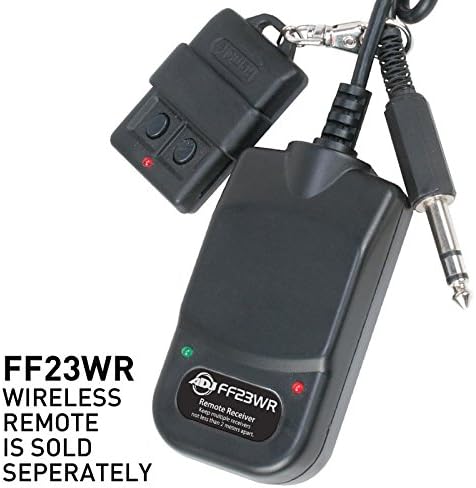
Image: The ADJ FF23WR Wireless Remote, which is sold separately, shown with its receiver and connection cable. This remote allows for wireless operation of the fog machine.
2. Timer Mode:
- The wired remote typically includes timer functions. Refer to the remote's specific instructions for setting interval, duration, and volume.
3. DMX Control:
The Fog Fury 3000 is DMX operational via 3-pin DMX connections. It utilizes 3 DMX channels.
- Connect a DMX controller to the DMX IN port on the rear of the unit.
- Set the DMX address using the LCD display and buttons on the rear panel. Refer to the DMX channel chart below for specific functions.
DMX Channel Chart:
| Channel | Function | Value Range | Description |
|---|---|---|---|
| 1 | Fog Output | 0-255 | 0 = Off, 1-255 = Fog Output (increasing intensity) |
| 2 | Special Functions | 0-255 | Reserved for future functions or specific modes (refer to advanced DMX manual if available) |
| 3 | Strobe/Pulse | 0-255 | 0 = Off, 1-255 = Strobe/Pulse effect (increasing speed) |
For detailed DMX programming, consult your DMX controller's manual.
Maintenance
Regular maintenance ensures the longevity and optimal performance of your Fog Fury 3000.
Cleaning:
- Exterior: Clean the exterior with a soft, dry cloth. Do not use abrasive cleaners or solvents.
- Fluid Tank: Periodically empty and rinse the fluid tank with distilled water to prevent residue buildup.
- Nozzle: If the fog output appears weak or inconsistent, the nozzle may be partially clogged. Use a small brush or compressed air to gently clear any obstructions.
Fluid Management:
- Always use high-quality, water-based fog fluid recommended by ADJ.
- Do not mix different types of fog fluid.
- Store fog fluid in a cool, dark place, away from direct sunlight.
- The unit features an automatic circuit cut-off to protect the pump if the fog fluid tank runs dry. However, it is best practice to ensure sufficient fluid before operation.
Storage:
Before storing the unit for extended periods, run a small amount of distilled water through the system to clean the pump and heater coil. This helps prevent mineral buildup. Store the unit in a cool, dry place.
Troubleshooting
If you encounter issues with your Fog Fury 3000, refer to the following common problems and solutions:
| Problem | Possible Cause | Solution |
|---|---|---|
| No fog output | No power; Unit not warmed up; No fog fluid; Clogged nozzle/pump; Remote not connected. | Check power connection; Wait for warm-up (approx. 8 min); Refill fluid tank; Clean nozzle/pump; Ensure remote is securely connected. |
| Weak or inconsistent fog | Low fluid level; Incorrect fluid type; Partially clogged nozzle/pump; Unit not fully heated. | Refill fluid; Use ADJ water-based fluid; Clean nozzle/pump; Allow unit to fully heat. |
| Unit not responding to DMX | Incorrect DMX address; Faulty DMX cable; DMX controller issue; DMX termination. | Verify DMX address setting; Test with a different DMX cable; Check DMX controller; Ensure proper DMX termination if using multiple units. |
| Unit overheats or shuts off | Insufficient ventilation; Fluid tank empty (safety cut-off). | Ensure adequate airflow around the unit; Refill fluid tank. |
If the problem persists after attempting these solutions, contact ADJ customer support.
Specifications
Detailed technical specifications for the ADJ Fog Fury 3000:
- Model: FOG FURY 3000
- Power Consumption: 1500W (max 1600W)
- Warm-up Time: Approximately 8 minutes
- Fog Output: 21,000 cubic feet per minute (CFM)
- Fluid Tank Capacity: 5 Liters
- Control: Manual, Timer (via wired remote), 3-pin DMX (3 channels)
- Dimensions: 18.75” x 13.75” x 12.75”
- Weight: 25 lbs.
- Safety Features: Electronic Thermal Sensing Technology, Automatic Circuit Cut-off (dry tank protection)
- Approvals: ETL Approved
Warranty and Support
Warranty Information:
ADJ Products provides a limited warranty for its products. For specific warranty terms and conditions, please refer to the warranty card included with your product or visit the official ADJ Products website. Keep your purchase receipt as proof of purchase for warranty claims.
Customer Support:
For technical assistance, service, or parts inquiries, please contact ADJ Products customer support. You can find contact information on the official ADJ website or through your authorized dealer.
ADJ Products Official Website: www.adj.com


