
Dometic TC-35FL
Dometic WAECO TC-35FL Thermoelectric Cooler User Manual
Model: TC-35FL | Brand: Dometic
1. Product Overview
The Dometic WAECO TC-35FL is a versatile 35-liter thermoelectric cooler designed for both cooling and warming. It operates on multiple power sources, including 12V, 24V DC, and 230V AC, making it ideal for use in vehicles, boats, or at home. Its robust injected molded plastic casing ensures durability.

Figure 1.1: Dometic WAECO TC-35FL Thermoelectric Cooler (closed view). This image shows the compact and robust design of the cooler, highlighting its grey and dark grey color scheme and the Dometic branding.
2. Safety Information
Please read all safety instructions carefully before operating the device. Failure to follow these instructions may result in electric shock, fire, and/or serious injury.
- Ensure the correct voltage is used for the power source (12V/24V DC or 230V AC).
- Do not immerse the cooler in water or expose it to excessive moisture.
- Keep ventilation openings clear and unobstructed to prevent overheating.
- Do not use the device if the power cables or the cooler itself are damaged.
- Repairs should only be performed by qualified personnel.
- This appliance is not intended for use by persons (including children) with reduced physical, sensory or mental capabilities, or lack of experience and knowledge, unless they have been given supervision or instruction concerning use of the appliance by a person responsible for their safety.
3. Package Contents
Verify that all items are present in the package:
- 1 x Dometic WAECO TC-35FL Thermoelectric Cooler
- 1 x 12V/24V DC Connection Cable (for cigarette lighter socket)
- 1 x 220-240V AC Connection Cable
- 1 x User Manual (this document)
4. Setup and Connection
Before first use, ensure the cooler is placed on a stable, level surface with adequate ventilation around all sides.
4.1. Connecting to 12V/24V DC Power (Vehicle)
- Locate the DC input socket on the side of the cooler.
- Insert the 12V/24V DC connection cable into the cooler's DC input.
- Plug the other end of the cable into your vehicle's cigarette lighter socket.
- Ensure the vehicle's engine is running or the ignition is on to provide power.

Figure 4.1: Close-up of the 12V/24V DC power input socket. This image shows the dedicated input for vehicle power, clearly labeled "12/24V=DC".
4.2. Connecting to 220-240V AC Power (Mains)
- Locate the AC input socket on the side of the cooler.
- Insert the 220-240V AC connection cable into the cooler's AC input.
- Plug the other end of the cable into a standard wall outlet.

Figure 4.2: Close-up of the 220-240V AC power input socket. This image displays the mains power input, labeled "TropiCool 220-240V~AC".
5. Operating Instructions
The Dometic WAECO TC-35FL offers both cooling and warming functions.

Figure 5.1: Control panel and integrated handle. This image shows the user interface with buttons for 'HOT' and 'COLD' modes, and temperature adjustment indicators.
5.1. Cooling Function
- Connect the cooler to a power source.
- Press the COLD button on the control panel. The indicator light will illuminate.
- Use the temperature adjustment buttons (if available, indicated by "NORMAL" to "COLDER" on the panel) to select the desired cooling level. The cooler can achieve temperatures significantly below ambient.
- For optimal cooling, pre-chill items before placing them inside the cooler.
5.2. Warming Function
- Connect the cooler to a power source.
- Press the HOT button on the control panel. The indicator light will illuminate.
- The cooler will begin to warm the interior.
5.3. Loading the Cooler
The 35-liter capacity allows for ample storage of beverages and food items.
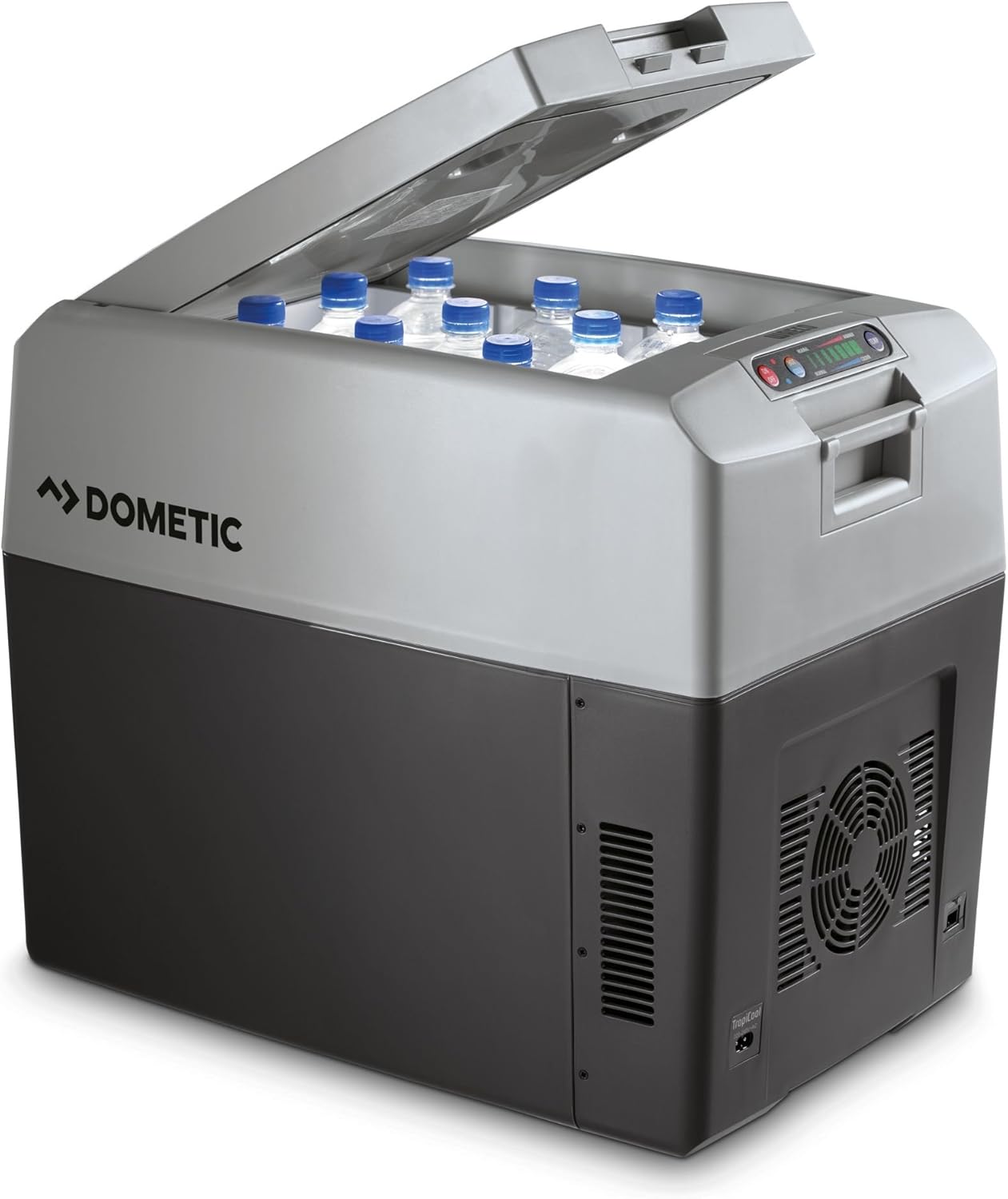
Figure 5.2: Cooler with lid open, showing internal capacity. This image demonstrates how bottles can be stored upright inside the cooler, showcasing its practical volume.
6. Maintenance and Care
Regular maintenance ensures optimal performance and longevity of your cooler.
- Cleaning: Clean the interior and exterior with a damp cloth and mild detergent. Do not use abrasive cleaners or solvents. Ensure the cooler is dry before storage.
- Ventilation: Periodically check that the ventilation grilles are free from dust and debris. Use a soft brush or vacuum cleaner to clear any blockages.
- Storage: When not in use, store the cooler in a dry, well-ventilated area. Leave the lid slightly ajar to prevent odors and mildew.
- Automatic Defrosting: The cooler features an automatic defrosting system, minimizing manual intervention.
7. Troubleshooting
| Problem | Possible Cause | Solution |
|---|---|---|
| Cooler not turning on. | No power supply; faulty cable; blown fuse (in vehicle). | Check power connection; try a different outlet/socket; inspect and replace fuse if necessary. |
| Insufficient cooling/warming. | Blocked ventilation; ambient temperature too high; lid not properly closed; overloaded. | Clear ventilation grilles; ensure lid is sealed; reduce contents; operate in a cooler environment if possible. |
| Unusual noise from fan. | Dust or debris in fan; fan malfunction. | Clean fan area; if noise persists, contact support. |
8. Technical Specifications
| Feature | Specification |
|---|---|
| Model | TC-35FL (TC 35) |
| Capacity | 33 Liters |
| Power Input | 12V DC, 24V DC, 220-240V AC |
| Power Consumption | 64 Watts (AC) |
| Dimensions (L x W x H) | 55 cm x 37.6 cm x 46 cm |
| Weight | 10 Kilograms |
| Casing Material | Injected Molded Plastic |
| Safety Certifications | CE, TÜV/GS |
| Defrost System | Automatic |
| Color | Dark Grey/Light Grey |

Figure 8.1: Product dimensions. This image provides a visual representation of the cooler's length, width, and height, indicating 55cm, 37.6cm, and 46cm respectively.
For detailed energy efficiency information, please refer to the official EU EPREL database: EPREL Product Information.
9. Warranty and Support
For warranty information, please refer to the terms and conditions provided at your point of purchase or contact the retailer directly. Dometic products are designed for reliability and performance.
For further assistance, technical support, or spare parts, please visit the official Dometic website or contact their customer service:
- Official Website: www.dometic.com
Related documentsTC-35FL


Ask a question about this manual
Ask about setup, troubleshooting, compatibility, parts, safety, or missing instructions. Manuals+ will review the question and use this page’s manual context to help answer it.