
1. Introduction
This manual provides detailed instructions for the setup, operation, and maintenance of your CHACON Weather Station Model 54416 with a wireless outdoor sensor. Please read this manual thoroughly before using the device to ensure correct operation and to maximize its lifespan.
2. Package Contents
- 1 x CHACON Weather Station (Main Unit)
- 1 x Wireless Outdoor Sensor
- 1 x User Manual
3. Product Overview
Familiarize yourself with the main components of your weather station.
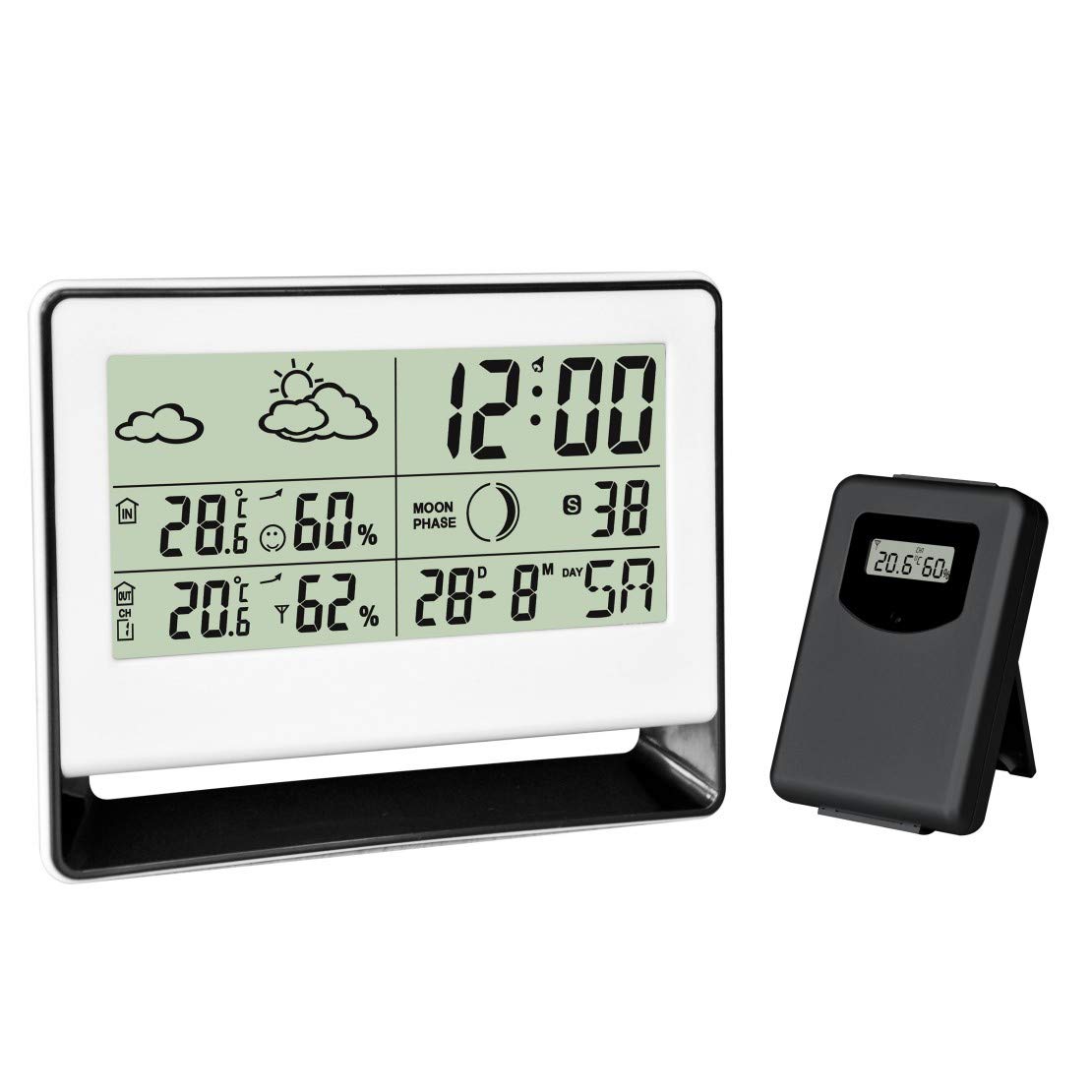
Figure 1: CHACON Weather Station main unit (left) and wireless outdoor sensor (right). The main unit displays time, indoor/outdoor temperature, humidity, weather forecast, and moon phase. The outdoor sensor transmits environmental data wirelessly to the main unit.

Figure 2: Close-up view of the CHACON Wireless Outdoor Sensor. This compact unit features a small display showing the current outdoor temperature and humidity readings before transmission to the main station.
Main Unit Display Features:
- Current Time and Calendar
- Indoor Temperature and Humidity
- Outdoor Temperature and Humidity (from wireless sensor)
- Weather Forecast Icons
- Moon Phase Display
- Alarm Function
4. Setup
4.1. Battery Installation
The CHACON Weather Station and its outdoor sensor are battery-powered. Batteries are not included.
- Main Unit: Open the battery compartment cover on the back of the main unit. Insert the required batteries (typically AAA, refer to the compartment label for quantity and type) according to the polarity indicators (+/-). Close the cover.
- Outdoor Sensor: Open the battery compartment cover on the back of the outdoor sensor. Insert the required batteries (typically AAA, refer to the compartment label for quantity and type) according to the polarity indicators (+/-). Close the cover.
Note: It is recommended to insert batteries into the outdoor sensor first, then into the main unit, to facilitate immediate pairing.
4.2. Sensor Pairing
The outdoor sensor should automatically pair with the main unit once both are powered on. If pairing does not occur:
- Ensure both units have fresh batteries.
- Place the outdoor sensor within close proximity (e.g., 1-2 meters) of the main unit during the initial setup.
- Press the 'RESET' button (if available) on both the main unit and the outdoor sensor.
- Allow a few minutes for the units to establish a connection. The outdoor temperature and humidity should appear on the main unit's display.
4.3. Sensor Placement
For accurate outdoor readings, place the wireless sensor in a sheltered location outdoors, away from direct sunlight and precipitation. Ensure it is within the effective transmission range of the main unit (typically up to 30 meters, depending on obstacles).
5. Operating Instructions
5.1. Setting Time and Date
Refer to the buttons on the back or side of the main unit. Typically, there will be a 'MODE' or 'SET' button to enter setting mode, and 'UP'/'DOWN' or '+'/'–' buttons to adjust values. Follow the on-screen prompts to set the time (hour, minute), date (year, month, day), and 12/24-hour format.
5.2. Setting the Alarm
Press the 'ALARM' or 'MODE' button repeatedly until the alarm time is displayed. Use the 'SET' or 'ADJUST' button to enter alarm setting mode, then use the adjustment buttons to set the desired alarm time. Press 'ALARM' again to activate or deactivate the alarm.
5.3. Temperature Unit Selection
Most units allow switching between Celsius (°C) and Fahrenheit (°F). Look for a dedicated '°C/°F' button or a setting option within the 'MODE' menu.
5.4. Weather Forecast
The weather station predicts weather conditions for the next 12-24 hours based on atmospheric pressure changes. The forecast is indicated by icons such as Sunny, Partly Cloudy, Cloudy, Rainy. These are predictions and may not always match actual local weather conditions.
5.5. Moon Phase Display
The moon phase icon on the display changes automatically according to the set date, showing the current phase of the moon.
6. Maintenance
- Cleaning: Wipe the main unit and outdoor sensor with a soft, damp cloth. Do not use abrasive cleaners or solvents.
- Battery Replacement: Replace batteries in both units when the low battery indicator appears on the display, or when readings become inconsistent. Always replace all batteries at the same time with new ones of the same type.
- Environmental Conditions: Avoid exposing the main unit to extreme temperatures, direct sunlight, or high humidity. The outdoor sensor is designed for outdoor use but should be protected from direct heavy rain and snow.
7. Troubleshooting
- No outdoor readings:
- Check if batteries are correctly installed and charged in both units.
- Ensure the outdoor sensor is within range of the main unit.
- Reduce obstacles between the sensor and main unit.
- Press the 'RESET' button (if available) on both units and allow them to re-pair.
- Inaccurate readings:
- Ensure the outdoor sensor is not in direct sunlight or near heat sources.
- Verify the main unit is not near heat-emitting appliances or in direct drafts.
- Allow time for the sensors to stabilize after initial setup or battery replacement.
- Display is dim or blank:
- Replace batteries in the main unit.
- Check battery polarity.
8. Specifications
| Feature | Detail |
|---|---|
| Brand | CHACON |
| Model Number | 54416 |
| Product Dimensions (L x W x H) | 3.2 x 20.2 x 26.2 cm (Main Unit) |
| Weight | 254 grams |
| Material | Plastic, Metal |
| Connectivity Technology | Wireless |
| Power Source | Battery Powered |
| Batteries Included | No |
| Temperature Accuracy | ±1 °C |
| Special Feature | Alarm |
| Recommended Use | Outdoor (for sensor) |
| Components Included | Weather station with wireless outdoor sensor |
9. Safety Information
- Do not expose the main unit to water or extreme moisture.
- Do not attempt to disassemble or repair the device yourself. Refer to qualified personnel.
- Keep batteries out of reach of children. Dispose of used batteries responsibly according to local regulations.
- Avoid placing the device near strong electromagnetic fields.
10. Warranty and Support
Information regarding warranty coverage and customer support for the CHACON Weather Station Model 54416 is not available in this document. Please refer to the product packaging or the manufacturer's official website for details on warranty terms and contact information for support.

