
1. Introduction
The Tivoli Audio Albergo is a compact and versatile Bluetooth clock radio designed to provide high-fidelity audio, AM/FM radio reception, and convenient alarm clock functionalities. This manual provides detailed instructions for setting up, operating, and maintaining your Albergo unit.
2. Safety Instructions
- Read all instructions before operating the unit.
- Keep these instructions for future reference.
- Heed all warnings on the product and in the manual.
- Do not use this apparatus near water or moisture.
- Clean only with a dry cloth.
- Do not block any ventilation openings. Install in accordance with the manufacturer's instructions.
- Do not install near any heat sources such as radiators, heat registers, stoves, or other apparatus (including amplifiers) that produce heat.
- Protect the power cord from being walked on or pinched.
- Only use attachments/accessories specified by the manufacturer.
- Unplug this apparatus during lightning storms or when unused for long periods of time.
- Refer all servicing to qualified service personnel.
3. Package Contents
Verify that your package contains the following items:
- Tivoli Audio Albergo Bluetooth Clock Radio Unit
- Power Adapter
- Remote Control
- FM Antenna
4. Product Overview
Front Panel Controls and Display
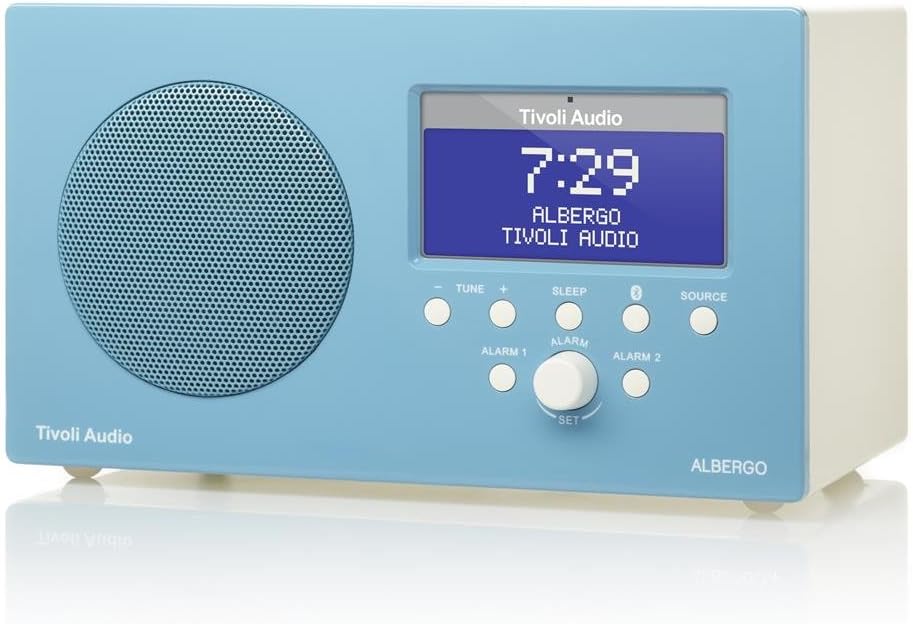
Figure 4.1: Front view of the Albergo unit. The front panel features a speaker grille, a digital display, and control buttons for tuning, sleep, Bluetooth, source selection, and alarm settings.
- Display: Shows time, station, source, and menu information.
- Tune - / Tune +: Adjusts radio frequency or navigates menu options.
- Sleep: Activates the sleep timer.
- Bluetooth Button: Initiates Bluetooth pairing mode.
- Source: Cycles through available audio sources (FM, AM, Bluetooth, Auxiliary).
- Alarm 1 / Alarm 2: Activates or sets Alarm 1 or Alarm 2.
- Set Knob: Rotates to adjust values and presses to confirm selections.
Side View and Rear Connections

Figure 4.2: Angled view of the Albergo unit. The rear panel typically includes connections for power, external antenna, and auxiliary input.
The rear panel of the Albergo unit contains the following connections:
- DC Input: For connecting the included power adapter.
- FM Antenna Input: For connecting the external FM antenna.
- Auxiliary Input: For connecting external audio devices via a 3.5mm cable (not included).
- Headphone Output: For private listening.
5. Setup
5.1 Power Connection
- Insert the small end of the power adapter into the DC Input jack on the rear of the Albergo unit.
- Plug the other end of the power adapter into a wall outlet.
- The unit will power on or enter standby mode.
5.2 Antenna Connection
- For FM reception, connect the included external FM antenna to the FM Antenna Input on the rear of the unit.
- Extend the antenna fully for optimal reception.
- For AM reception, the Albergo has a built-in internal AM antenna. If reception is poor, try repositioning the unit.
6. Operating Instructions
6.1 Power On/Off
- Press the Power button (usually integrated with the Set knob or a dedicated button on the remote) to turn the unit on or off.
- When powered off, the clock display will remain active.
6.2 Radio Operation (AM/FM)
- Press the Source button until "FM" or "AM" appears on the display.
- Use the Tune - or Tune + buttons to manually adjust the frequency.
- To auto-scan for the next available station, press and hold Tune - or Tune +.
- The Albergo supports FM RDS (Radio Data System) where available, displaying station information.
6.3 Bluetooth Operation
- Press the Source button until "Bluetooth" appears on the display.
- The unit will enter pairing mode, indicated by a flashing Bluetooth icon on the display.
- On your Bluetooth-enabled device (e.g., smartphone, tablet), enable Bluetooth and search for available devices.
- Select "Tivoli Albergo" from the list of devices.
- Once paired, the Bluetooth icon on the Albergo display will stop flashing and remain solid. You can now stream audio wirelessly.
6.4 Clock and Alarm Settings
Many clock and alarm settings are best accessed and adjusted using the included remote control.
- Setting the Time:
- In standby mode, press and hold the Set knob or the Menu button on the remote.
- Navigate to "Time Set" using the Tune +/- buttons or remote arrows.
- Press Set or Enter on the remote to confirm.
- Adjust hours and minutes using Tune +/- or remote arrows, confirming each with Set or Enter.
- Setting Alarms (Alarm 1 / Alarm 2):
- Press the Alarm 1 or Alarm 2 button on the front panel or remote.
- Follow the on-screen prompts to set the alarm time, source (buzzer, FM, AM), and volume.
- Confirm each setting using the Set knob or remote's Enter button.
- Snooze Function: When an alarm sounds, press the Snooze button (often the Sleep button or a dedicated button on the remote) to temporarily silence the alarm for a set period.
- Sleep Timer: Press the Sleep button repeatedly to cycle through available sleep timer durations (e.g., 15, 30, 45, 60 minutes, Off). The unit will automatically turn off after the selected time.
6.5 Remote Control Usage
The included full-function remote control provides access to all features and settings, including those not directly available on the front panel. Ensure the remote has working batteries and is pointed towards the front of the Albergo unit during use.
7. Maintenance
- Cleaning: Use a soft, dry cloth to clean the unit. Do not use abrasive cleaners, waxes, or solvents.
- Placement: Avoid placing the unit in direct sunlight, near heat sources, or in areas with high humidity or dust.
- Antenna: Handle the FM antenna carefully to prevent damage.
8. Troubleshooting
| Problem | Possible Cause | Solution |
|---|---|---|
| No power | Power adapter not connected or faulty outlet. | Ensure power adapter is securely connected to the unit and a working wall outlet. |
| Poor radio reception | Antenna not properly connected or positioned; weak signal. | Extend the FM antenna fully. Reposition the unit for better AM reception. Try a different location. |
| Bluetooth device won't pair | Albergo not in pairing mode; device too far; previously paired device connected. | Ensure Albergo is in Bluetooth source mode and flashing. Move device closer. Disconnect from other Bluetooth devices. |
| Clock displays incorrect time | Time not set correctly; power interruption. | Refer to Section 6.4 to reset the time. Unplug and replug the unit to reset if necessary. |
| Alarm does not sound | Alarm not activated; volume too low; incorrect alarm source. | Verify Alarm 1 or Alarm 2 is enabled. Check alarm volume. Ensure correct alarm source (buzzer/radio) is selected. |
| Remote control not working | Dead batteries; obstruction; not pointed correctly. | Replace remote control batteries. Ensure no obstructions between remote and unit. Point remote directly at the unit. |
9. Specifications
- Brand: Tivoli Audio
- Model Number: ALBERGO
- Connectivity Technology: Bluetooth
- Tuner Technology: AM, FM (with RDS where available)
- Special Features: Digital Clock, Dual Alarms, Sleep Timer, Snooze
- Power Source: AC Power Adapter
- Display Type: Digital LCD
- Included Components: Remote Control
- Item Weight: Approximately 2.3 Pounds (1.04 kg)
- UPC: 815097015581
10. Warranty and Support
For warranty information and technical support, please refer to the documentation provided with your purchase or visit the official Tivoli Audio website. Keep your proof of purchase for warranty claims.


