
BOSS ME-80
BOSS ME-80 Multi-Effects Pedal Guitar Instruction Manual
Model: ME-80
Introduction
The BOSS ME-80 is a versatile and compact tone processor designed for guitarists. It offers a wide selection of flagship-quality BOSS amps and effects, making it an ideal solution for both practice and live performances. Its knob-based interface allows for quick sound adjustments, and its selectable operation modes provide flexibility for individual stompbox-style control or instant recall of complex multi-effects setups. The ME-80 also features unique foot switches for efficient effects switching and patch selection, and can connect to BOSS Tone Studio software for expanded tonal possibilities and access to a library of patches.
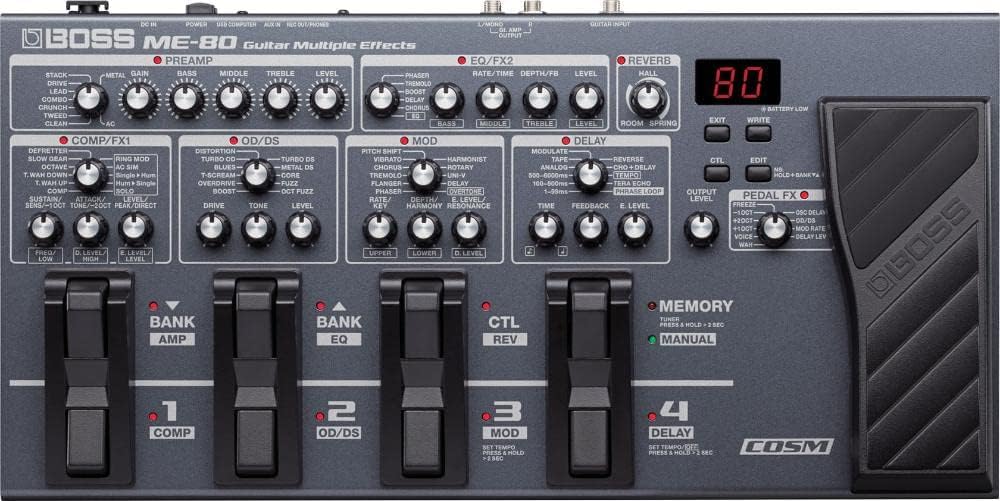
Figure 1: Top view of the BOSS ME-80 Multi-Effects Pedal, highlighting its intuitive knob-based interface and foot switches.
Setup Guide
1. Powering the Unit
The ME-80 can be powered using either an AC adapter (PSA series, sold separately) or six AA batteries. For stable performance, especially during extended use or live settings, AC power is recommended. When using batteries, ensure they are correctly inserted into the battery compartment located on the underside of the unit.

Figure 2: Side view of the ME-80, illustrating the power input and USB connection point.
2. Connecting Your Guitar and Amplifier
- Connect your guitar to the GUITAR INPUT jack on the ME-80 using a standard 1/4-inch instrument cable.
- Connect the GT. AMP OUTPUT L/MONO jack on the ME-80 to your guitar amplifier's input. For stereo output, connect the R jack to a second amplifier or input.
- For direct recording or headphone monitoring, use the REC OUT/PHONES jack.

Figure 3: Rear panel of the ME-80, detailing the guitar input, stereo outputs, and recording/headphone jack.
3. USB Connection for Computer Integration
The ME-80 features a USB port for connecting to a computer. This allows for:
- Audio Interface Functionality: Record your guitar directly to your Digital Audio Workstation (DAW) with the ME-80's effects.
- MIDI Control: Control parameters and switch patches via MIDI messages from your computer.
- BOSS Tone Studio: Access the free BOSS Tone Studio software for editing, organizing, and downloading new patches.
Video 1: Official BOSS video demonstrating the setup and features of the ME-80, including its USB connectivity and integration with BOSS Tone Studio.
Operating Modes and Effects
The ME-80 offers two primary operating modes: Manual Mode and Memory Mode.
1. Manual Mode
In Manual Mode, the ME-80 functions like a traditional pedalboard, with each footswitch directly controlling an individual effect module (e.g., COMP, OD/DS, MOD, DELAY). The knobs on the panel directly adjust the parameters of the active effects, providing immediate and intuitive control over your sound. This mode is ideal for on-the-fly adjustments during live performances.

Figure 4: The ME-80's control surface, illustrating the dedicated knobs for each effect section, which are active in Manual Mode.
2. Memory Mode
Memory Mode allows you to store and recall complete multi-effects setups (patches). Each patch can contain a combination of effects, amplifier models, and parameter settings. The footswitches are used to select different patches, enabling quick transitions between complex sounds. The ME-80 comes with a variety of factory presets, and you can create and save your own custom patches.
3. Effect Categories
The ME-80 features a comprehensive suite of effects, organized into logical categories:
- PREAMP: Various COSM amp models for different tonal characteristics.
- COMP/FX1: Compressor, T.WAH, OCTAVE, etc.
- OD/DS: Overdrive and Distortion effects.
- MOD: Modulation effects like Chorus, Flanger, Phaser, Tremolo.
- DELAY: Various delay types including Analog, Tape, Reverse, and Phrase Loop.
- EQ/FX2: Equalizer and additional effects.
- REVERB: Room, Hall, Plate, and Spring reverb types.
- PEDAL FX: Wah, Voice, and other expression pedal controlled effects.

Figure 5: Demonstrating the use of the expression pedal for real-time effect control, such as Wah or Volume.
Maintenance
- Cleaning: Use a soft, dry cloth to clean the unit. Avoid abrasive cleaners or solvents.
- Battery Replacement: If using batteries, replace all six AA batteries simultaneously when the "BATTERY LOW" indicator appears on the display.
- Storage: When not in use for extended periods, disconnect the AC adapter and remove batteries to prevent leakage. Store the unit in a cool, dry place away from direct sunlight and extreme temperatures.
Troubleshooting
| Problem | Possible Cause | Solution |
|---|---|---|
| No sound or low volume. | Incorrect cable connections, low battery, output level too low. | Check all cable connections. Replace batteries if low. Adjust the OUTPUT LEVEL knob. |
| Effects not engaging. | Incorrect operating mode, individual effect module turned off. | Ensure you are in the correct operating mode (Manual or Memory). In Manual Mode, press the corresponding footswitch to activate the effect. |
| Noise or hum. | Ground loop, faulty cables, interference from other electronic devices. | Use high-quality shielded cables. Try a different power outlet. Move the unit away from other electronic devices. |
Specifications
- Model: ME-80
- Dimensions (L x W x H): 20.5" x 12.8" x 5.6" (520 mm x 325 mm x 142 mm)
- Weight: 7.92 pounds (3.6 kg)
- Power Supply: AC adapter (PSA series, sold separately) or 6 x AA batteries (Alkaline or Ni-MH)
- Current Draw: 200 mA
- Nominal Input Level: GUITAR INPUT: -10 dBu, AUX IN: -20 dBu
- Nominal Output Level: GT. AMP OUTPUT L/MONO, R: -10 dBu, REC OUT/PHONES: -10 dBu
- Input Impedance: GUITAR INPUT: 1 M ohm, AUX IN: 27 k ohms
- Output Impedance: GT. AMP OUTPUT L/MONO, R: 2 k ohms, REC OUT/PHONES: 44 ohms
- Effects: COMP/FX1, OD/DS, MOD, DELAY, PREAMP, EQ/FX2, REVERB, PEDAL FX, NS (Noise Suppressor)
- Phrase Loop: 38 seconds
- USB: USB Audio/MIDI functionality
Warranty Information
For detailed warranty information, please refer to the warranty card included with your product or visit the official BOSS website. Keep your proof of purchase for warranty claims.
Support and Resources
For further assistance, product updates, and additional resources, please visit the official BOSS support page or contact customer service.
- BOSS Tone Studio: Download the latest version of BOSS Tone Studio software for advanced editing and patch management.
- BOSS Tone Central: Access a library of free, gig-ready patches created by professional guitarists.
- Online Manuals: Digital versions of the instruction manual and other guides are available on the BOSS website.
Related documentsME-80


Ask a question about this manual
Ask about setup, troubleshooting, compatibility, parts, safety, or missing instructions. Manuals+ will review the question and use this page’s manual context to help answer it.