
Myson 2TRV HEAD
Myson Standard Thermostatic Radiator Valve Replacement Head Manual
Model: 2TRV HEAD
Introduction
This manual provides essential information for the installation, operation, and maintenance of your Myson Standard Thermostatic Radiator Valve Replacement Head (TRV 2 WAY). This product is designed as a direct replacement head for existing Myson TRV 2-way thermostatic radiator valves. Please note that this product includes the head only; the valve body is not included. It is also interchangeable with the Myson 'Contract' thermostatic head, which has a similar appearance but lacks red markings and features a black bottom section with a white triangle.

Figure 1: Front view of the Myson Standard Thermostatic Radiator Valve Replacement Head.
Setup and Installation
The Myson TRV replacement head is designed for straightforward installation onto an existing Myson TRV 2-way valve body. No specialized tools are typically required for fitting.
Fitting the Head to the Valve
- Ensure the valve body is clean and free from debris.
- Set the arrow on the replacement head to the fully open position (indicated by a black dot or maximum setting).
- Engage the sensor head firmly onto the valve body.
- Screw the knurled ring securely to the valve body by hand until it is finger tight. Avoid overtightening.

Figure 2: Detailed instructions for fitting the head and using locking pins.
Use of Locking Pins (Where Provided)
Some Myson TRV heads come with metal locking pins to set minimum and maximum temperature limits. Refer to Figure 2 for visual guidance.
Locking a Specific Level:
- Set the valve to the desired temperature level.
- Insert the first locking pin in line with the 'circular black' marking.
- Insert the second locking pin in line with the 'black dot' marking.
Limiting Temperature Range:
High Limit:
- Set the valve temperature to the highest required level.
- Insert the first locking pin in line with the 'black dot' marking.
Low Limit:
- Set the valve temperature to the lowest required level.
- Insert the second locking pin in line with the 'circular black' marking.

Figure 3: Underside of the TRV head, illustrating the slots for locking pins.
Operating Instructions
The Myson TRV head allows you to control the heat output of your radiator by sensing the room temperature and adjusting the flow of hot water through the valve. The head features numerical settings and symbols to indicate temperature levels.
- Temperature Adjustment: Rotate the head clockwise or counter-clockwise to select your desired room temperature. Higher numbers typically correspond to warmer settings.
- Frost Protection (*): Setting the head to the snowflake symbol (*) will activate frost protection, maintaining a minimum temperature (typically around 7°C) to prevent pipes from freezing.
- Fully Open Setting: The highest numerical setting or a specific symbol (often a black dot or 'MAX') indicates the fully open position, allowing maximum heat output from the radiator.
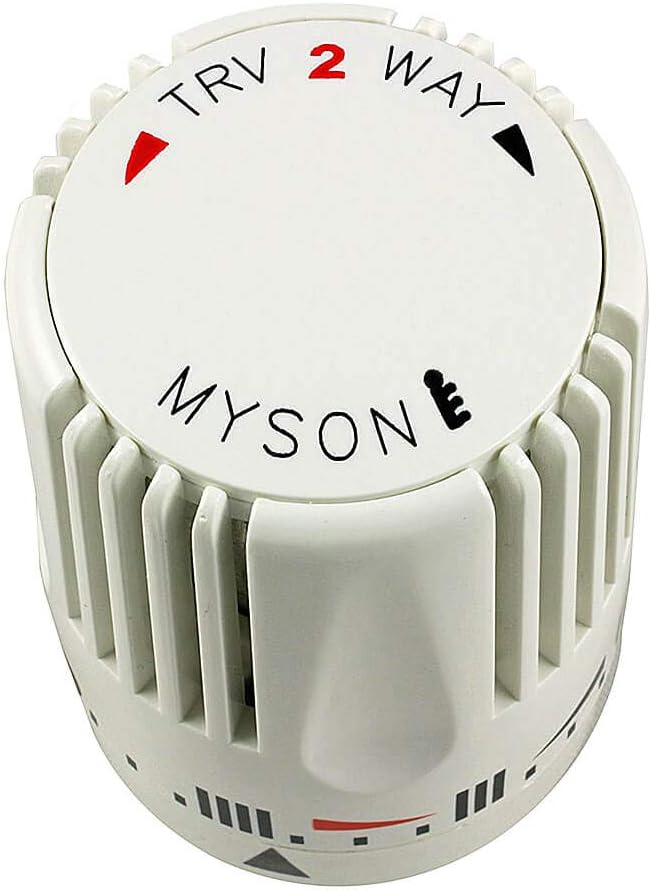
Figure 4: Top view of the TRV head with temperature markings and symbols.
Maintenance
The Myson TRV head is designed for long-term, maintenance-free operation. However, occasional checks can ensure optimal performance:
- Cleaning: Wipe the exterior of the head with a soft, damp cloth. Do not use abrasive cleaners or solvents.
- Seasonal Check: Before the heating season, ensure the head rotates freely through its full range of settings. If the radiator is cold when the valve is open, gently press the pin on the valve body to ensure it is not stuck.
- Avoid Obstruction: Ensure curtains, furniture, or other objects do not obstruct the thermostatic head, as this can affect its ability to accurately sense room temperature.
Troubleshooting
| Problem | Possible Cause | Solution |
|---|---|---|
| Radiator remains cold when TRV is set to a high temperature. | Valve pin stuck in closed position; air in radiator; system pressure low. |
|
| TRV head is difficult to screw onto the valve body. | Misalignment; thread binding; old valve body thread wear. |
|
| Room is too hot/cold despite TRV setting. | Incorrect setting; head obstructed; external heat sources affecting sensor. |
|
Specifications
| Feature | Detail |
|---|---|
| Brand | Myson |
| Model Number | 2TRV HEAD |
| Material | Metal |
| Item Dimensions (L x W x H) | 1.36 x 0.9 x 1.81 inches |
| Item Weight | 4.9 ounces |
| Exterior Finish | Metal |
| Valve Type | Thermostatic Radiator Valve |
| Inlet Connection Size | 0.5 Inches |
| Inlet Connection Type | Compression |
| Outlet Connection Size | 0.5 Inches |
| Outlet Connection Type | Flange |
| Specification Met | CE, RoHS |
| Manufacturer | Rettig |
| Date First Available | April 15, 2014 |
Warranty Information
Myson products are manufactured to high standards and are designed for durability. For specific warranty terms and conditions, please refer to the documentation provided with your original Myson TRV valve or contact Myson customer support. Typically, replacement parts like this head are covered under a limited warranty against manufacturing defects.
Customer Support
If you encounter any issues or have questions regarding your Myson Standard Thermostatic Radiator Valve Replacement Head that are not covered in this manual, please contact Myson customer support or your local distributor. When contacting support, please have your product model number (2TRV HEAD) and purchase details ready.
For further assistance, you may visit the official Myson website or consult with a qualified HVAC professional.
Ask a question about this manual
Ask about setup, troubleshooting, compatibility, parts, safety, or missing instructions. Manuals+ will review the question and use this page’s manual context to help answer it.