
Introduction
This manual provides detailed instructions for the operation and maintenance of your Casio G-Shock AWG-M100A-1ACR Tough Solar Watch. Please read this manual thoroughly to ensure proper use and to fully utilize all features of your watch.
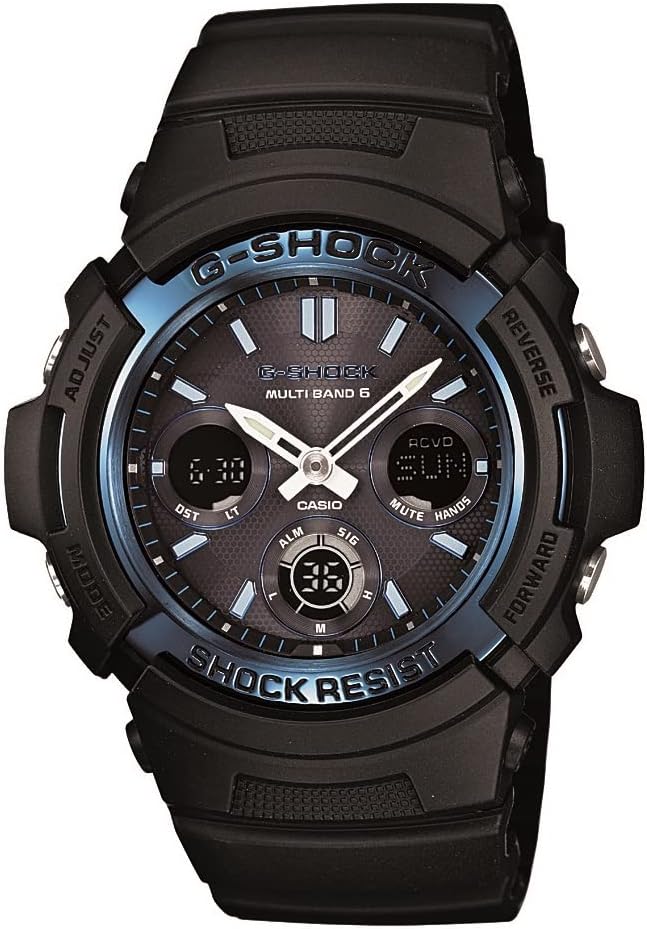
Image: Front view of the Casio G-Shock AWG-M100A-1ACR watch, showcasing its black resin band, case, and dial with blue accents and digital displays.
Setup
1. Initial Charging (Tough Solar)
Your watch is equipped with Tough Solar power, which converts light into electrical energy. Before initial use, expose the watch face to bright light (sunlight or fluorescent light) for several hours to ensure a full charge. The watch will continue to charge when exposed to light during normal wear.
- Avoid blocking the watch face from light exposure.
- A fully charged battery can last approximately 6 months without further light exposure under normal use, or longer in power-saving mode.
2. Time Calibration (Multi-Band Atomic Timekeeping)
The watch features Multi-Band Atomic Timekeeping, receiving time calibration radio signals for accurate time. This function automatically receives signals up to six times a day (five times for China). Manual reception is also possible.
- Signal Reception Areas: US (WWVB), UK (MSF), Germany (DCF77), Japan (JJY40/JJY60), China (BPC).
- Ensure the watch is placed in an area with good signal reception, typically near a window, away from electronic devices that may cause interference.
- For manual reception, refer to the "Time Calibration" section in the operating instructions.
3. Initial Settings: Home City and Daylight Saving Time (DST)
Before using the watch, configure your Home City and Daylight Saving Time (DST) settings. These settings are crucial for correct time display and atomic time signal reception.
- Enter the Timekeeping Mode.
- Press and hold the ADJUST button until the city code starts to flash.
- Use the FORWARD and REVERSE buttons to select your desired Home City code.
- Press the MODE button to cycle through other settings like DST.
- Use the FORWARD or REVERSE buttons to toggle DST ON or OFF as required for your region.
- Press the ADJUST button to exit the settings.
Operating Instructions
The Casio G-Shock AWG-M100A-1ACR features multiple modes and functions accessible via its four buttons.
Button Functions Overview
| Button | Location | Primary Function |
|---|---|---|
| ADJUST | Top Left | Used to enter/exit setting modes, confirm selections. |
| REVERSE | Top Right | Used to scroll backward through settings or values. |
| MODE | Bottom Left | Used to change between different watch modes (Timekeeping, World Time, Alarm, Stopwatch, Countdown Timer). |
| FORWARD | Bottom Right | Used to scroll forward through settings or values, activate LED light. |
1. Timekeeping Mode
This is the default mode, displaying the current time, day, and date. The analog hands show the current time, while the digital displays provide additional information.
- 12/24 Hour Formats: Can be toggled in settings.
- Full Auto Calendar: Pre-programmed until the year 2099.
2. World Time Mode
Allows you to view the current time in 31 time zones (48 cities + UTC). Press the MODE button to navigate to this mode.
- Use the FORWARD and REVERSE buttons to scroll through city codes.
3. Alarm Mode
The watch features 5 daily alarms and an hourly time signal.
- Press the MODE button to navigate to the Alarm Mode.
- Use the FORWARD/REVERSE buttons to select an alarm (AL1-AL5) or the Hourly Time Signal (SIG).
- Press the ADJUST button to toggle an alarm ON/OFF or to enter alarm setting mode.
4. Stopwatch Mode
Measures elapsed time with 1/100-second accuracy.
- Press the MODE button to navigate to the Stopwatch Mode.
- Use the FORWARD button to start/stop the stopwatch.
- Use the REVERSE button to reset the stopwatch.
- Measuring capacity: 59'59.99".
5. Countdown Timer Mode
Functions as a countdown timer with a range of 1 minute to 100 minutes.
- Press the MODE button to navigate to the Countdown Timer Mode.
- Press the ADJUST button to set the countdown time.
- Use the FORWARD/REVERSE buttons to adjust the time.
- Press the FORWARD button to start/stop the countdown.
6. Hand Adjustment Feature
This unique feature allows you to temporarily move the analog hands out of the way to provide an unobstructed view of the digital displays, which is useful when using the stopwatch or countdown timer.
- To activate: While in any mode, press and hold both the FORWARD and REVERSE buttons simultaneously for a few seconds. The hands will move to a position that does not obstruct the digital displays.
- To deactivate: Press any button, and the hands will return to the current time.
7. LED Light Operation
The watch features a Full Auto LED Light with Afterglow for illumination in low-light conditions.
- Press the FORWARD button to activate the LED light.
- The light duration can be set to 1.5 seconds or 3 seconds in the watch settings.
- The "Full Auto LED Light" feature means the light will automatically illuminate when you tilt your wrist towards your face in dark conditions, provided the auto-light function is enabled in settings.

Image: The Casio G-Shock AWG-M100A-1ACR watch worn on a wrist, illustrating its proportional size and fit.
Maintenance
1. Water Resistance (200M)
Your G-Shock watch is water-resistant to 200 meters (20 ATM), making it suitable for swimming, showering, and snorkeling. Do not operate buttons while the watch is submerged in water.
- Avoid exposing the watch to hot water or steam, as this can damage seals.
- Rinse the watch with fresh water after exposure to saltwater.
2. Cleaning
Regularly clean your watch to maintain its appearance and functionality.
- Wipe the case and band with a soft, dry cloth.
- For stubborn dirt, use a soft brush and mild soap solution, then rinse thoroughly with fresh water and dry.
- Avoid using chemical cleaners or solvents.
3. Battery and Power Saving
The watch uses a solar rechargeable battery. Ensure regular exposure to light to maintain optimal charge levels.
- Battery Power Indicator: Check the digital display for the current charge level.
- Power Saving Function: When enabled, the watch will automatically enter a power-saving state (blank display) when left in the dark for a certain period, conserving battery life. The timekeeping continues internally.
4. Shock Resistance
G-Shock watches are designed for high shock resistance. While durable, avoid unnecessary impacts to prolong the watch's lifespan.
Troubleshooting
- Time Synchronization Issues: If the watch fails to receive the atomic time signal, ensure it is placed in an open area, away from electronic interference, especially overnight. Manual reception can be attempted. Verify your Home City setting is correct.
- Digital Display Visibility: The negative digital displays (light digits on a dark background) can be challenging to read in low light. Use the LED light for better visibility. This is a characteristic of the display type.
- Analog Hands Not Matching Digital Time: If the analog hands are misaligned with the digital time, perform a hand home position correction. Refer to the detailed manual (Module 5230) for specific steps on hand alignment.
- Battery Not Charging: Ensure the watch face is exposed to sufficient light. If the battery indicator remains low despite exposure, contact customer support.
Specifications
- Model Number: AWG-M100A-1ACR
- Module: 5230
- Brand: Casio G-Shock
- Material: Resin (Case and Band)
- Dimensions: 2.05 x 0.59 x 1.83 inches
- Weight: 2 ounces
- Power Source: Tough Solar (Solar Rechargeable Battery)
- Timekeeping: Multi-Band Atomic Timekeeping (US, UK, Germany, Japan, China)
- Water Resistance: 200M (20 ATM)
- Shock Resistance: Yes
- Light: Full Auto LED Light with Afterglow
- World Time: 31 time zones (48 cities + UTC)
- Alarms: 5 Daily Alarms, Hourly Time Signal
- Stopwatch: 1/100 second, Measuring capacity: 59'59.99"
- Countdown Timer: Measuring unit: 1 second, Countdown range: 1 minute to 100 minutes
- Calendar: Full Auto Calendar (pre-programmed until 2099)
- Time Formats: 12/24 Hour Formats
- Accuracy: +/-15 seconds per month (without signal calibration)
Warranty and Support
Your Casio G-Shock watch is covered by a manufacturer's warranty. Please refer to the warranty card included with your purchase for specific terms and conditions, including warranty duration and coverage details.
For technical support, service, or warranty claims, please contact Casio customer service. Contact information can typically be found on the official Casio website or in the documentation provided with your watch.
Online Resources: For the most up-to-date information and detailed module instructions (Module 5230), visit the official Casio G-Shock support website.