
1. Introduction
This manual provides essential information for the proper setup, operation, maintenance, and troubleshooting of your Ovation CE44P-FKOA Acoustic-Electric Guitar. Please read this manual thoroughly before using your instrument to ensure optimal performance and longevity.
2. Product Overview
The Ovation CE44P-FKOA is an acoustic-electric guitar designed for both acoustic play and amplified performance. It features a unique construction and integrated electronics.
Key Features:
- Body Design: Classic mid-depth Lyrachord cutaway body with a Figured Koa top and Elite multi-sound hole design for clear highs and balanced bass response.
- Bracing: Scalloped "X" bracing design for natural tone and optimal response.
- Sound Characteristics: Delivers the classic Ovation Elite sound with full projection, note clarity, and nuanced tonal complexity.
- Aesthetics: Features elegant multi-wood epaulets, black binding, abalone purfling, and a Natural gloss finish.
- Electronics: Equipped with an Ovation Slim line pickup and OP-4BT preamp system, including a three-band EQ, volume/gain control, onboard tuner, and low-battery indicator light.
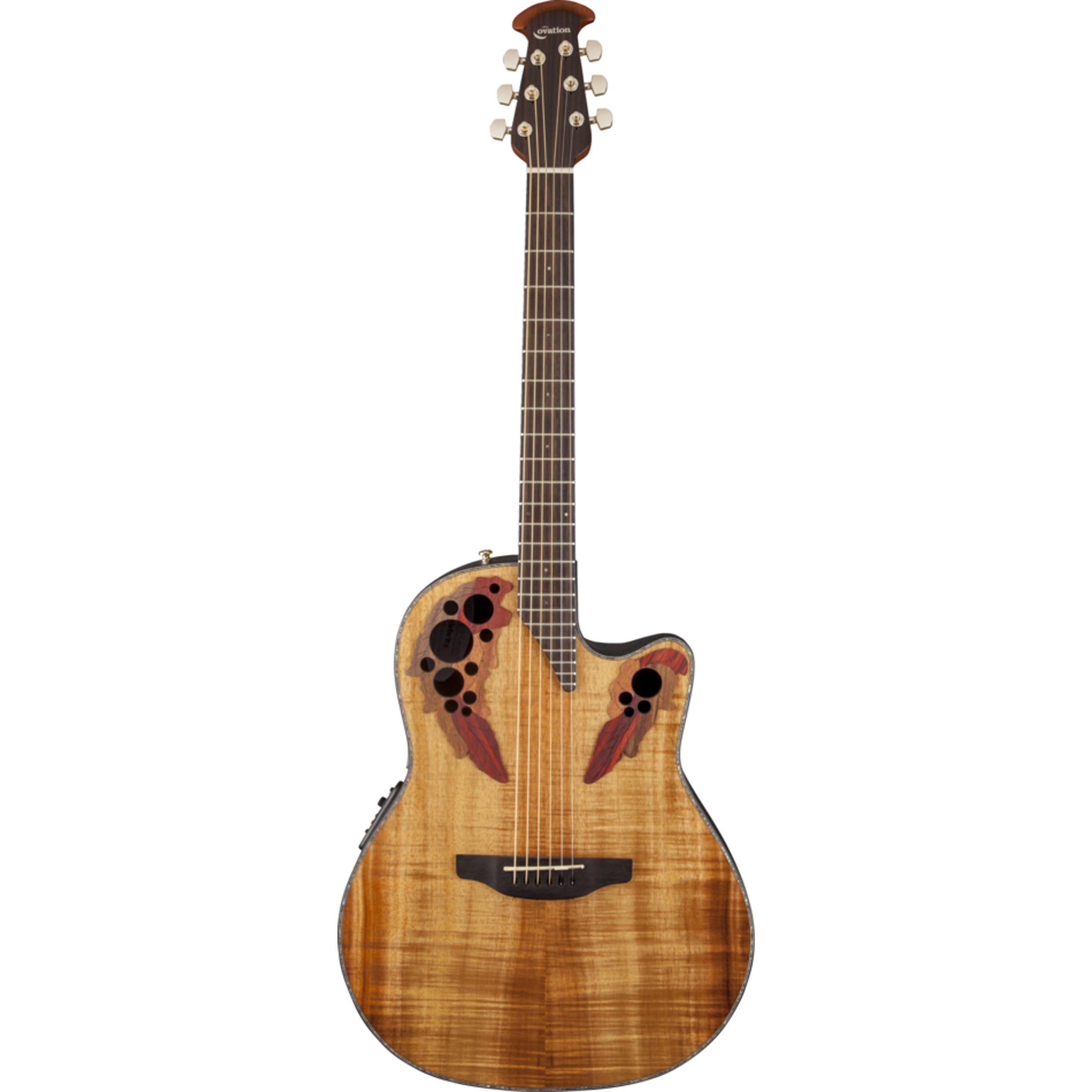
Figure 1: Front view of the Ovation CE44P-FKOA Acoustic-Electric Guitar, showcasing the Figured Koa top and multi-sound hole design.

Figure 2: Detail view of the guitar body, highlighting the Figured Koa wood grain and binding.
3. Setup
3.1 Unpacking
Carefully remove the guitar from its packaging. Inspect the instrument for any signs of damage that may have occurred during shipping. Retain all packaging materials for future transport or storage.
3.2 Battery Installation
The Ovation CE44P-FKOA requires one 9V battery for its preamp system. The battery compartment is typically located on the side of the guitar body, near the output jack. Ensure the battery is inserted with correct polarity.
- Locate the battery compartment cover.
- Open the cover and insert a fresh 9V battery, observing the polarity markings.
- Close the battery compartment cover securely.
The low-battery light on the preamp will indicate when the battery needs replacement.
3.3 Tuning the Guitar
Your guitar is equipped with an onboard tuner for convenience.
- Press the 'Tuner' button on the OP-4BT preamp to activate the tuner.
- Pluck each string individually. The display will show the note being played and indicate if it is sharp, flat, or in tune.
- Adjust the tuning pegs until each string is accurately tuned (E-A-D-G-B-e, from thickest to thinnest string).
- Press the 'Tuner' button again to deactivate the tuner.
4. Operating
4.1 Acoustic Play
The CE44P-FKOA can be played as a traditional acoustic guitar without any amplification. Its Lyrachord body and Koa top are designed to produce a rich, resonant acoustic tone.
4.2 Amplified Play (Using the Preamp)
To connect your guitar to an amplifier or PA system:
- Ensure your amplifier or PA system is turned off and its volume is set to minimum.
- Connect a standard 1/4 inch (6.35mm) instrument cable from the guitar's output jack to the input of your amplifier or PA system.
- Turn on your amplifier or PA system.
- Adjust the Volume/Gain control on the guitar's OP-4BT preamp to your desired level.
- Use the Three-Band EQ (Bass, Mid, Treble) controls on the preamp to shape your amplified tone. Adjust these controls to suit your playing style and the acoustic environment.
- Gradually increase the volume on your amplifier or PA system to the desired listening level.
Note: Always connect or disconnect cables with the amplifier volume turned down to prevent loud pops or potential damage to your equipment.
5. Maintenance
5.1 Cleaning
- Wipe down the guitar body, neck, and strings with a soft, lint-free cloth after each use to remove sweat and oils.
- For the gloss finish, use a guitar-specific polish sparingly.
- Avoid using abrasive cleaners or solvents, as these can damage the finish.
5.2 String Replacement
Strings should be replaced regularly to maintain optimal tone and playability. The guitar uses Bronze strings.
- Loosen the old strings using a string winder.
- Remove the bridge pins and old strings.
- Insert new strings, ensuring the ball end is seated correctly under the bridge pin.
- Thread the string through the tuning machine post and wind it neatly.
- Tune the new strings to pitch. New strings will stretch, requiring frequent re-tuning initially.
5.3 Environmental Considerations
Store your guitar in a stable environment, away from extreme temperature changes, direct sunlight, and high humidity. A guitar case provides the best protection.
6. Troubleshooting
6.1 No Sound When Amplified
- Check Battery: Ensure the 9V battery is fresh and correctly installed. The low-battery light on the preamp will indicate a depleted battery.
- Check Cable: Verify that the instrument cable is securely connected to both the guitar and the amplifier. Try a different cable if available.
- Check Amplifier: Ensure the amplifier is powered on and its volume is not at zero. Test the amplifier with another instrument if possible.
- Check Guitar Volume: Confirm the volume/gain control on the guitar's preamp is turned up.
6.2 Poor Sound Quality / Buzzing
- String Condition: Old or corroded strings can cause poor tone and buzzing. Replace strings if necessary.
- Tuning: Ensure the guitar is properly tuned.
- EQ Settings: Adjust the Bass, Mid, and Treble controls on the preamp. Extreme settings can sometimes lead to undesirable sound.
- Action/Setup: If buzzing persists, the guitar may require a professional setup to adjust string action or neck relief.
7. Specifications
| Feature | Specification |
|---|---|
| Model Number | CE44P-FKOA |
| Item Weight | 7.75 pounds |
| Product Dimensions | 43.76 x 23 x 6.5 inches |
| Batteries | 1 x 9V (included) |
| Back Material | Fiberglass |
| Body Material | Fiberglass |
| Color Name | Figured Koa |
| Connector Type | 1/4 inch (6.35mm) jack |
| Fretboard Material | Rosewood |
| Scale Length | 25.25 inches |
| String Material | Bronze |
| Top Material | Koa Wood |
| Neck Material Type | Mora |
| Number of Strings | 6 |
| Guitar Bridge System | Fixed |
| Hand Orientation | Right |
8. Warranty and Support
For information regarding warranty coverage and customer support, please refer to the official Ovation website or contact your authorized dealer. Keep your proof of purchase for warranty claims.
Online Resources: For additional support, product registration, and frequently asked questions, visit the official Ovation website: www.ovationguitars.com


