
Go Power GP-FLEX-35
Go Power! GP-FLEX-35 35W Flexible Solar Kit User Manual
Model: GP-FLEX-35
Introduction
This manual provides essential information for the safe and efficient operation of your Go Power! GP-FLEX-35 35W Flexible Monocrystalline Solar Kit. This kit is designed for use in various environments, including marine, RV, and long-haul truck applications, providing a reliable power source for battery charging.
The kit includes a 35-watt flexible solar panel, a 10 Amp PWM solar charge controller, and necessary cabling for installation.

Figure 1: Go Power! GP-FLEX-35 Flexible Solar Kit components.
Safety Information
- Read all instructions before installation and operation.
- Wear appropriate personal protective equipment during installation.
- Ensure all electrical connections are secure and properly insulated to prevent short circuits.
- Do not attempt to disassemble or modify the solar panel or controller.
- Keep children and unauthorized personnel away from the installation area.
- This product contains chemicals known to the State of California to cause cancer and birth defects or other reproductive harm. Wash hands after handling.
Kit Contents
- 1x Go Power! GP-FLEX-35 Flexible Monocrystalline Solar Panel (35W)
- 1x Go Power! GP-PWM-10 Solar Charge Controller (10 Amp)
- 1x Set of 25 feet #10 AWG Cables
Setup and Installation
1. Site Selection and Panel Mounting
The GP-FLEX-35 solar panel is designed for flexible mounting on various surfaces. It can curve up to 30 degrees, allowing it to conform to curved surfaces such as RV roofs, boat decks, or truck bodies.

Figure 2: Panel flexibility and thickness specifications.
- Choose a location that receives maximum sunlight exposure throughout the day.
- Ensure the surface is clean, dry, and free of debris before mounting.
- Use an appropriate adhesive for the specific surface material (e.g., RV roof, boat deck). Adhesive is not included in the kit.
- The panel is durable and can be walked on, but avoid sharp objects or excessive force.
2. Solar Charge Controller Installation (GP-PWM-10)
The GP-PWM-10 solar charge controller manages the power flow from the solar panel to your batteries, preventing overcharging and optimizing battery life. It can handle up to 10 amps of solar charge, supporting up to 180 watts of solar input.
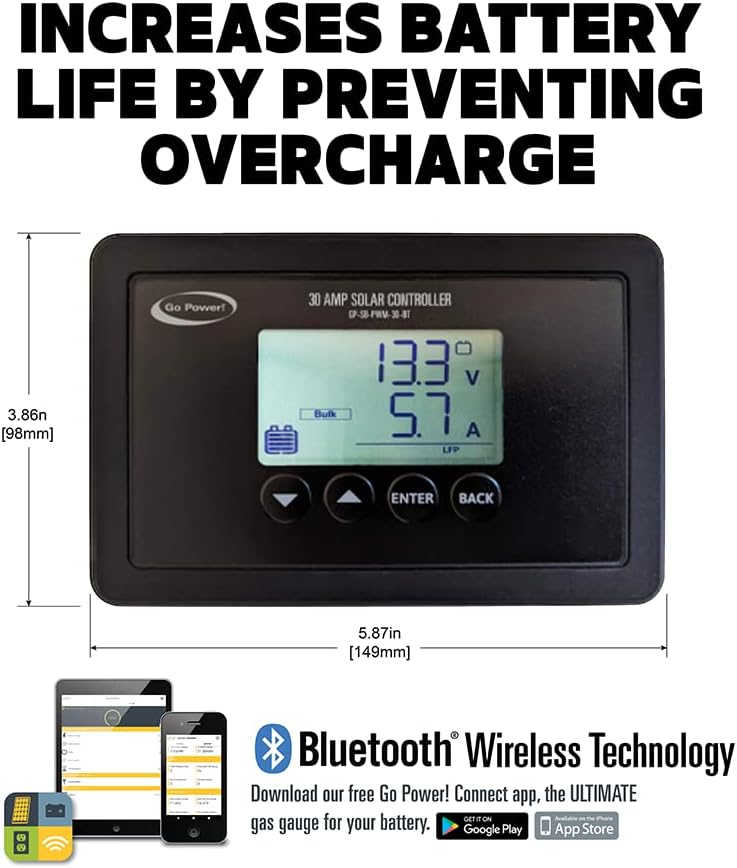
Figure 3: GP-PWM-10 Solar Charge Controller.
- Mount the controller in a dry, well-ventilated area, close to the batteries but away from direct sunlight or extreme temperatures.
- Ensure there is sufficient space around the controller for air circulation.
3. Wiring Connections
Follow these steps for wiring the solar kit. It is crucial to connect components in the correct order to prevent damage.
- Connect to Battery: First, connect the supplied #10 AWG cables from the solar charge controller to your battery bank. Ensure correct polarity (positive to positive, negative to negative).
- Install Fuse: Install a fuse (not explicitly stated if included, but recommended) on the positive line between the controller and the battery.
- Connect to Solar Panel: Next, connect the solar panel cables to the solar charge controller. Ensure correct polarity.
- Verify Connections: Double-check all connections for tightness and correct polarity before proceeding.
The 25-foot #10 AWG cables are designed to connect the panel to the controller and the controller to the batteries. Note that this length is for the total run, meaning the distance from the panel to the controller and from the controller to the battery should be considered when planning cable routing.
Operating Instructions
Once installed, the Go Power! GP-FLEX-35 solar kit operates automatically to charge your batteries. The GP-PWM-10 controller will display charging status and battery voltage.
- Monitoring: Observe the display on the GP-PWM-10 controller to monitor battery voltage and charging current.
- Battery Charging: The controller will regulate the charge to ensure your batteries are maintained at 100% without overcharging.
- Quiet Operation: The solar charging system operates silently, providing power without noise or fuel consumption.
Maintenance
The Go Power! GP-FLEX-35 solar panel requires minimal maintenance.
- Panel Cleaning: Periodically clean the surface of the solar panel with water and a soft cloth to remove dirt, dust, or debris that may reduce efficiency. Avoid abrasive cleaners or harsh chemicals.
- Connection Checks: Annually inspect all electrical connections for corrosion or looseness. Tighten as necessary.
- Controller Inspection: Ensure the solar charge controller remains free of dust and is adequately ventilated.
Troubleshooting
| Problem | Possible Cause | Solution |
|---|---|---|
| No power output from solar panel | Panel is shaded or dirty; faulty connection; damaged panel. | Clean panel surface; check for obstructions; verify all wiring connections; inspect panel for physical damage. |
| Controller display is off or not functioning | No power from battery; reverse polarity connection. | Check battery connections and voltage; ensure correct polarity from battery to controller. |
| Low charging current | Insufficient sunlight; dirty panel; battery fully charged; wiring issues. | Ensure panel is in direct sunlight; clean panel; check battery status; inspect wiring for resistance or loose connections. |
| Battery not charging to 100% | Battery issues; insufficient solar input; controller settings. | Test battery health; ensure adequate sunlight and clean panel; consult controller manual for settings. |
Specifications

Figure 4: GP-FLEX-35 Solar Panel dimensions.
| Feature | Specification |
|---|---|
| Model | GP-FLEX-35 |
| Brand | Go Power! |
| Panel Type | Flexible Monocrystalline Silicon |
| Maximum Power (Panel) | 35 Watts |
| Controller Type | PWM (Pulse Width Modulation) |
| Controller Max Current | 10 Amps |
| Controller Max Solar Input | 180 Watts |
| Panel Dimensions (L x W x H) | 21.1 x 15.25 x 0.6 inches (approx. 53.6 x 38.7 x 1.5 cm) |
| Panel Weight | 1.1 Pounds (approx. 0.5 kg) |
| Flexibility | Up to 30 degrees |
| Included Cables | 25 feet #10 AWG |
Warranty Information
Specific warranty details are typically provided with the product packaging or on the manufacturer's official website. Please refer to the documentation included with your Go Power! GP-FLEX-35 kit for the most accurate and up-to-date warranty terms and conditions.
Generally, Go Power! products come with a limited warranty covering defects in materials and workmanship. Keep your proof of purchase for warranty claims.
Support and Contact
For technical assistance, troubleshooting, or further information regarding your Go Power! GP-FLEX-35 Flexible Solar Kit, please contact Go Power! customer support.
- Manufacturer: Go Power!
- Website: gopower.com (Example link, actual link might vary)
- Refer to your product packaging for specific contact numbers or email addresses.
Related documentsGP-FLEX-35


Ask a question about this manual
Ask about setup, troubleshooting, compatibility, parts, safety, or missing instructions. Manuals+ will review the question and use this page’s manual context to help answer it.