
Introduction
This manual provides detailed instructions for the installation, operation, and maintenance of your Millennium 5422-SN Two Light Vanity fixture. This fixture is part of the Neo-Industrial collection, featuring a satin nickel finish and designed for vanity lighting applications. Please read this manual thoroughly before beginning installation to ensure safe and proper use.
Safety Information
WARNING: Risk of electric shock. Disconnect power at the fuse box or circuit breaker before installing or servicing. All electrical connections must be in accordance with local codes, ordinances, or the National Electric Code (NEC). If you are unfamiliar with proper electrical wiring connections, obtain the services of a qualified electrician.
- Do not connect this fixture to an ungrounded electrical system.
- Do not use bulbs exceeding the maximum wattage specified (100 watts per socket).
- Ensure all wire connections are secure and properly insulated.
- This fixture is rated for Damp locations. Do not install in areas subject to direct water spray.
- Always wear safety glasses during installation.
Package Contents
Verify that all components are present before beginning installation:
- Millennium 5422-SN Two Light Vanity Fixture (1)
- Mounting Hardware Kit (includes mounting plate, screws, wire nuts)
- Installation Instructions (this manual)
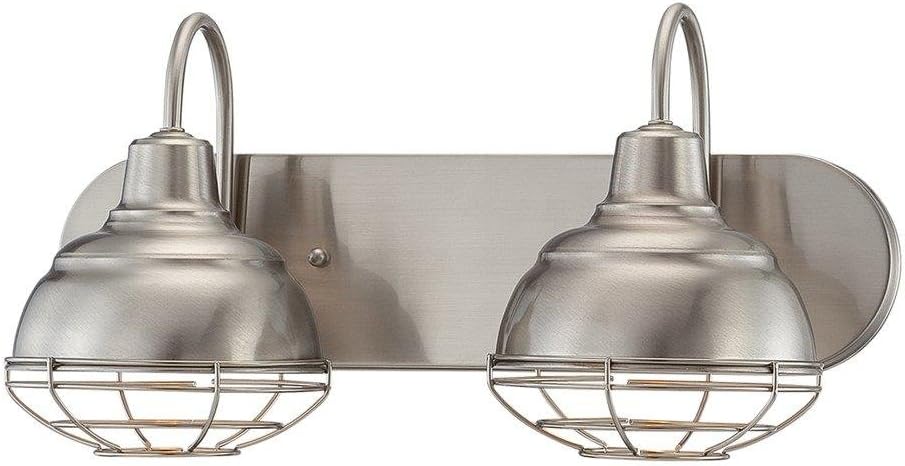
Image: The Millennium 5422-SN Two Light Vanity Fixture, showcasing its satin nickel finish and industrial-inspired design with two caged light shades.
Setup and Installation
- Turn Off Power: Locate the circuit breaker or fuse box that supplies power to the light fixture location. Turn off the power completely.
- Prepare Mounting Surface: Ensure the wall surface is clean, dry, and structurally sound for wall mounting.
- Install Mounting Plate: Attach the mounting plate to the electrical junction box using the provided screws. Ensure it is securely fastened.
- Make Electrical Connections:
- Connect the fixture's black wire to the house's black (hot) wire using a wire nut.
- Connect the fixture's white wire to the house's white (neutral) wire using a wire nut.
- Connect the fixture's ground wire to the house's ground wire (bare copper or green) and to the mounting plate's ground screw.
Note: If your house wiring does not include a ground wire, consult a qualified electrician.
- Mount Fixture: Carefully tuck all wires into the junction box. Align the fixture's base with the mounting plate and secure it with the decorative nuts or screws provided.
- Install Bulbs: Insert two standard incandescent or LED bulbs (not included) into the sockets. Do not exceed 100 watts per bulb.
- Restore Power: Turn the power back on at the circuit breaker or fuse box.
Operating Instructions
The Millennium 5422-SN Two Light Vanity fixture operates via a standard wall switch (toggle or push button, depending on your home's wiring). Simply flip the switch to turn the light on or off.
Maintenance
To maintain the appearance and functionality of your vanity light fixture:
- Cleaning: Always turn off the power before cleaning. Wipe the fixture with a soft, dry cloth. Do not use abrasive cleaners, solvents, or polishes as they may damage the finish.
- Bulb Replacement: Ensure the power is off and the bulbs have cooled before replacing. Use only bulbs that meet the specified wattage and type.
- Inspection: Periodically check for loose connections or damaged wiring. If any issues are found, disconnect power and consult a qualified electrician.
Troubleshooting
| Problem | Possible Cause | Solution |
|---|---|---|
| Light does not turn on | No power to fixture; Loose wire connection; Faulty bulb; Tripped circuit breaker. | Check power supply at breaker/fuse box; Verify all wire connections are secure; Replace bulb; Reset circuit breaker. |
| Light flickers | Loose bulb; Loose wire connection; Incompatible dimmer switch (if applicable). | Tighten bulb; Check wire connections; Ensure dimmer switch is compatible with bulb type. |
| Bulbs burn out quickly | Incorrect bulb wattage; Voltage fluctuations. | Ensure bulbs do not exceed 100 watts; Consult an electrician if voltage issues persist. |
Specifications
| Feature | Detail |
|---|---|
| Brand | Millennium |
| Model Number | 5422-SN |
| Dimensions (L x W x H) | 1 x 18 x 9 inches |
| Item Weight | 4.69 pounds |
| Material | Plastic, Metal, Glass |
| Finish Type | Satin Nickel |
| Number of Light Sources | 2 |
| Voltage | 120 Volts |
| Max Wattage per Bulb | 100 watts |
| Mounting Type | Wall Mount |
| Safety Rating | UL Listed, Damp Location Rated |
Warranty and Support
This Millennium 5422-SN Two Light Vanity fixture comes with a manufacturer's warranty. For specific details regarding warranty coverage and duration, please refer to the warranty information provided with your purchase or visit the official Millennium Lighting website.
For technical support, replacement parts, or any inquiries not covered in this manual, please contact Millennium Lighting customer service. Contact information can typically be found on the manufacturer's website or on the product packaging.


