
1. Introduction
Thank you for choosing the Brookstone Global Power Converter. This device is designed to provide power conversion and plug adaptation for your electronic appliances when traveling internationally. It converts 220/240 volts to 110/120 volts and includes built-in adapter plugs for use in over 150 countries.
2. Important Safety Information
- Indoor Use Only: This power converter is intended for indoor use in dry locations only. Do not expose to moisture or extreme temperatures.
- Disconnect When Not In Use: Always unplug the converter from the wall outlet when not in use.
- Wattage Limit: Do not exceed the maximum wattage rating of 1875 watts. Overloading the converter can cause damage to the unit or connected appliances, and may pose a fire hazard.
- Appliance Compatibility: This converter is designed for use with small travel appliances such as hair dryers, curling irons, and shavers. It is not suitable for high-power appliances like refrigerators, air conditioners, or certain medical devices.
- Voltage Conversion: This device converts 220/240V to 110/120V. It does not convert 110/120V to 220/240V. Ensure your appliance is compatible with the output voltage.
- Children and Pets: Keep the device out of reach of children and pets.
- Damage: Do not operate the converter if it has been damaged in any way. Contact customer support for assistance.
3. Product Features
- Converts power and adapts plugs in over 150 countries.
- Supports small appliances up to 1875 watts.
- All-in-one design with 4 built-in adapter plugs (Europe, UK, Australia/China).
- Dual modes for low- and high-wattage appliances.
- Converts from 220/240 volts to 110/120 volts.
4. Setup and Operation
4.1 Identifying the Correct Adapter Plug
The Brookstone Global Power Converter features an all-in-one design with integrated adapter plugs for various regions. To select the appropriate plug, slide the corresponding button on the side of the unit.
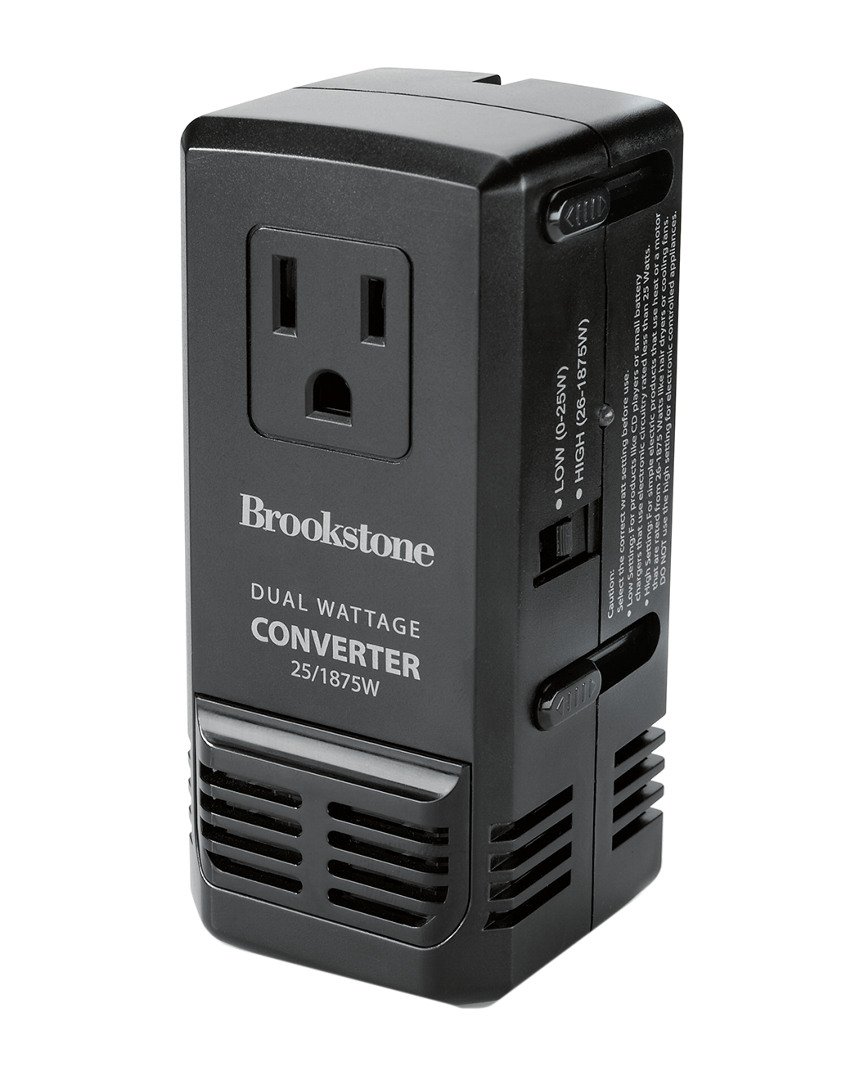
Image 1: The Brookstone Global Power Converter with the European plug extended. This configuration is suitable for many countries in Europe.

Image 2: The Brookstone Global Power Converter with the UK plug extended. This configuration is used in the United Kingdom and other regions.
4.2 Selecting Converter Mode
The converter offers dual modes for different wattage appliances:
- Low Wattage Mode: For appliances up to 25W (e.g., chargers for phones, cameras, tablets).
- High Wattage Mode: For appliances from 26W up to 1875W (e.g., hair dryers, curling irons, travel irons).
Ensure you select the correct mode based on your appliance's wattage to prevent damage. The mode selector switch is typically located on the side of the unit. Refer to your appliance's label for its wattage rating.
4.3 Connecting Your Appliance
- Identify the correct adapter plug for your destination country and slide it out until it locks into place.
- Select the appropriate wattage mode (Low or High) for your appliance.
- Plug your 110/120V appliance into the universal outlet on the converter.
- Plug the converter into the wall outlet.
- Turn on your appliance.
Note: Always ensure the converter is securely plugged into the wall and your appliance is securely plugged into the converter.
5. Maintenance
- Cleaning: Disconnect the converter from all power sources before cleaning. Wipe the exterior with a soft, dry cloth. Do not use liquid cleaners or abrasive materials.
- Storage: Store the converter in a cool, dry place away from direct sunlight and moisture. Ensure all plugs are retracted before storage.
- Inspection: Periodically inspect the converter for any signs of damage, such as frayed wires or loose connections. Do not use if damaged.
6. Troubleshooting
- Converter Not Powering On:
- Ensure the converter is fully plugged into a live wall outlet.
- Check the wall outlet with another device to confirm it is functional.
- Verify that the correct adapter plug is fully extended and locked.
- Appliance Not Working:
- Confirm your appliance is securely plugged into the converter.
- Check that the appliance's wattage does not exceed the converter's 1875W limit.
- Ensure the correct wattage mode (Low/High) is selected on the converter.
- Verify that your appliance is designed for 110/120V input, as the converter steps down 220/240V to 110/120V.
- Test your appliance directly in a compatible 110/120V outlet if available, to rule out appliance malfunction.
- Overheating:
- Immediately unplug the converter and the appliance.
- Allow the unit to cool down.
- Ensure the appliance's wattage is within the converter's limits.
- Avoid using the converter in enclosed spaces where heat cannot dissipate.
- Prongs Not Extending/Retracting:
- Gently attempt to slide the button again. Do not force it.
- Ensure no debris is obstructing the mechanism.
- If the mechanism is stuck or broken, discontinue use and contact customer support.
7. Specifications
| Specification | Value |
|---|---|
| Product Dimensions | 5.56 x 2.83 x 2.24 inches |
| Item Weight | 12 ounces (0.75 Pounds) |
| Model Number | 858280 |
| Brand | Brookstone |
| Color | Black |
| Input Voltage | 220/240 Volts AC |
| Output Voltage | 110/120 Volts AC |
| Max Wattage | 1875 Watts |
| UPC | 883594044281 |
8. Warranty and Support
For warranty information or technical support, please refer to the official Brookstone website or contact their customer service department. Keep your purchase receipt as proof of purchase.