
1. Introduction
The Welch Allyn SureTemp Plus Electronic Thermometer is a precision instrument designed for quick and accurate measurement of core body temperature. This device is suitable for use in various clinical settings and home environments, providing reliable readings for both adults and pediatric patients. Its intuitive design and robust construction ensure consistent performance.
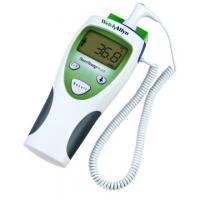
Image: The Welch Allyn SureTemp Plus Electronic Thermometer, a white and green handheld device with a digital display and coiled probe cord.
2. Safety Information
- Always use a new, disposable probe cover for each patient to prevent cross-contamination.
- Do not immerse the thermometer in liquid. Clean the device according to the maintenance instructions.
- Keep the device out of reach of children.
- Do not use the thermometer near strong electromagnetic fields.
- If the device is dropped or damaged, discontinue use and contact customer support.
- Ensure batteries are correctly installed and replaced when the low battery indicator appears.
3. Components
The Welch Allyn SureTemp Plus Electronic Thermometer consists of the following main components:
- Thermometer Unit: The main handheld device with a digital display and control buttons.
- Probe: The temperature sensing tip, connected to the unit by a coiled cord.
- Probe Well: A receptacle on the unit for storing the probe and dispensing probe covers.
- Disposable Probe Covers: Single-use covers that fit over the probe tip.
- LCD Display: Backlit screen showing temperature readings, mode indicators, and battery status.
- Control Buttons: Buttons for power, mode selection (adult/pediatric, oral/axillary/rectal), unit selection (C/F), and recall.
4. Setup
4.1. Battery Installation
- Locate the battery compartment cover on the back of the thermometer unit.
- Open the cover and insert three (3) AA batteries, ensuring correct polarity.
- Close the battery compartment cover securely.
4.2. Loading Probe Covers
- Open the box of Welch Allyn disposable probe covers.
- Insert the box into the probe well on the thermometer unit, ensuring the covers are facing the correct direction for dispensing.
5. Operating Instructions
5.1. Powering On/Off
The thermometer automatically powers on when the probe is removed from the probe well. It powers off automatically when the probe is returned to the well or after a period of inactivity.
5.2. Attaching a Probe Cover
- Remove the probe from the probe well. The unit will power on.
- Insert the probe tip into a new disposable probe cover from the dispenser until it clicks into place. The blue part on the probe will pop up slightly, indicating a secure fit.
5.3. Selecting Measurement Mode (Adult/Pediatric, Oral/Axillary/Rectal)
Press the mode selection button (typically indicated by a person icon) to cycle through the available measurement modes:
- Adult Oral: For oral temperature measurement in adults.
- Adult Axillary: For underarm temperature measurement in adults.
- Pediatric Axillary: For underarm temperature measurement in children.
- Rectal: For rectal temperature measurement (use dedicated rectal probe if available, or ensure proper hygiene with probe covers).
The selected mode will be displayed on the LCD screen.
5.4. Selecting Temperature Unit (Celsius/Fahrenheit)
Press the C/F button to toggle between Celsius (°C) and Fahrenheit (°F) temperature units. The selected unit will be displayed on the LCD screen.
5.5. Taking a Temperature Reading
- Ensure a new probe cover is securely attached and the correct measurement mode is selected.
- Place the probe tip in the appropriate measurement site (e.g., under the tongue for oral, in the armpit for axillary, or rectally).
- Hold the probe steady until the thermometer beeps, indicating the measurement is complete and the temperature is displayed on the screen.
- Note the temperature reading.
5.6. Disposing of Probe Covers
After taking a temperature, hold the probe over a waste receptacle and press the eject button (usually a small button near the probe connection) to release the used probe cover. Dispose of the cover properly.
5.7. Recalling Previous Readings
The SureTemp Plus thermometer can store previous temperature readings. To view the last reading, press the Recall button. The display will show the last recorded temperature and the mode it was taken in.
6. Maintenance and Cleaning
6.1. Cleaning the Thermometer Unit
- Wipe the exterior of the thermometer unit with a soft cloth dampened with a mild detergent or an approved disinfectant solution.
- Do not use abrasive cleaners or immerse the unit in liquid.
- Ensure the unit is completely dry before storage or next use.
6.2. Probe Cleaning
The probe tip is protected by disposable covers. If the probe itself becomes soiled, clean it with an approved disinfectant wipe and allow it to air dry.
6.3. Storage
Store the thermometer in a clean, dry place at room temperature, away from direct sunlight and extreme temperatures.
7. Troubleshooting
| Problem | Possible Cause | Solution |
|---|---|---|
| No display when powered on | Low or dead batteries; incorrectly installed batteries. | Replace batteries with new AA batteries; ensure correct polarity. |
| Inaccurate readings | Improper probe placement; used or damaged probe cover; probe not fully inserted into cover. | Ensure correct probe placement for the selected mode; use a new, undamaged probe cover; ensure probe cover is securely attached. |
| "ERR" message on display | Measurement error; device malfunction. | Repeat measurement; if error persists, contact customer support. |
| Probe cover not ejecting | Eject button malfunction; obstruction. | Ensure no obstruction; if issue persists, contact customer support. |
8. Specifications
- Model: 01690-200 (SureTemp Plus 690)
- Brand: Welch Allyn
- Display Type: Digital, Backlit LCD
- Power Source: Battery Powered (3x AA batteries)
- Temperature Range: 60.0°F to 105.9°F (15.6°C to 41.1°C)
- Accuracy: High Accuracy
- Measurement Sites: Oral, Axillary, Rectal
- Memory: Recalls last temperature reading
- Included Components: Oral/Rectal Probe with Cord, Probe Well, Optional Wall Mount
- Material: Plastic
- Product Care: Wipe Clean
- Package Dimensions: 9.96 x 8.5 x 4.8 inches
- Item Weight: 1.41 Pounds
9. Warranty and Support
For specific warranty information, please refer to the warranty card included with your product packaging or visit the official Welch Allyn website. For technical support, troubleshooting assistance, or to order replacement parts, please contact Welch Allyn customer service through their official channels. Keep your purchase receipt and model number handy when contacting support.


