Introduction
The BONECO S450 Digital Steam Humidifier is designed to provide optimal humidity levels in your indoor environment. This appliance heats water to its boiling point, producing hygienic, germ-free steam that is released into the air. This manual provides essential information for the safe and efficient operation, maintenance, and troubleshooting of your S450 humidifier. Please read these instructions carefully before first use and keep them for future reference.
Safety Instructions
- Always place the humidifier on a firm, level, and water-resistant surface.
- Do not place the humidifier directly on carpet or soft surfaces that may block the air vents.
- Keep the humidifier out of reach of children and pets. The steam produced is hot and can cause burns.
- Ensure the power cord is not damaged and is placed where it cannot be tripped over.
- Unplug the humidifier before filling, cleaning, or performing any maintenance.
- Do not immerse the appliance in water or other liquids.
- Only use clean tap water. Do not add essential oils directly into the water tank, use the designated fragrance container.
- Do not block the steam outlet.
- If the appliance is damaged, do not operate it. Contact BONECO customer support.
Product Overview
Familiarize yourself with the components of your BONECO S450 humidifier.

Figure 1: Front view of the BONECO S450 Digital Steam Humidifier, showing the water level indicator and control panel.

Figure 2: Close-up of the digital display and control panel, featuring buttons for AUTO mode, Sleep mode, timer, and humidity level adjustment.

Figure 3: Interior view of the humidifier base, showing the heating element and the placement for anti-mineral pads.
Setup
- Unpacking: Carefully remove the humidifier from its packaging. Retain packaging for future transport or storage.
- Placement: Place the humidifier on a stable, level, and water-resistant surface, at least 6 inches (15 cm) away from walls and furniture. Ensure the steam outlet is not obstructed.
- Filling the Water Tank:
- Remove the water tank from the base.
- Unscrew the tank cap at the bottom of the water tank.
- Fill the tank with clean tap water. Do not exceed the maximum fill line.
- Securely screw the tank cap back on.
- Place the filled water tank back onto the humidifier base.
- Anti-Mineral Pads: Insert one of the included anti-mineral pads into the designated area in the base of the humidifier (refer to Figure 3). These pads help reduce mineral buildup.
- Power Connection: Plug the power cord into a suitable electrical outlet. The humidifier is now ready for operation.
Operating Instructions
The BONECO S450 features a digital LED display and touch controls for easy operation.
- Power On/Off: Press the power button (⏻) on the control panel to turn the humidifier on or off.
- Setting Desired Humidity:
- Use the up (▲) and down (▼) arrows to adjust the desired humidity level, ranging from 30% to 70% relative humidity (RH).
- The humidifier will automatically maintain the set humidity level.
- AUTO Mode: Press the "AUTO" button to activate automatic operation. In this mode, the humidifier will automatically select the optimal output level to reach and maintain a comfortable humidity.
- ECON Mode: The humidifier may also feature an ECON mode (Economy mode) which optimizes energy consumption while maintaining humidity. Refer to the display for activation.
- Display Dimmer: The display features an auto dimmer for night use. This function automatically reduces the brightness of the LED display in low light conditions.
- Fragrance Container: To use fragrances, add a few drops of essential oil to the designated fragrance container, typically a small tray located on the side or back of the unit. Do not add oils directly into the water tank.
- Empty Tank Indicator: The humidifier will indicate when the water tank is empty and will automatically shut off to prevent damage. Refill the tank as described in the Setup section.
Maintenance
Regular cleaning and maintenance ensure the longevity and efficient operation of your BONECO S450 humidifier. Always unplug the unit before cleaning.
- Daily Maintenance:
- Empty any remaining water from the base and water tank.
- Rinse the water tank and base with fresh water.
- Wipe down the exterior with a soft, damp cloth.
- Weekly Cleaning / Descaling:
- The S450 features a self-cleaning mode and a decalcification mode. Follow the instructions on the display for activating these modes.
- For manual descaling, remove the water tank and base.
- Pour a descaling solution (e.g., citric acid solution or a commercial descaler recommended for humidifiers) into the heating element area in the base.
- Allow the solution to sit for the recommended time (e.g., 30 minutes to several hours, or overnight for heavy buildup).
- Carefully scrub the heating plate with a soft brush or sponge to remove mineral deposits. Avoid using abrasive materials that could scratch the surface.
- Rinse the base thoroughly with clean water multiple times to remove all descaling solution residue.
- Clean the water tank with a mild detergent and rinse thoroughly.
- Anti-Mineral Pads Replacement: The included anti-mineral pads help reduce mineral buildup. Replace these pads regularly, typically every 2-4 weeks depending on water hardness and usage. Dispose of used pads responsibly. The humidifier includes 2 anti-mineral pads.
Troubleshooting
| Problem | Possible Cause | Solution |
|---|---|---|
| Humidifier not producing steam. |
|
|
| Humidifier leaks water. |
|
|
| Unusual noise during operation. |
|
|
| Humidity level not increasing. |
|
|
Specifications
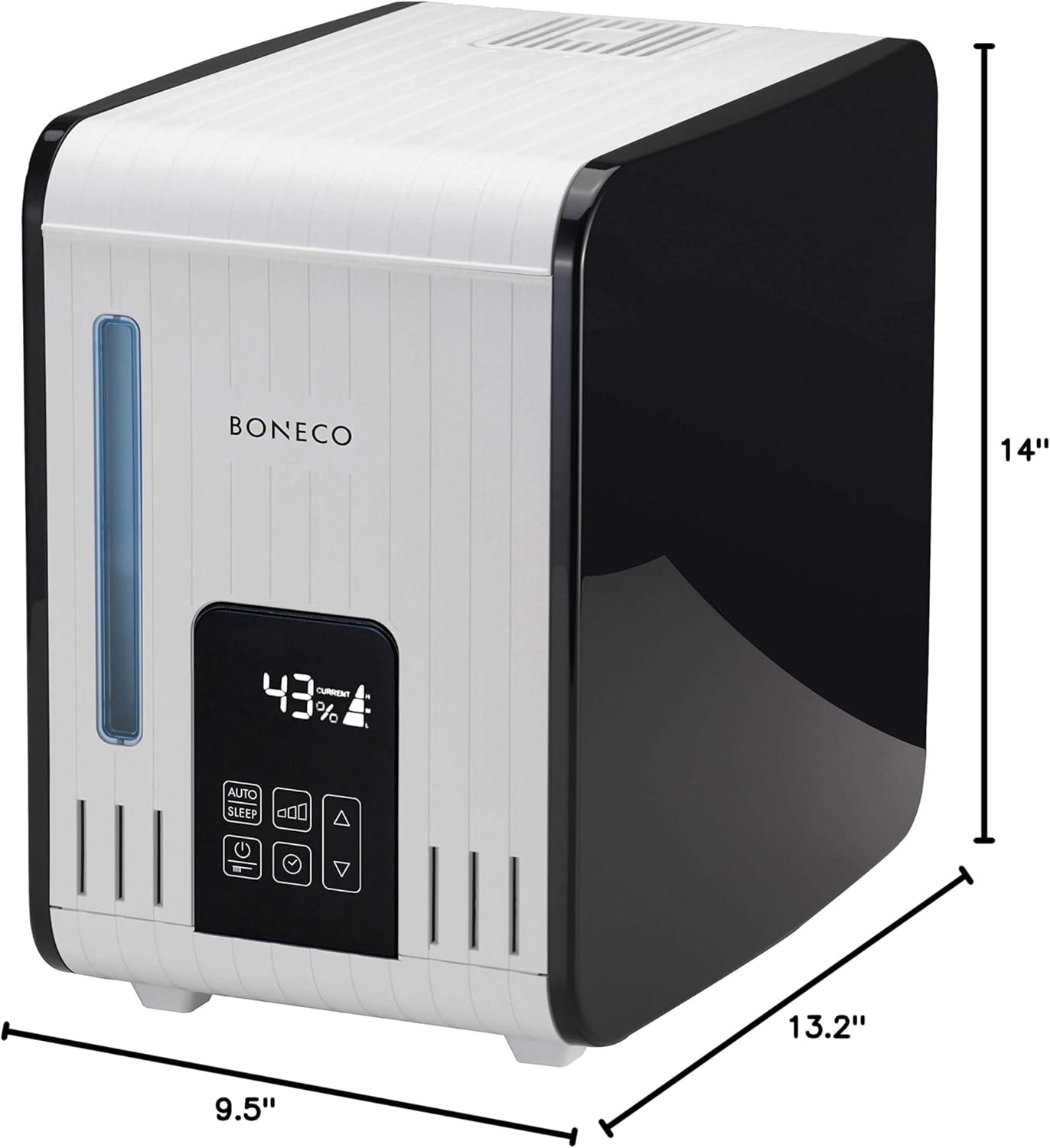
Figure 4: Dimensions of the BONECO S450 Digital Steam Humidifier.
- Model: AOS S450
- Product Dimensions: 9.5"D x 14"W x 13.2"H
- Item Weight: 10 Pounds
- Water Tank Capacity: 3.5 Gallons (7 Liters)
- Voltage: 230 Volts
- Wattage: 480 Watts
- Special Features: Auto Shut Off, Digital LED Display, Programmable Hygrostat, Self-Cleaning Mode, Decalcification Mode, Auto Display Dimmer, Fragrance Container.
- Included Components: 2 Anti-Mineral Pads
- Manufacturer: BONECO
Warranty and Support
For warranty information, product registration, or technical support, please visit the official BONECO website or contact their customer service department. Keep your purchase receipt as proof of purchase.


