
1. Introduction
Thank you for purchasing the WeighMax W-BX650C Pocket Scale. This precision instrument is designed for accurate weighing of various items up to 650 grams with a readability of 0.1 gram. Its compact size and durable construction make it ideal for portable use. Please read this manual thoroughly before operating the scale to ensure proper use and to achieve the best results.
2. Safety Information
- Do not overload the scale beyond its maximum capacity of 650 grams. Overloading can damage the internal sensor.
- Avoid extreme temperatures and humidity. Operate the scale in a stable environment.
- Keep the scale away from strong electromagnetic fields, which can affect accuracy.
- Handle the scale with care. Avoid dropping or subjecting it to sudden shocks.
- Clean the scale with a soft, damp cloth. Do not use abrasive cleaners or immerse the scale in water.
- Remove batteries if the scale will not be used for an extended period to prevent leakage.
3. Package Contents
- WeighMax W-BX650C Pocket Scale
- Protective Cover (doubles as a weighing tray)
- User Manual (this document)
- AAA Batteries (may or may not be included depending on retailer)
4. Setup
4.1 Battery Installation
- Locate the battery compartment on the underside of the scale.
- Open the battery compartment cover.
- Insert two (2) AAA batteries, ensuring correct polarity (+/-) as indicated inside the compartment.
- Close the battery compartment cover securely.
4.2 Initial Placement
Place the scale on a hard, flat, and stable surface. Uneven surfaces can affect weighing accuracy.
5. Operating Instructions
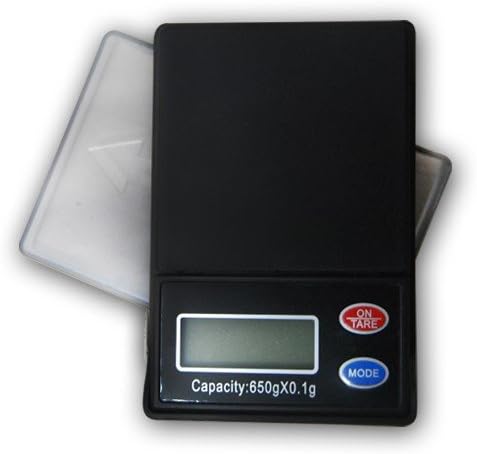
Figure 1: WeighMax W-BX650C Pocket Scale. This image shows the compact black scale with its clear protective cover slightly open. The scale features an LCD display, an "ON/TARE" button (red), and a "MODE" button (blue).
5.1 Power On/Off
- To turn on the scale, press the ON/TARE button. The display will show "88888" and then "0.0g" (or the last used unit).
- To turn off the scale, press and hold the ON/TARE button for approximately 3 seconds.
- The scale features an energy-saving auto shut-off function and will turn off automatically after a period of inactivity (typically 60 seconds).
5.2 Weighing Items
- Ensure the scale is on and displaying "0.0g".
- Carefully place the item to be weighed onto the center of the weighing platform.
- The weight will be displayed on the LCD screen.
5.3 Tare Function
The tare function allows you to subtract the weight of a container, so you only measure the contents.
- Place an empty container on the weighing platform. The display will show its weight.
- Press the ON/TARE button. The display will reset to "0.0g".
- Now, place the items to be weighed into the container. The display will show only the net weight of the items.
5.4 Mode Selection (Unit Conversion)
The scale can display weight in multiple units.
- With the scale on, press the MODE button repeatedly to cycle through the available weighing units: G (grams), OZ (ounces), OZT (troy ounces), and CT (carats).
- The selected unit will be indicated on the LCD display.
6. Maintenance
6.1 Cleaning
To clean the scale, use a soft, slightly damp cloth. Do not use harsh chemicals, abrasive cleaners, or immerse the scale in water. Ensure the scale is dry before storage or next use.
6.2 Storage
Store the scale in a clean, dry environment at room temperature. Use the protective cover to prevent dust and damage to the weighing platform and display. If storing for an extended period, remove the batteries.
7. Troubleshooting
| Problem | Possible Cause | Solution |
|---|---|---|
| Scale does not turn on | Dead or incorrectly installed batteries | Replace batteries with new AAA batteries, ensuring correct polarity. |
| Inaccurate readings | Uneven surface, air currents, overloaded, or needs calibration | Place on a stable, flat surface. Avoid drafts. Ensure weight is within capacity. If issues persist, consider professional calibration if available (not user-calibratable for this model). |
| "O_Ld" or "EEEE" displayed | Overload error | Remove the item immediately. Do not exceed 650g capacity. |
| "Lo" displayed | Low battery indicator | Replace batteries. |
8. Specifications
- Model: W-BX650C
- Capacity: 650 grams (6.5E+2 Grams)
- Readability: 0.1 gram
- Weighing Units: G (grams), OZ (ounces), OZT (troy ounces), CT (carats)
- Display: Backlight LCD
- Power: 2 x AAA batteries
- Auto Shut-off: Yes (energy saving)
- Form Factor: Mini / Pocket Scale
- Manufacturer: Busy Bee Distributor
- ASIN: B00HCRWHPA
9. Warranty and Support
For warranty information or technical support, please refer to the documentation provided at the time of purchase or contact your retailer. As specific warranty terms can vary, it is recommended to retain your proof of purchase.