
1. Product Overview
The Irradio Mini Blast is a compact, amplified Bluetooth speaker designed for portable audio playback. It offers high-efficiency sound output and versatile connectivity options.
Key Features:
- Bluetooth 3.0 EDR for wireless audio streaming.
- Integrated USB 2.0 connection.
- Auxiliary (AUX) input for connecting external audio devices.
- Integrated lithium battery for portable use.
- 3 Watts maximum speaker output power.
- DC 5V power supply.
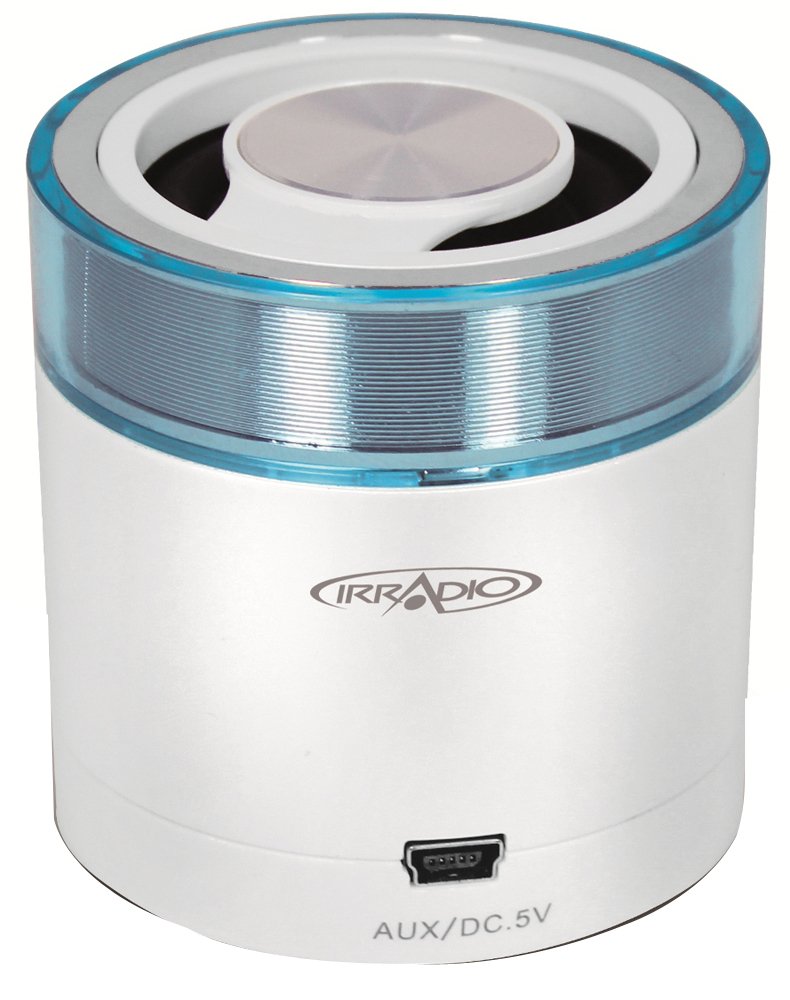
Image 1.1: Front view of the Irradio Mini Blast Amplified Bluetooth Speaker in white and blue. This image displays the compact design and primary color scheme of the device.
2. Package Contents
Please check the box for the following items:
- Irradio Mini Blast Speaker Unit
- USB Cable
- Quick Start Guide
- User Manual
3. Safety Information
Read all safety instructions before using this product. Failure to follow these instructions may result in electric shock, fire, or other hazards.
- Do not expose the device to extreme temperatures, direct sunlight, or high humidity.
- Do not disassemble, repair, or modify the device. This may void the warranty and pose a safety risk.
- Keep the device away from water and other liquids.
- Use only the provided or approved charging cable.
- Dispose of the device and its battery responsibly according to local regulations.
4. Setup
4.1 Initial Charging
- Connect the provided USB cable to the speaker's USB port.
- Connect the other end of the USB cable to a compatible USB power adapter (DC 5V, not included) or a computer's USB port.
- The charging indicator light will illuminate (color may vary) to show that the device is charging.
- Allow the speaker to charge fully before first use. The indicator light will change or turn off when charging is complete.
4.2 Powering On/Off
- To Power On: Press and hold the Power button (usually marked with Ⓘ) for approximately 3 seconds. An audible tone or indicator light will confirm the device is on.
- To Power Off: Press and hold the Power button for approximately 3 seconds. An audible tone or indicator light will confirm the device is off.
5. Operating Instructions
5.1 Bluetooth Pairing
- Ensure the speaker is powered on and within close proximity (within 10 meters) of your Bluetooth-enabled device.
- The speaker will automatically enter Bluetooth pairing mode, indicated by a flashing LED light (e.g., blue).
- On your audio device (smartphone, tablet, etc.), enable Bluetooth and search for available devices.
- Select "Irradio Mini Blast" from the list of found devices.
- Once paired, the LED indicator will typically stop flashing and remain solid, and an audible confirmation may be heard.
- You can now play audio from your device through the speaker.
5.2 AUX Connection
For devices without Bluetooth, use the AUX input:
- Connect one end of a 3.5mm audio cable (not included) to the AUX port on the Irradio Mini Blast speaker.
- Connect the other end of the 3.5mm audio cable to the headphone jack or audio output port of your external audio device.
- The speaker should automatically switch to AUX mode, or you may need to press a mode button if available.
- Adjust the volume on both your external device and the speaker.
5.3 USB Playback
The integrated USB 2.0 connection can be used for charging the speaker or potentially for playing audio from a USB storage device, depending on the model's specific features. Refer to the quick start guide for detailed USB playback instructions if applicable.
6. Maintenance
6.1 Cleaning
- Always power off the device before cleaning.
- Use a soft, dry, lint-free cloth to wipe the exterior of the speaker.
- Do not use abrasive cleaners, solvents, or strong chemicals, as these can damage the surface.
- Avoid getting moisture into any openings.
6.2 Storage
- Store the speaker in a cool, dry place away from direct sunlight and extreme temperatures.
- If storing for an extended period, charge the battery periodically (e.g., every 3-6 months) to maintain battery health.
7. Troubleshooting
| Problem | Possible Cause | Solution |
|---|---|---|
| Speaker does not power on. | Battery is depleted. | Charge the speaker using the provided USB cable. |
| Cannot connect via Bluetooth. | Bluetooth is not enabled on the device; speaker is out of range; speaker is already paired to another device. | Ensure Bluetooth is on; move device closer to speaker; disconnect from other devices and try pairing again. |
| No sound or low volume. | Volume is too low on speaker or connected device; incorrect input mode selected. | Increase volume on both speaker and connected device; ensure correct input mode (Bluetooth/AUX) is selected. |
| Sound distortion. | Volume is too high; audio source quality is poor. | Reduce volume on speaker and connected device; try a different audio source. |
8. Specifications
| Feature | Detail |
|---|---|
| Model Name | Mini |
| Model Number | 166000109 |
| Brand | IRRADIO |
| Connectivity Technology | Bluetooth (3.0 EDR), Auxiliary, USB |
| Speaker Maximum Output Power | 3 Watts |
| Power Source | Battery Powered (Integrated Lithium Battery) |
| Power Supply | DC 5V |
| Mounting Type | Table Mount |
| Product Dimensions | 18.2 x 11 x 7.2 cm |
| Item Weight | 100 grams |
| Color | White/Light Blue |
9. Warranty and Support
9.1 Warranty Information
This product is covered by a limited warranty. Please refer to the warranty card included in your package or contact your retailer for specific terms and conditions. The warranty typically covers manufacturing defects under normal use.
9.2 Customer Support
For technical assistance, troubleshooting, or warranty claims, please contact your point of purchase or visit the official Irradio website for support contact details. Have your model number (166000109) and purchase information ready when contacting support.