
Beetel M56
Beetel M56 Corded Landline Phone User Manual
Model: M56
Introduction
This user manual provides comprehensive instructions for the setup, operation, and maintenance of your Beetel M56 Corded Landline Phone. Please read this manual carefully before using the phone to ensure proper functionality and to maximize your user experience.
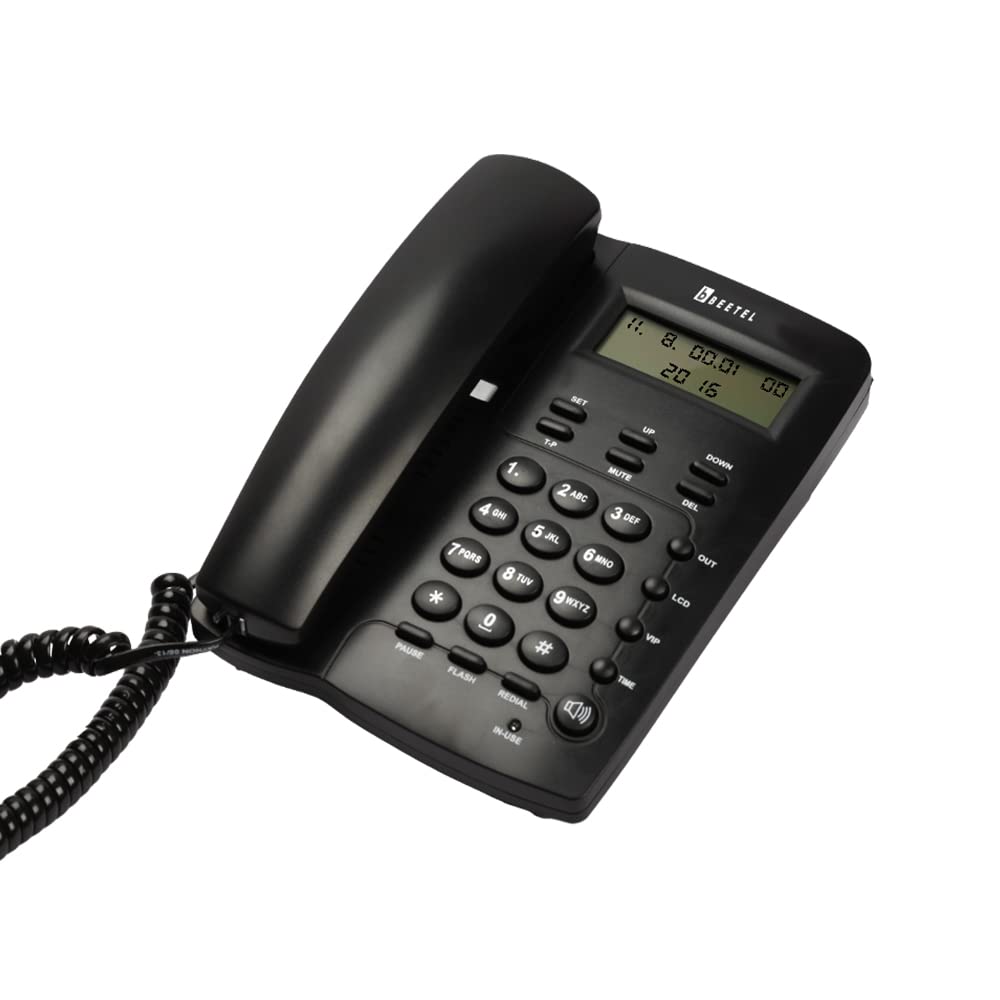
Image: Front view of the Beetel M56 Corded Landline Phone in black, showing the handset, keypad, and LCD display.
Package Contents
Upon opening the package, verify that all components are present:
- Beetel M56 Landline Phone Unit
- Handset
- Coiled Handset Cord
- Line Cord
- User Manual
Setup
1. Connecting the Phone
- Connect one end of the coiled handset cord to the handset and the other end to the port labeled "HANDSET" on the phone base.
- Connect one end of the line cord to the port labeled "LINE" on the phone base and the other end to your telephone wall jack.
- (Optional) Insert 2 x 9V batteries into the battery compartment if you wish to retain time and date settings during power outages. Note that the phone functions without batteries for basic operation.
2. Initial Power On and Display
Once connected, the phone will power on automatically. The 16-digit LCD display will illuminate, showing the current time and date (if batteries are installed and set) or default information.

Image: Close-up view of the Beetel M56 phone's 16-digit LCD display, showing call information.
Operating Instructions
Making a Call
- Lift the handset or press the SPEAKER button to get a dial tone.
- Dial the desired phone number using the numeric keypad.
- To end the call, replace the handset or press the SPEAKER button again.
Receiving a Call
When the phone rings, lift the handset or press the SPEAKER button to answer the call. The Caller ID feature will display the incoming number (if available from your service provider).
Caller ID Functionality
The Beetel M56 supports DTMF/FSK compatible Caller ID. The display shows incoming numbers, new calls, total calls, and repeat calls. You can check, erase, and call back for incoming/outgoing calls.

Image: The Beetel M56 phone displaying information related to incoming calls, highlighting its 30 incoming calls memory feature.

Image: The Beetel M56 phone's display showing various call indicators such as new, repeat, incoming, and total calls.
Speaker Phone Operation
The phone features a two-way speakerphone with adjustable volume. Press the SPEAKER button to activate or deactivate the speakerphone function.

Image: The Beetel M56 phone with a focus on the speakerphone button and its two-way audio capability.
Ringer Volume Control
Adjust the ringer volume using the dedicated switch located on the side or bottom of the phone base.

Image: A view of the Beetel M56 phone highlighting the ringer volume control switch.
Redial Function
Press the REDIAL button to redial the last dialed number. The phone stores up to 31 digits for redial memory.
Mute Function
During a call, press the MUTE button to temporarily mute your microphone. The other party will not hear you. Press it again to unmute.
Maintenance
- Keep the phone clean by wiping it with a soft, damp cloth. Avoid using harsh chemicals or abrasive cleaners.
- Do not expose the phone to excessive moisture, direct sunlight, or extreme temperatures.
- Ensure the cords are not tangled or pinched to prevent damage.
Troubleshooting
| Problem | Possible Cause | Solution |
|---|---|---|
| No dial tone | Line cord not connected properly; Service outage. | Check line cord connection; Contact your telephone service provider. |
| Caller ID not displaying | Caller ID service not subscribed; Incorrect phone settings. | Contact your service provider to activate Caller ID; Refer to phone settings for display options. |
| Low speaker volume | Speaker volume set too low. | Adjust speaker volume using the volume control. |
| Time/Date resets | Batteries not installed or low. | Install or replace 9V batteries. |
Specifications
- Model: Beetel M56
- Display: 16 Digit LCD Display
- Caller ID: DTMF/FSK Compatible
- Speaker Phone: Two-way with adjustable volume
- Memory: 30 Incoming Calls, 5 Outgoing Calls, 31 Digit Redial
- Ringer: Adjustable volume control
- Dimensions: 20 x 16.2 x 8.5 cm
- Weight: 990 g
- Power: Line powered, optional 2 x 9V batteries for display retention
- Color: Black
Warranty and Support
Warranty Information
This Beetel M56 Corded Landline Phone comes with a 12-month Beetel Warranty from the date of purchase. Please retain your purchase receipt as proof of warranty.
Customer Support
For any technical assistance, troubleshooting, or warranty claims, please contact Beetel customer support. Refer to the official Beetel website or product packaging for the most current contact information.
You can also visit the official Beetel store on Amazon for more information: Beetel Store
Ask a question about this manual
Ask about setup, troubleshooting, compatibility, parts, safety, or missing instructions. Manuals+ will review the question and use this page’s manual context to help answer it.