
1. Introduction
This manual provides detailed instructions for the proper installation, operation, and maintenance of the ITT Cannon MDM Series Micro D Sub Connector. This specific model is a 25-contact plug designed for crimp or solder cable mounting applications. Adhering to these instructions will ensure optimal performance and longevity of the connector.
2. Product Overview
The ITT Cannon MDM Series Micro D Sub Connector is a high-reliability, miniature connector solution. It features 25 contacts in a plug configuration, suitable for various electronic applications requiring secure and compact interconnections. The design supports both crimp and solder termination methods for cable attachment.
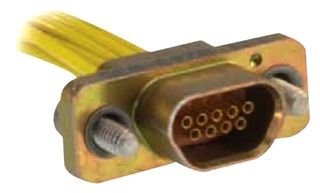
Figure 1: ITT Cannon MDM Series Micro D Sub Connector. This image displays the 25-contact plug connector with its metallic housing, visible screw mounts, and attached yellow wires, illustrating its cable mount configuration.
Key Features:
- 25 Contacts: Provides ample connectivity for complex signal requirements.
- Plug Configuration: Designed to mate with a corresponding receptacle.
- Crimp / Solder Termination: Offers flexibility in cable attachment methods.
- Cable Mount: Suitable for direct attachment to cables.
- Durable Construction: Engineered for reliable performance in demanding environments.
3. Setup and Installation
Proper installation is crucial for the reliable operation of the connector. Follow these steps carefully.
Required Tools and Materials:
- Wire strippers
- Crimp tool (for crimp contacts) or Soldering iron and solder (for solder contacts)
- Heat shrink tubing (optional, for insulation)
- Multimeter (for continuity testing)
- Appropriate gauge wires
Installation Steps:
- Prepare Wires: Carefully strip the insulation from the ends of your wires to the recommended length for your chosen termination method (crimp or solder). Ensure no stray strands are present.
- Terminate Contacts:
- Crimp Termination: Insert the stripped wire into the crimp barrel of the contact. Use the appropriate crimp tool to securely crimp the contact onto the wire. Verify the crimp is firm and the wire is fully seated.
- Solder Termination: Insert the stripped wire into the solder cup of the contact. Apply heat with a soldering iron and introduce solder to create a strong, clean electrical and mechanical connection. Avoid excessive heat.
- Insert Contacts into Connector Housing: Refer to the specific wiring diagram for your application. Carefully insert each terminated contact into its designated cavity in the connector housing. Ensure the contacts are fully seated and locked into place. A slight click may be heard or felt.
- Secure Cable (if applicable): If the connector includes a cable clamp or strain relief mechanism, secure the cable to prevent tension on the individual wire terminations.
- Continuity Test: Before final deployment, use a multimeter to perform a continuity test on each pin to ensure proper electrical connections and to check for any short circuits.
WARNING: Always ensure power is disconnected from all components before beginning installation to prevent electrical shock or damage to equipment.
4. Operating Instructions
Once installed, the ITT Cannon MDM Series Micro D Sub Connector functions as a passive electrical interface. Its operation primarily involves proper mating and unmating with a compatible receptacle.
- Mating the Connector: Align the plug connector with its corresponding receptacle. Gently push the connectors together until they are fully seated. Ensure proper alignment to avoid bending or damaging pins.
- Securing the Connection: If the connector features locking screws or clips, tighten them securely to prevent accidental disconnection and maintain a stable electrical connection. Do not overtighten.
- Unmating the Connector: Before unmating, ensure any locking mechanisms (screws, clips) are disengaged. Gently pull the connectors apart by gripping the connector bodies, not the cables. Avoid twisting or yanking.
CAUTION: Never force connectors together or apart, as this can damage the pins or housing. Always ensure power is off before mating or unmating connectors in live circuits.
5. Maintenance
The ITT Cannon MDM Series Micro D Sub Connector is designed for minimal maintenance. However, periodic inspection can help ensure continued reliable performance.
- Visual Inspection: Periodically inspect the connector for any signs of physical damage, corrosion, bent pins, or loose connections.
- Cleaning: If necessary, gently clean the contact areas with a lint-free cloth and a small amount of isopropyl alcohol. Ensure the connector is completely dry before re-establishing connections. Avoid abrasive cleaners.
- Connection Integrity: Verify that all cable terminations remain secure and that the connector is firmly mated and locked (if applicable) in its application.
6. Troubleshooting
This section addresses common issues that may arise during the use of the connector.
| Problem | Possible Cause | Solution |
|---|---|---|
| No signal/intermittent connection |
|
|
| Connector difficult to mate/unmate |
|
|
If troubleshooting steps do not resolve the issue, contact ITT Cannon technical support or a qualified technician.
7. Specifications
Detailed technical specifications for the ITT Cannon MDM Series Micro D Sub Connector (25 Contacts, Plug).
- Brand: ITT Cannon
- Model: MDM Series (Micro D Sub Connector)
- Contact Count: 25 Contacts
- Connector Type: Plug
- Termination Method: Crimp / Solder
- Mounting Type: Cable Mount
- Compatible Devices: Amplifier, Car Stereo, Other Car Audio Equipment (as per product listing)
- Recommended Uses: Vehicle audio systems (as per product listing)
- Color: Gold, Yellow (referring to contact plating and wire insulation in image)
- ASIN: B00H2A8HWE
8. Warranty and Support
For specific warranty information regarding your ITT Cannon MDM Series Micro D Sub Connector, please refer to the documentation provided at the time of purchase or visit the official ITT Cannon website. General support and technical assistance can be obtained through authorized distributors or the manufacturer's customer service channels.
For further assistance, please visit: www.ittcannon.com


