
Introduction
The Ikan MB-T06 Tilta 6x6 Carbon Fiber Matte Box is designed for professional filmmaking, offering precise light control and filter management. Its lightweight carbon fiber construction ensures minimal added weight to your camera rig, while the swing-away design facilitates quick lens changes. This matte box is compatible with 19mm rod systems and includes an adapter for 15mm rod systems.

Image: The Ikan MB-T06 Tilta 6x6 Carbon Fiber Matte Box shown with its top and side flags open, providing a clear view of the filter stages and lens opening.
Key Features
- Three-stage 6.6 x 6.6 Filter System: Accommodates multiple large filters for comprehensive light control.
- Lightweight Carbon Fiber Construction: Reduces overall rig weight, enhancing portability and ease of use.
- 19mm Swing-Away Rod Mount: Allows the matte box to pivot away from the lens for quick and efficient lens changes without detaching the entire unit.
- 12mm of Height Adjustability: Provides flexibility to align the matte box precisely with various lens heights.
- One Carbon Fiber French Flag and Two Carbon Fiber Side Wings: Offers versatile light spill control and flare reduction.
Product Overview and Setup
This video provides a comprehensive overview of the Ikan MB-T06 Tilta 6x6 Carbon Fiber Matte Box, demonstrating its key features, assembly, and mounting procedures on a camera rig. It covers the filter system, adjustable flags, rod mounting, and swing-away design.
Video: An official product video demonstrating the features and setup of the Ikan MB-T06 Tilta 6x6 Carbon Fiber Matte Box, including its filter system, flags, and mounting options.
What's in the Box
The Ikan MB-T06 Tilta 6x6 Carbon Fiber Matte Box package includes the main matte box unit, a carbon fiber French flag, two carbon fiber side wings, a 19mm rod adapter, a 15mm rod adapter, and various matte inserts (16-20mm, 24-28mm, 35-40mm, 50-65mm, 85-180mm) and adapter rings (134mm, 114mm, 95mm, 80mm) to accommodate different lens sizes.

Image: All components of the Ikan MB-T06 Tilta 6x6 Carbon Fiber Matte Box kit laid out, including the matte box, flags, rod adapters, matte inserts, and adapter rings.
Setup and Installation
1. Mounting the Matte Box
- Attach the appropriate rod adapter (19mm or 15mm) to your camera rig's rod system.
- Slide the matte box onto the rod adapter and secure it using the locking mechanism.
- Adjust the height of the matte box using the vertical adjustment knob to align it with your lens.

Image: The Ikan MB-T06 matte box securely mounted on a camera rig, demonstrating its integration with the rod system.
2. Attaching Flags
- Insert the carbon fiber French flag into the top slot of the matte box and secure it with the thumbscrews.
- Attach the two carbon fiber side wings to the designated slots on the sides of the matte box.
- Adjust the angle of the flags to block unwanted light and prevent lens flares.

Image: The Ikan MB-T06 matte box with its top French flag and side wings fully extended, mounted on a camera rig.
3. Inserting Filters
- Open the filter trays by pulling the release tabs.
- Slide your 6.6 x 6.6 inch filters into the desired stages. The matte box features three rotating filter holders.
- Close the filter trays securely.
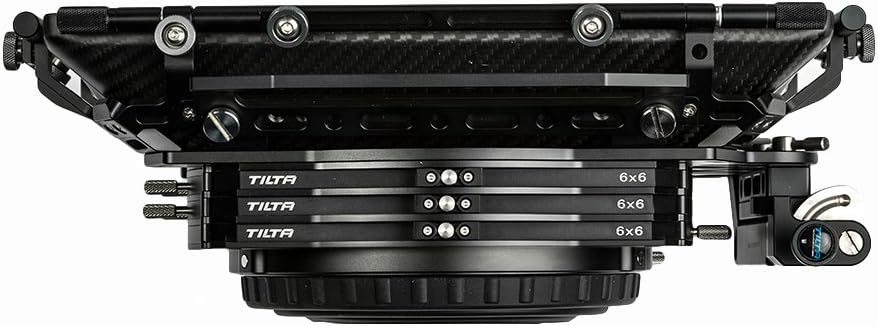
Image: A top-down view of the Ikan MB-T06 matte box, highlighting its three rotating filter stages designed for 6.6 x 6.6 inch filters.

Image: A front view of the Ikan MB-T06 matte box, showcasing the flexible bellows and the mechanism for inserting and securing filters.
Operating the Matte Box
1. Using the Swing-Away Design
To change lenses quickly, loosen the locking knob on the swing-away mechanism. Pivot the matte box away from the lens. After changing the lens, swing the matte box back into position and secure the locking knob.
2. Adjusting Flags
The French flag and side wings can be independently adjusted to precisely control light. Loosen the thumbscrews, position the flags as needed to block stray light or create specific lighting effects, and then tighten the thumbscrews to secure them.
3. Changing Matte Inserts
The matte box comes with various matte inserts (e.g., 16-20mm, 24-28mm, 35-40mm, 50-65mm, 85-180mm) to prevent vignetting with different focal length lenses. Select the appropriate insert for your lens and slide it into the front slot of the matte box.

Image: The Ikan MB-T06 matte box shown with a 35-40mm matte insert installed, demonstrating how different inserts fit into the front of the unit.
Maintenance
To ensure the longevity and optimal performance of your Ikan MB-T06 matte box, follow these maintenance guidelines:
- Regularly clean the carbon fiber and aluminum surfaces with a soft, dry cloth.
- Avoid using abrasive cleaners or solvents that could damage the finish.
- Inspect all screws and locking mechanisms periodically to ensure they are secure.
- Store the matte box in a protective case when not in use to prevent dust and physical damage.
Troubleshooting
If you encounter issues with your Ikan MB-T06 matte box, consider the following common solutions:
- Vignetting: Ensure the correct matte insert is used for your lens's focal length. Adjust the matte box height if necessary.
- Loose Mounting: Verify that all rod clamps and locking knobs are tightened securely.
- Stiff Filter Trays: Check for any debris obstructing the trays. Clean gently if needed.
- Light Leaks: Ensure all flags are properly positioned and secured to block stray light. Check for any gaps between the matte box and the lens.
Specifications
| Feature | Specification |
|---|---|
| Model Number | MB-T06 |
| Brand | Ikan |
| Material | Aluminum, Carbon Fiber |
| Filter System | Three-stage 6.6 x 6.6 inch rotating filter holders |
| Rod Compatibility | 19mm (with included 15mm adapter) |
| Height Adjustability | 12mm |
| Dimensions (L x W x H) | 15.7 x 13.1 x 11.7 inches |
| Item Weight | 4.3 Pounds |
| UPC | 847983008117 |
Warranty Information
Ikan products are designed for reliability and performance. This product is covered by a limited warranty against defects in materials and workmanship. The specific terms and duration of the warranty may vary by region and product type. Please retain your proof of purchase for warranty claims. For detailed warranty information, please refer to the official Ikan website or contact customer support.
Support
For technical assistance, product inquiries, or service requests, please contact Ikan customer support. You can find contact information, FAQs, and additional resources on the official Ikan website. When contacting support, please have your product model number (MB-T06) and purchase details ready.
Online Resources: Visit the Ikan website for the latest product information, firmware updates, and support documentation.
Contact Email: Refer to the Ikan website for the most current support email address.
Phone Support: Refer to the Ikan website for regional phone support numbers.