
Introduction and Overview
The Dyson DC59 Animal Cordless Vacuum Cleaner is engineered for versatile, whole-home cleaning. Its balanced design allows for effective cleaning from floor to ceiling, reaching high-up areas, low spaces, and in-between furniture with ease. This model features a detachable wand and specialized tools to adapt to various cleaning tasks.
A mini motorised tool is included for tackling tough tasks, specifically designed to remove ground-in dirt and pet hair from upholstery and confined spaces. For more demanding cleaning, a Boost mode provides increased suction power for up to 6 minutes. The vacuum comes equipped with essential accessories including a wide debris nozzle/brush and crevice tools.

Figure 1: Dyson DC59 Animal in its full stick vacuum configuration.
Setup and Initial Charge
Before first use, ensure the Dyson DC59 Animal is fully charged. The vacuum utilizes a Lithium-Ion battery. It is recommended to charge the battery completely before its initial operation to optimize battery life and performance.
Assembly:
- Attach the Wand: Align the end of the long wand with the main body of the vacuum (the motorhead section). Push firmly until it clicks securely into place.
- Attach the Cleaner Head: Connect your desired cleaner head (e.g., the motorised cleaner head) to the other end of the wand. Ensure it clicks into place.
- Charging: Plug the charger into a wall outlet and connect it to the charging port on the vacuum. A blue light will indicate charging status.

Figure 2: Components of the Dyson DC59, showing the main body, wand, and cleaner head.
Operating Instructions
The Dyson DC59 is designed for intuitive operation. The trigger-style power button allows for instant on/off control, conserving battery life.
General Use:
- Power On/Off: Press and hold the trigger to activate suction. Release the trigger to turn off.
- Boost Mode: For stubborn dirt or high-traffic areas, locate the 'MAX' button on the top of the main body. Press it to engage Boost mode for increased suction. Press again to return to normal mode. Note that Boost mode reduces runtime.
- Floor to Ceiling Cleaning: The lightweight design and detachable wand allow for easy transition between floor cleaning and reaching high or low areas. Remove the wand to use as a handheld vacuum.
Using Attachments:
- Motorised Cleaner Head: Ideal for carpets and hard floors. The brush bar agitates dirt for effective removal.
- Mini Motorised Tool: Attach directly to the main body for cleaning upholstery, pet beds, and tight spaces. Its small size and powerful motor make it effective for ground-in dirt and hair.
- Crevice Tool: Perfect for narrow gaps, edges, and corners.
- Combination Tool (Wide Debris Nozzle/Brush): Features a wide nozzle for larger debris and a brush that can be extended for dusting or gentle cleaning.

Figure 3: Dyson DC59 Animal used as a handheld vacuum with a short attachment.
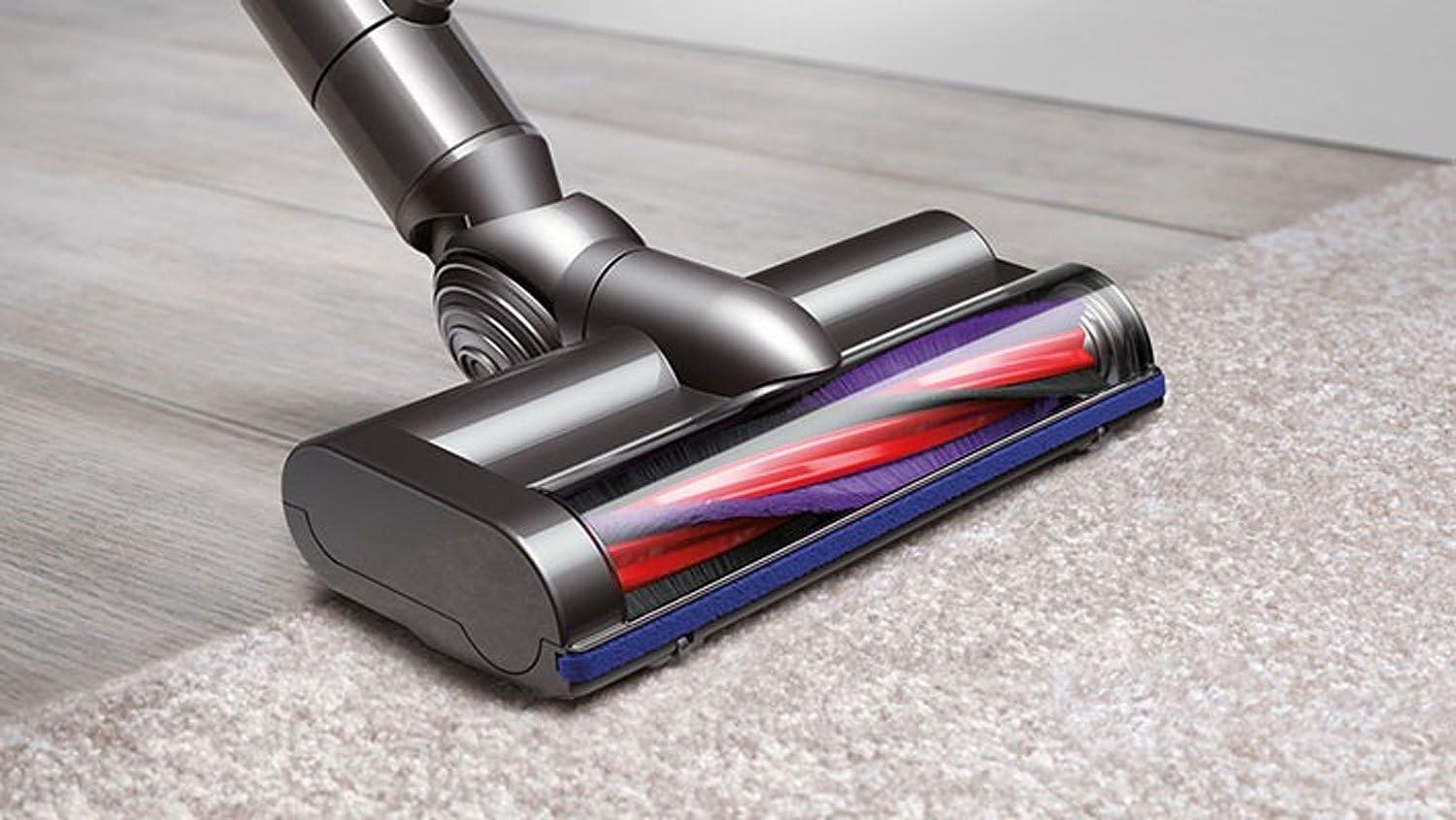
Figure 4: Close-up of the motorised cleaner head on carpet, highlighting its brush bar.
Maintenance
Regular maintenance ensures optimal performance and longevity of your Dyson DC59 Animal.
Emptying the Bin:
- To empty the clear bin, hold the vacuum over a trash can.
- Locate the red lever on the side of the bin. Pull the lever down to release the bin flap and empty contents.
- Push the flap back up until it clicks securely into place.
Cleaning the Filter:
- The filter is located at the top of the main body, usually purple in color.
- Twist and pull the filter out.
- Wash the filter under cold tap water until the water runs clear. Squeeze and twist to remove excess water.
- Leave the filter to dry completely for at least 24 hours in a warm, dry place before reinserting. Do not use a tumble dryer or microwave.
Cleaning the Brush Bar:
- Periodically check the cleaner head's brush bar for tangled hair or debris.
- To remove the brush bar, use a coin to unlock the end cap on the cleaner head. Slide the brush bar out.
- Remove any tangled hair or fibers. The brush bar can be washed if necessary, but ensure it is completely dry before reinserting.

Figure 5: Detail of the cleaner head with the brush bar exposed for cleaning.
Troubleshooting
If your Dyson DC59 Animal is not performing as expected, consult the following common issues:
- No Power/Short Runtime:
- Ensure the battery is fully charged. A full charge provides up to 20 minutes of suction (17 minutes with motorised tool, 6 minutes in Boost mode).
- Check the charger connection.
- If battery life has significantly degraded, consider replacing the battery.
- Reduced Suction:
- Check if the clear bin is full and empty it.
- Clean the filter as described in the Maintenance section. A dirty filter is a common cause of reduced suction.
- Inspect the cleaner head, wand, and main body for blockages. Remove any obstructions.
- Brush Bar Not Spinning:
- Check the brush bar for tangled hair or debris and clean it.
- Ensure the cleaner head is properly attached.
Specifications
| Feature | Detail |
|---|---|
| Brand | Dyson |
| Model Name | DC59 Animal |
| Special Feature | Radial Cyclone technology |
| Filter Type | Disk |
| Included Components | Nozzle, Crevice Tool |
| Is Cordless? | Yes |
| Capacity | 0.4 Liters |
| Runtime | 20 minutes (17 minutes with motorised tool) |
| Recommended Uses | Hard Floor, Rug, Upholstery, Carpet, Hardwood, Tile Floor |
| Form Factor | Stick |
| Color | Nickel |
| Battery Type | Lithium-Ion |
| Noise Level | 80 dB |
| Item Weight | 8.8 pounds |
| Product Dimensions | 29.2 x 10.7 x 6.1 inches |
Warranty and Support
The Dyson DC59 Animal Cordless Vacuum Cleaner comes with a 2-year guarantee covering parts and labor.
For detailed instructions, safety information, or further assistance, please refer to the official user manual:
Download Official User Manual (PDF)
For direct support, please visit the official Dyson website or contact their customer service.
Official Product Videos
No official "Seller" videos are available for this product at this time. Please refer to the written instructions and diagrams for guidance.


