
1. Product Overview
This manual provides instructions for the Hotpoint Ariston Aquastop Micro-Switch, an essential component for various dishwashers. This micro-switch is compatible with Ariston, Hotpoint, Scholtes, and Indesit dishwasher models. It is designed to detect water levels or flow within the appliance, contributing to its safe and efficient operation.
Model Number: C00143107 (also known as C00037205, 037205).
2. Important Safety Information
- Always disconnect the dishwasher from the main power supply before attempting any installation, maintenance, or repair.
- Installation should only be performed by a qualified technician or an individual with appropriate electrical and appliance repair knowledge.
- Wear appropriate personal protective equipment (PPE), such as gloves and eye protection, during installation.
- Ensure all connections are secure and correctly installed to prevent water leaks or electrical hazards.
- Refer to your specific dishwasher's service manual for detailed instructions on accessing and replacing internal components.
3. Product Components
The Hotpoint Ariston Aquastop Micro-Switch consists of a compact housing with electrical terminals and a lever arm.
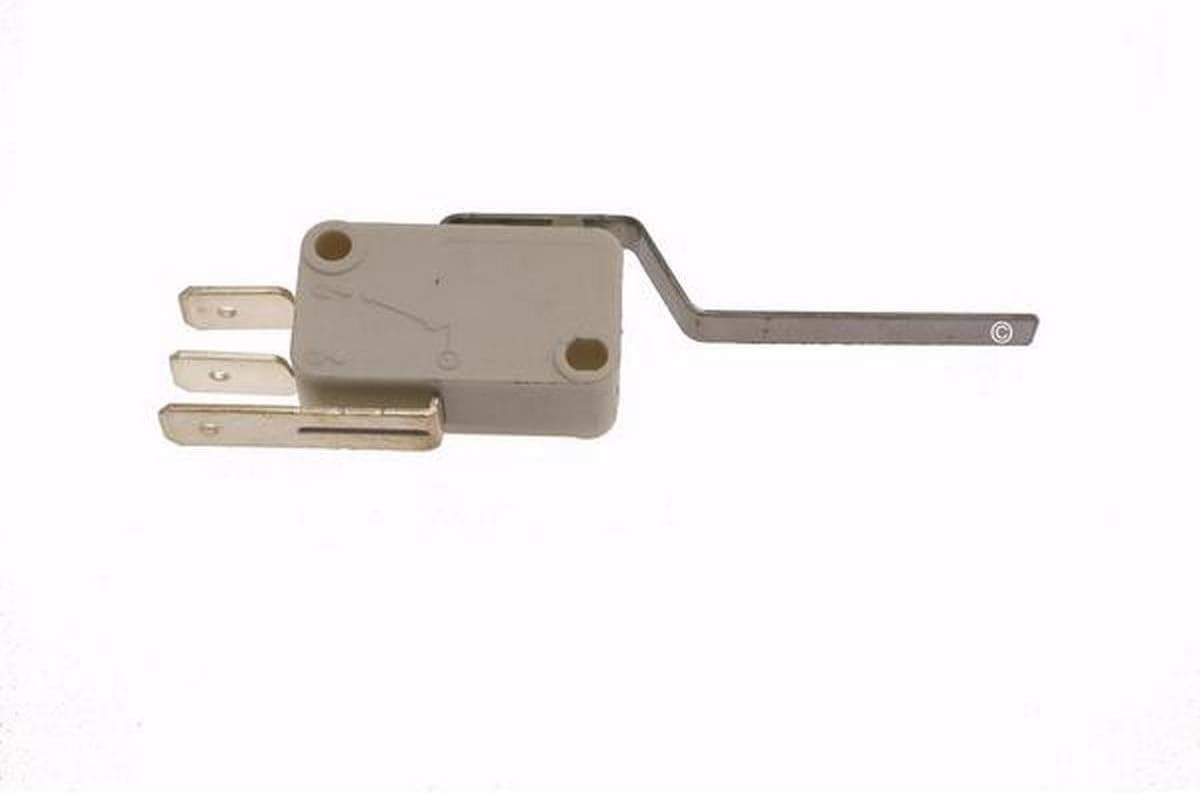
Image Description: A close-up view of the Hotpoint Ariston Aquastop Micro-Switch. The component features a light grey plastic body with three metal electrical terminals extending from one side and a metal lever arm extending from the other. Two screw holes are visible on the top surface of the plastic body for mounting.
4. Installation Guide
Follow these steps for proper installation of the micro-switch:
- Preparation: Disconnect the dishwasher from the power supply. Turn off the water supply to the dishwasher.
- Access: Depending on your dishwasher model, you may need to remove the bottom panel, side panel, or other components to access the aquastop assembly or water inlet system where the micro-switch is located.
- Locate Old Switch: Identify the existing micro-switch. Note its orientation and how it is connected.
- Disconnect: Carefully disconnect the electrical wires from the old micro-switch. Take a photo if necessary to remember the wiring configuration.
- Remove Old Switch: Unscrew or unclip the old micro-switch from its mounting bracket or housing.
- Install New Switch: Position the new Hotpoint Ariston Aquastop Micro-Switch (Model C00143107) in the same location and orientation as the old one. Secure it using the original screws or clips.
- Connect Wires: Reconnect the electrical wires to the new micro-switch's terminals. Ensure a secure connection.
- Reassemble: Reassemble any panels or components that were removed to access the switch.
- Test: Restore the water supply and reconnect the dishwasher to the power supply. Run a short cycle to verify proper operation and check for any leaks.
5. Operation
The Aquastop Micro-Switch operates automatically within the dishwasher's system. It functions as a sensor, typically detecting the presence or absence of water, or a specific water level, to trigger or halt certain functions of the dishwasher. When activated by water pressure or level, the lever arm moves, closing or opening an electrical circuit to send a signal to the dishwasher's control board. This ensures proper water management and helps prevent overflows.
6. Maintenance
The Hotpoint Ariston Aquastop Micro-Switch is a sealed unit and does not require routine maintenance. If the dishwasher exhibits issues related to water filling, draining, or unexpected stops, the micro-switch may need inspection.
- Inspection: Periodically check the area around the micro-switch for any signs of corrosion, loose wiring, or physical damage.
- Cleaning: Ensure the area around the switch is free from debris or limescale buildup that could impede the movement of its lever arm.
- Replacement: If the switch is suspected to be faulty, it should be replaced with an original or compatible part (Model C00143107).
7. Troubleshooting Common Issues
If your dishwasher is experiencing problems that might be related to the Aquastop Micro-Switch, consider the following:
- Dishwasher Not Filling with Water: The micro-switch might be stuck in an "off" position, preventing the water inlet valve from opening. Check for obstructions or a faulty switch.
- Dishwasher Overfilling: The micro-switch might be stuck in an "on" position, failing to signal the control board to stop water intake.
- Error Codes: Consult your dishwasher's user manual for specific error codes related to water intake or aquastop system failures. These codes can often point to a faulty micro-switch.
- Intermittent Operation: Loose wiring or a partially failing switch can cause inconsistent operation. Ensure all electrical connections are secure.
If troubleshooting steps do not resolve the issue, professional assistance is recommended.
8. Product Specifications
| Feature | Detail |
|---|---|
| Brand | Hotpoint |
| Model Number | C00143107 (also C00037205, 037205) |
| Compatibility | Ariston, Hotpoint, Scholtes, Indesit Dishwashers |
| Part Type | Aquastop Micro-Switch |
| ASIN | B00GX4I626 |
| First Available | November 15, 2013 |
9. Warranty and Support
Information regarding specific warranty terms for this replacement part is typically provided by the retailer or the part manufacturer at the time of purchase. Please retain your proof of purchase for any warranty claims.
For technical support or further assistance, please contact the retailer from whom the part was purchased or refer to the official Hotpoint or Ariston service resources.
