
1. Introduction
This manual provides essential instructions for the safe and effective use of your OMRON M2 Upper Arm Blood Pressure Monitor (Model: HEM-7121). Please read all instructions thoroughly before using the device. Keep this manual for future reference.
The OMRON M2 monitor is designed to measure blood pressure and pulse rate in adults. It features Intellisense Technology for comfortable and accurate readings, a Cuff Wrap Guide for correct application, and Irregular Heartbeat Detection.
2. Important Safety Information
Always consult your physician for information about your specific blood pressure. Self-diagnosis and treatment based on measurement results can be dangerous. Do not modify the device or cuff. Use only OMRON authorized parts. Keep the device out of reach of children and pets. Do not use this device on infants or individuals who cannot express their consent.
3. Package Contents
Verify that all components are present in the package:
- 1 x OMRON M2 Monitor
- 1 x Cuff Wrap HEM-CR24 (22-32 CM)
- 1 x Storage Bag
- 1 x Instruction Manual
- 4 x 1.5 AA Batteries

Image: The OMRON M2 Blood Pressure Monitor box, illustrating the monitor, cuff, and a list of included items.
4. Setup
4.1. Installing Batteries
- Open the battery cover on the back of the monitor.
- Insert the four 1.5 AA batteries according to the polarity markings (+/-) inside the battery compartment.
- Close the battery cover securely.
4.2. Connecting the Arm Cuff
- Insert the air plug of the arm cuff into the air jack on the left side of the monitor until it clicks.
- Ensure the connection is firm to prevent air leakage during measurement.
5. Operating Instructions
5.1. Applying the Arm Cuff
- Sit in a chair with your feet flat on the floor. Rest your arm on a table so the cuff is at heart level.
- Wrap the cuff around your upper left arm. The air tube should run down the inside of your arm and be centered with your middle finger.
- The bottom edge of the cuff should be 1-2 cm (0.5-1 inch) above your elbow.
- Secure the cuff firmly with the fabric fastener. Ensure it is snug but not too tight. The Cuff Wrap Guide feature will indicate if the cuff is applied correctly.
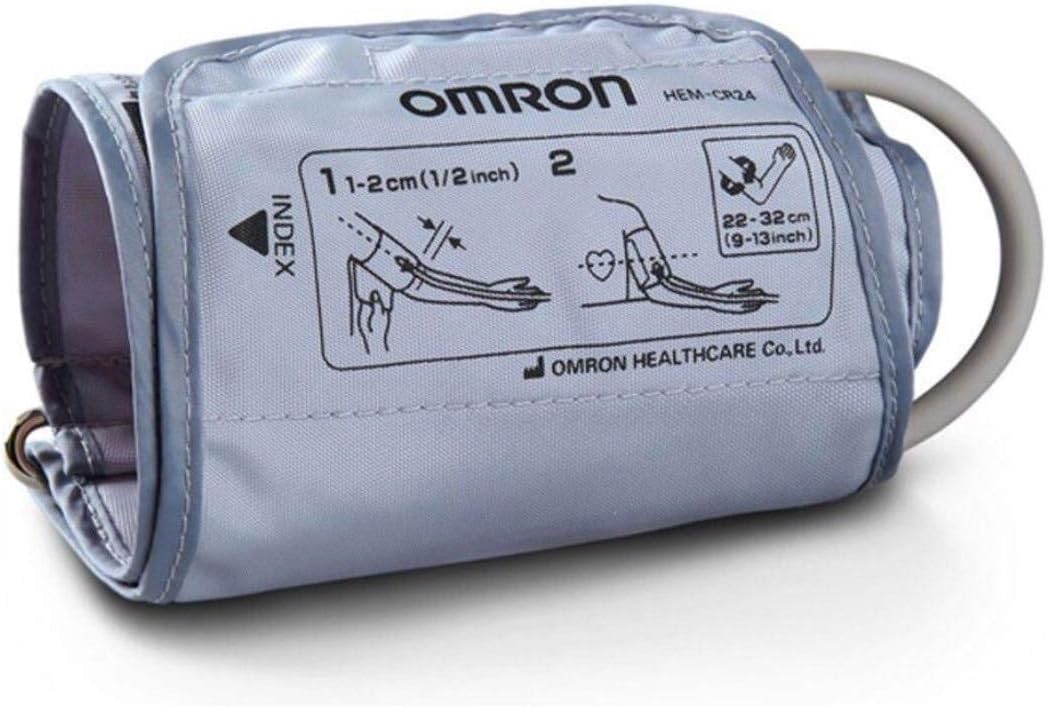
Image: Diagram illustrating the correct placement of the OMRON arm cuff on the upper arm, indicating position relative to the elbow and heart.
5.2. Taking a Measurement
- Ensure you are relaxed and have not consumed caffeine, alcohol, or exercised for at least 30 minutes prior.
- Press the START/STOP button. The cuff will begin to inflate automatically using Intellisense Technology.
- Remain still and do not talk during the measurement.
- Once the measurement is complete, the cuff will deflate, and your systolic pressure (SYS), diastolic pressure (DIA), and pulse rate will be displayed on the LCD.
- If an irregular heartbeat is detected, the Irregular Heartbeat Detection symbol will appear on the display.
- Press the START/STOP button again to turn off the monitor. The measurement will be stored in memory.
5.3. Understanding Your Readings
- SYS (Systolic Pressure): The highest pressure in your arteries when your heart beats.
- DIA (Diastolic Pressure): The lowest pressure in your arteries when your heart rests between beats.
- PULSE: Your heart rate, measured in beats per minute.
6. Maintenance
6.1. Cleaning
- Wipe the monitor and cuff with a soft, dry cloth.
- If necessary, use a soft cloth moistened with water and a mild soap, then wipe dry.
- Do not use abrasive cleaners or immerse the monitor or cuff in water.
6.2. Storage
- Store the monitor and cuff in the provided storage bag.
- Keep the device in a clean, safe location away from direct sunlight, extreme temperatures, and humidity.
- Remove batteries if the unit will not be used for an extended period.
7. Troubleshooting
| Problem | Possible Cause | Solution |
|---|---|---|
| Monitor does not turn on. | Batteries are dead or incorrectly inserted. | Replace batteries or reinsert them with correct polarity. |
| Error message displayed. | Cuff not applied correctly, movement during measurement, or air leakage. | Reapply cuff, remain still, check cuff connection. Refer to manual for specific error codes. |
| Readings are inconsistent. | Improper cuff placement, movement, or talking during measurement. | Ensure correct cuff placement and follow measurement guidelines. Take multiple readings. |
8. Specifications
- Model: HEM-7121
- Display: LCD Digital Display
- Measurement Method: Oscillometric method
- Measurement Range: Pressure: 0 to 299 mmHg, Pulse: 40 to 180 beats/min
- Accuracy: Pressure: ±3 mmHg, Pulse: ±5% of display reading
- Memory: 30 measurements with date and time for 1 user
- Power Source: 4 "AA" batteries 1.5V
- Battery Life: Approximately 1000 measurements with new alkaline batteries
- Console Weight: Approximately 250 g (without batteries)
- Console Dimensions: Approximately 10.3 cm (W) × 8 cm (H) × 12.9 cm (L)
- Cuff Material: Nylon and Polyester
9. Warranty and Support
For warranty information, technical support, or service, please refer to the warranty card included with your product or contact OMRON customer service. Contact details can typically be found on the OMRON Healthcare official website or on the product packaging.


