
1. Product Overview
The Catnapper Cloud 12 Power Chaise Recliner is designed for comfort and relaxation. This oversized recliner features soft, durable padded velvet upholstery and a power reclining mechanism that allows for a lay-flat position. Its generous dimensions provide ample space for comfortable lounging.

Image 1.1: Front view of the recliner in its upright position.

Image 1.2: Side view of the recliner, showing its plush design.

Image 1.3: Rear view of the recliner.
2. Setup
The Catnapper Cloud 12 Power Chaise Recliner requires no assembly. It is delivered ready for use.
Placement
- Ensure the recliner is placed on a level surface.
- Allow sufficient clearance behind the recliner (approximately 12-18 inches) for full recline operation.
- Position the recliner near a power outlet for the power reclining function.
3. Operating Instructions
The Catnapper Cloud 12 features a power reclining mechanism for effortless adjustment.
Reclining the Chair
- Locate the power control button on the side of the recliner.
- Press and hold the button to slowly recline the chair to your desired position. The chair can achieve a lay-flat position for maximum comfort.

Image 3.1: Recliner in a partially reclined state.

Image 3.2: Recliner fully extended to a lay-flat position.
Returning to Upright Position
- Press and hold the power control button again.
- The chair will slowly return to its original upright position. Release the button when the desired position is reached.
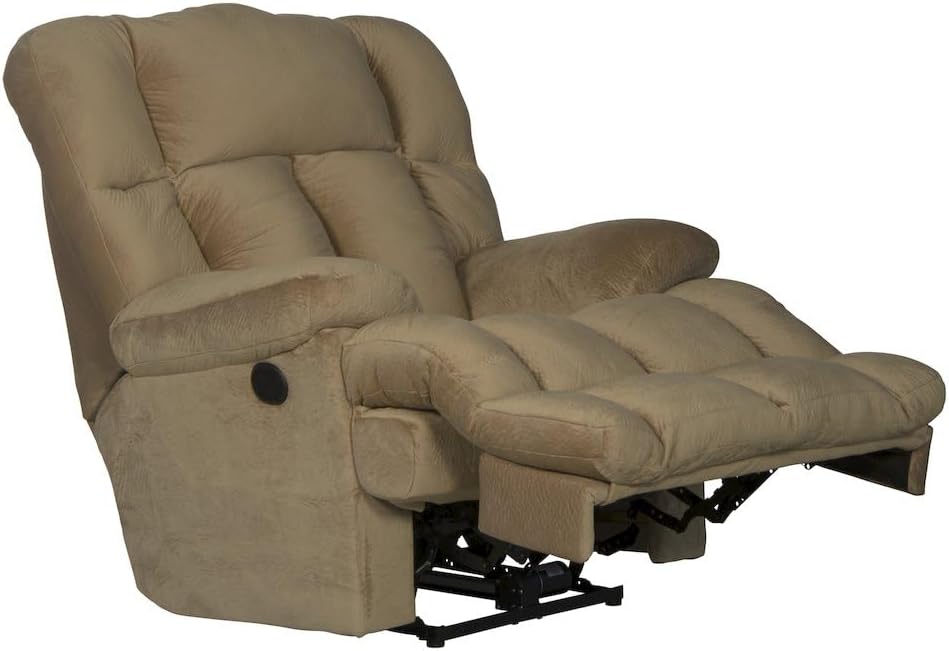
Image 3.3: Recliner in a slightly reclined position.
4. Maintenance and Care
Proper care will extend the life and appearance of your recliner.
Cleaning Instructions
- Spot Wash: For spills or stains, immediately blot the affected area with a clean, dry cloth.
- Use a mild soap solution and a damp cloth for spot cleaning. Test on an inconspicuous area first.
- Avoid harsh chemicals or abrasive cleaners, as these can damage the microfiber fabric.
- Regularly vacuum the recliner using a soft brush attachment to remove dust and debris.
General Care
- Keep the recliner away from direct sunlight to prevent fading.
- Avoid placing the recliner near heat sources like radiators or fireplaces.
- Periodically check all connections and fasteners to ensure they are secure.
5. Specifications
| Feature | Detail |
|---|---|
| Brand | Catnapper |
| Model Name | Cloud 12 |
| Product Dimensions (D x W x H) | 48"D x 48"W x 46"H |
| Seat Depth | 42 inches |
| Upholstery Fabric Type | Microfiber, Padded Velvet |
| Fill Material | Foam |
| Item Weight | 127 Pounds |
| Maximum Weight Recommendation | 127 Pounds |
| Assembly Required | No |
| Special Feature | Durable, Power Recliner, Lay Flat Reclining |
| Product Care Instructions | Spot Wash |
| UPC | 720368819778 |

Image 5.1: Product dimensions for the Catnapper Cloud 12 Recliner.

Image 5.2: Comfort Coil Seating technology details.
6. Troubleshooting
This section addresses common issues you might encounter with your recliner.
Recliner Not Operating
- Check Power Connection: Ensure the power cord is securely plugged into both the recliner and a functioning wall outlet.
- Verify Outlet: Test the wall outlet with another appliance to confirm it is receiving power.
- Inspect Cord: Check the power cord for any visible damage or kinks.
Unusual Noises During Operation
- Lubrication: Moving parts may require occasional lubrication. Consult a professional if noises persist.
- Obstructions: Ensure no objects are caught in the reclining mechanism.
If issues persist after attempting these troubleshooting steps, please contact customer support.
7. Warranty and Support
For specific warranty information regarding your Catnapper Cloud 12 Power Chaise Recliner, please refer to the documentation provided at the time of purchase or contact Catnapper customer service directly. Warranty terms typically cover manufacturing defects and mechanical components for a specified period.
Customer Support
If you have any questions, require assistance, or need to report an issue, please contact Catnapper customer support through their official website or the contact information provided with your purchase.


