
1. Introduction
Thank you for choosing the Pro'sKit PT-5501I Variable Speed Rotary Tool Kit. This manual provides essential information for the safe and efficient operation, maintenance, and troubleshooting of your new rotary tool. Please read this manual thoroughly before using the tool and retain it for future reference.

Figure 1.1: The Pro'sKit PT-5501I Variable Speed Rotary Tool. This image shows the main rotary tool unit, highlighting its ergonomic design and power cord connection.
2. Safety Instructions
Always observe basic safety precautions to reduce the risk of fire, electric shock, and personal injury when using this tool.
- Work Area Safety: Keep your work area clean and well-lit. Cluttered or dark areas invite accidents. Do not operate power tools in explosive atmospheres, such as in the presence of flammable liquids, gases, or dust.
- Electrical Safety: Power tool plugs must match the outlet. Never modify the plug in any way. Avoid body contact with earthed or grounded surfaces such as pipes, radiators, ranges, and refrigerators.
- Personal Safety: Always wear eye protection. Use a dust mask if operating in dusty conditions. Do not overreach. Keep proper footing and balance at all times. Dress properly; avoid loose clothing or jewelry.
- Tool Use and Care: Do not force the power tool. Use the correct power tool for your application. Disconnect the plug from the power source before making any adjustments, changing accessories, or storing power tools.
- Maintenance: Maintain power tools. Check for misalignment or binding of moving parts, breakage of parts, and any other condition that may affect the power tool’s operation.
3. Package Contents
The Pro'sKit PT-5501I Variable Speed Rotary Tool Kit includes the following items:
- Pro'sKit PT-5501I Rotary Tool (230V)
- Flexible Shaft
- 40-piece Multipurpose Accessory Set
- Carrying Case
- Instruction Manual

Figure 3.1: Contents of the Pro'sKit PT-5501I Rotary Tool Kit. This image displays the rotary tool, flexible shaft, various accessories, and the carrying case.
4. Product Features
The Pro'sKit PT-5501I Rotary Tool is designed for versatility and precision, offering a range of features for various applications:
- Variable Speed Control: Adjust speed from 10,000 to 32,000 RPM for optimal performance across different materials and tasks.
- Flexible Shaft: Provides enhanced comfort and precision for detailed work in hard-to-reach areas.
- Spindle Lock: Facilitates quick and easy accessory changes.
- External Carbon Brushes: Designed for convenient replacement, extending tool lifespan.
- Multipurpose Accessories: Includes a 40-piece set suitable for cutting, sanding, polishing, drilling, and burr removal.

Figure 4.1: Overview of the Pro'sKit PT-5501I Rotary Tool Kit and its accessories. This image illustrates the various components and their potential applications, such as polishing and precision engineering.
5. Setup
Follow these steps to set up your rotary tool for operation:
- Unpacking: Carefully remove all components from the carrying case. Inspect for any damage.
- Selecting an Accessory: Choose the appropriate accessory for your task (e.g., grinding stone, sanding drum, drill bit).
- Inserting an Accessory:
- Press and hold the spindle lock button located on the tool head.
- Unscrew the collet nut counter-clockwise until the collet jaws open.
- Insert the accessory shank fully into the collet.
- Tighten the collet nut clockwise by hand, then release the spindle lock button. Ensure the accessory is securely held.
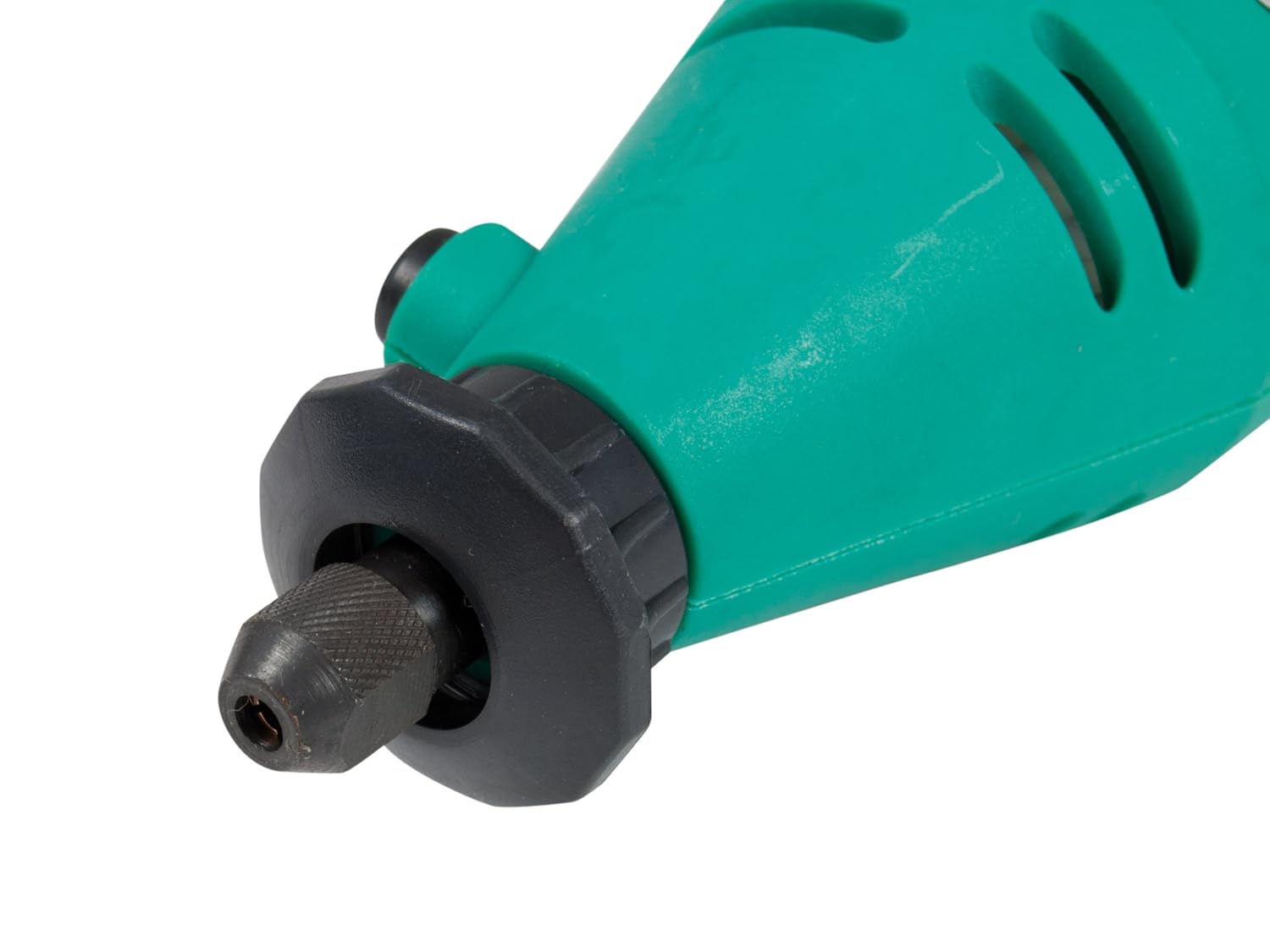
Figure 5.1: Close-up view of the rotary tool's chuck and spindle lock mechanism. This image details how accessories are inserted and secured.
- Attaching the Flexible Shaft (Optional):
- Ensure the rotary tool is unplugged.
- Remove the collet nut and collet from the rotary tool.
- Screw the flexible shaft coupling onto the rotary tool's threaded collar until secure.
- Insert the flexible shaft's inner drive cable into the rotary tool's chuck.
- Insert the desired accessory into the flexible shaft's collet and tighten.
- Power Connection: Plug the tool into a standard 230V AC power outlet.
6. Operating Instructions
Before operating, ensure all safety precautions are understood and followed.
- Powering On/Off: Locate the ON/OFF switch on the tool body. Slide it to the 'ON' position to start the tool and to the 'OFF' position to stop it.
- Adjusting Speed: Use the variable speed dial to select the desired RPM. Start with a lower speed and gradually increase it as needed for your application and material.
- Working with the Tool:
- Hold the tool firmly with both hands or use the flexible shaft for precision.
- Apply light, consistent pressure. Do not force the tool, as this can lead to overheating or damage to the tool or workpiece.
- Allow the tool to reach full speed before contacting the workpiece.
- For cutting, sanding, polishing, drilling, and burr removal, use the appropriate accessory and technique. Refer to accessory-specific instructions if available.
- Cooling: During extended use, allow the tool to cool periodically to prevent overheating.
7. Maintenance
Regular maintenance ensures optimal performance and extends the life of your rotary tool.
- Cleaning: After each use, unplug the tool and clean the housing with a soft, damp cloth. Use a brush to remove dust and debris from ventilation openings. Do not use harsh chemicals or abrasive cleaners.
- Carbon Brush Replacement: The tool is equipped with external carbon brushes for easy replacement. When the tool's performance decreases or it stops working, the carbon brushes may need replacement. Refer to the diagram on the tool for the location of the brush caps. Unscrew the caps, remove the old brushes, and insert new ones, ensuring they are seated correctly. Replace the caps securely.
- Accessory Care: Clean accessories after use. Store them in the provided carrying case to prevent damage and loss.
- Storage: Store the tool and all accessories in the original carrying case in a dry, secure location, out of reach of children.

Figure 7.1: The Pro'sKit PT-5501I Rotary Tool Kit stored in its carrying case. Proper storage protects the tool and accessories.
8. Troubleshooting
If you encounter issues with your Pro'sKit PT-5501I Rotary Tool, refer to the following table:
| Problem | Possible Cause | Solution |
|---|---|---|
| Tool does not start | No power supply; Faulty switch; Worn carbon brushes | Check power connection; Test outlet; Replace switch; Replace carbon brushes. |
| Loss of power/Reduced speed | Worn carbon brushes; Overload; Loose connection | Replace carbon brushes; Reduce pressure on workpiece; Check power cord. |
| Excessive vibration | Bent accessory shank; Improperly seated accessory | Replace bent accessory; Re-seat accessory securely in collet. |
| Tool overheats | Continuous heavy use; Blocked ventilation slots | Allow tool to cool; Clear ventilation slots; Reduce workload. |
If the problem persists after attempting these solutions, please contact customer support.
9. Specifications
| Specification | Detail |
|---|---|
| Model Number | PT-5501I |
| Brand | Pro'sKit |
| Voltage | 230 Volts |
| Power Source | Corded Electric |
| Minimum Rotational Speed | 10,000 RPM |
| Maximum Rotational Speed | 32,000 RPM |
| Item Weight | 1.4 Kilograms (1 kg 400 g) |
| Product Dimensions (L x W x H) | 23.5 x 28.5 x 7 Centimeters |
| Recommended Uses | Cutting, Sanding, Polishing, Drilling, Burr Removal |
| Special Feature | Variable Speed |
| Included Components | Rotary Tool, Flexible Shaft, 40-piece Accessory Set, Carrying Case |
10. Warranty and Support
Pro'sKit products are manufactured to high-quality standards. For warranty information, technical support, or service inquiries, please refer to the contact details provided with your purchase documentation or visit the official Pro'sKit website. Keep your proof of purchase for any warranty claims.