
1. Product Overview
The BOURNS H-46-6A-1 is an analogue turns counting dial designed for precise control and measurement with multi-turn potentiometers. This dial features a black knurl and a satin chrome-face composition, ensuring durability and clear readability. It is engineered for use with precision potentiometers ranging from 0 to 20 turns, providing accurate rotational position indication. The design incorporates a precision feel with no backlash, housed within a robust cast casing. Its primary application is in test and measurement environments where accurate rotational adjustment is critical.
Key features include:
- Analogue turns counting dial with black knurl and satin chrome-face.
- Black markings on a chrome background for enhanced visibility.
- Compatible with precision potentiometers from 0 to 20 turns.
- Precision feel with no backlash for accurate adjustments.
- Durable cast housing.
- Excellent readability for precise control.
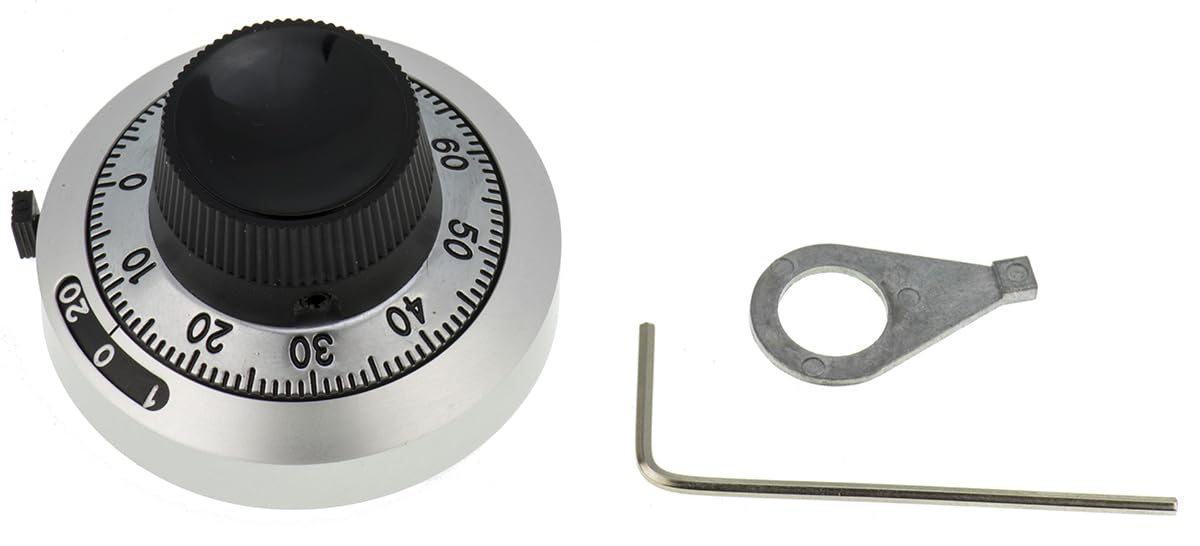
Figure 1: Front view of the BOURNS H-46-6A-1 Turns Counting Dial, showing the black knurled knob and satin chrome face with numerical markings.
2. What's in the Box
Upon opening the product packaging, please verify that all components are present and undamaged. The standard package for the H-46-6A-1 Turns Counting Dial includes:
- One (1) BOURNS H-46-6A-1 Turns Counting Dial
- One (1) Cap (typically for securing the dial to the potentiometer shaft)
If any items are missing or damaged, please contact your supplier or BOURNS customer support immediately.
3. Setup and Installation
This section provides instructions for the proper installation of the H-46-6A-1 Turns Counting Dial onto a compatible multi-turn potentiometer.
3.1 Required Tools
- Small flat-head screwdriver (for set screw, if applicable)
- Wrench or nut driver (for mounting nut, if applicable)
3.2 Installation Steps
- Prepare Potentiometer: Ensure the potentiometer is securely mounted to its panel or chassis. The shaft of the potentiometer should be clean and free of debris.
- Align Potentiometer: Rotate the potentiometer shaft to its mechanical limit (e.g., fully counter-clockwise or 0 turns position). This will serve as your reference point.
- Mount Dial: Carefully slide the H-46-6A-1 dial onto the potentiometer shaft. Ensure the dial's internal mechanism engages properly with the shaft. The dial is designed for a 6.35 mm (1/4 inch) diameter shaft.
- Set Zero Position: With the potentiometer at its mechanical limit (0 turns), align the dial's main indicator to the "0" mark on the turns counter and the fine adjustment scale to "0". If there is a set screw on the dial, gently tighten it to secure the dial to the shaft. Do not overtighten.
- Secure Mounting (if applicable): If the dial includes a mounting nut or bushing, tighten it to secure the dial assembly to the panel. Ensure the dial is flush and stable.
- Verify Operation: Gently rotate the dial through its full range of motion (0 to 20 turns) to ensure smooth operation and accurate counting. The dial should rotate freely without binding.
Note: Always refer to the specific potentiometer's datasheet for its mechanical limits and shaft specifications to ensure compatibility.
4. Operating Instructions
The H-46-6A-1 Turns Counting Dial provides a clear and precise method for setting and reading the rotational position of a multi-turn potentiometer.
4.1 Reading the Dial
The dial typically consists of two main indicators:
- Turns Counter: This is usually a window or a larger scale that indicates the full number of turns. For the H-46-6A-1, this will display values from 0 to 20.
- Fractional Turn Scale: This is the main rotating knob with a finer scale (e.g., 0-100 divisions) that indicates the fractional part of a turn. One full rotation of this scale corresponds to one full turn on the turns counter.
To read the current setting:
- Observe the number displayed in the turns counter window. This is the whole number of turns.
- Read the value indicated by the pointer on the fractional turn scale. This is the fractional part of the turn.
- Combine these two readings for the total turns. For example, if the turns counter shows "5" and the fractional scale shows "50", the total setting is 5.50 turns.
4.2 Setting the Dial
To adjust the potentiometer to a desired number of turns:
- Grasp the knurled knob of the dial firmly.
- Rotate the knob clockwise or counter-clockwise until the desired whole number of turns appears in the turns counter window.
- Continue rotating the knob until the desired fractional turn value aligns with the pointer on the fractional turn scale.
- The precision feel and lack of backlash ensure that the setting remains stable once adjusted.
5. Maintenance
The BOURNS H-46-6A-1 Turns Counting Dial is designed for long-term reliability and requires minimal maintenance.
- Cleaning: Periodically wipe the dial's surface with a soft, dry, lint-free cloth to remove dust and fingerprints. For stubborn marks, a slightly damp cloth with mild soap can be used, followed by immediate drying. Avoid abrasive cleaners or solvents, as these can damage the finish and markings.
- Inspection: Regularly inspect the dial for any signs of physical damage, loose components, or difficulty in rotation. Ensure the set screw (if present) remains snug.
- Environment: Operate and store the dial in a clean, dry environment, free from excessive dust, moisture, and extreme temperatures.
No internal lubrication or user-serviceable parts are present within the dial mechanism. Attempting to disassemble the dial may void any applicable warranty and could damage the unit.
6. Troubleshooting
This section addresses common issues you might encounter with the H-46-6A-1 Turns Counting Dial.
| Problem | Possible Cause | Solution |
|---|---|---|
| Dial does not rotate smoothly or binds. |
|
|
| Turns counter or fractional scale reading is inaccurate. |
|
|
| Dial feels loose or wobbly. |
|
|
If the issue persists after attempting these troubleshooting steps, please contact BOURNS customer support or your product supplier for further assistance.
7. Specifications
The following are the key specifications for the BOURNS H-46-6A-1 Turns Counting Dial:
| Parameter | Value |
|---|---|
| Model Number | H-46-6A-1 |
| Brand | BOURNS |
| Turns Capacity | 0 to 20 Turns |
| Shaft Diameter Compatibility | 6.35 mm (1/4 inch) |
| Dial Face Color | Satin Chrome |
| Knob Color | Black |
| Marking Color | Black on Chrome Background |
| Housing Material | Cast |
| Features | Precision feel, no backlash, excellent readability |
| Typical Applications | Test & Measurement, precision control systems |
8. Warranty and Support
BOURNS products are manufactured to high-quality standards. Specific warranty terms and conditions for the H-46-6A-1 Turns Counting Dial are typically provided at the point of purchase or can be obtained directly from BOURNS.
For technical support, warranty claims, or further information regarding this product, please contact:
- Your authorized BOURNS distributor or reseller.
- BOURNS Customer Service (refer to the official BOURNS website for contact details: www.bourns.com).
Please have your product model number (H-46-6A-1) and purchase details ready when contacting support.


