
Magic Chef MCPMCIM30SST
User Manual
Magic Chef Portable Mini Ice Maker MCIM30SST
Model: MCPMCIM30SST
Important Safety Instructions
When using electrical appliances, basic safety precautions should always be followed to reduce the risk of fire, electric shock, and injury to persons. Please read all instructions carefully before operating this appliance.
- Electrical Safety: Ensure the appliance is connected to a properly grounded outlet. Do not operate with a damaged cord or plug.
- Water Safety: Use only potable water. Do not immerse the appliance in water or other liquids.
- Ventilation: Maintain adequate ventilation around the unit. Do not block air vents.
- Children: Close supervision is necessary when any appliance is used by or near children.
- Maintenance: Unplug the appliance before cleaning or performing any maintenance.
Product Overview
The Magic Chef Portable Mini Ice Maker MCIM30SST is designed to produce ice quickly and efficiently for your convenience. Its compact design makes it suitable for various settings.
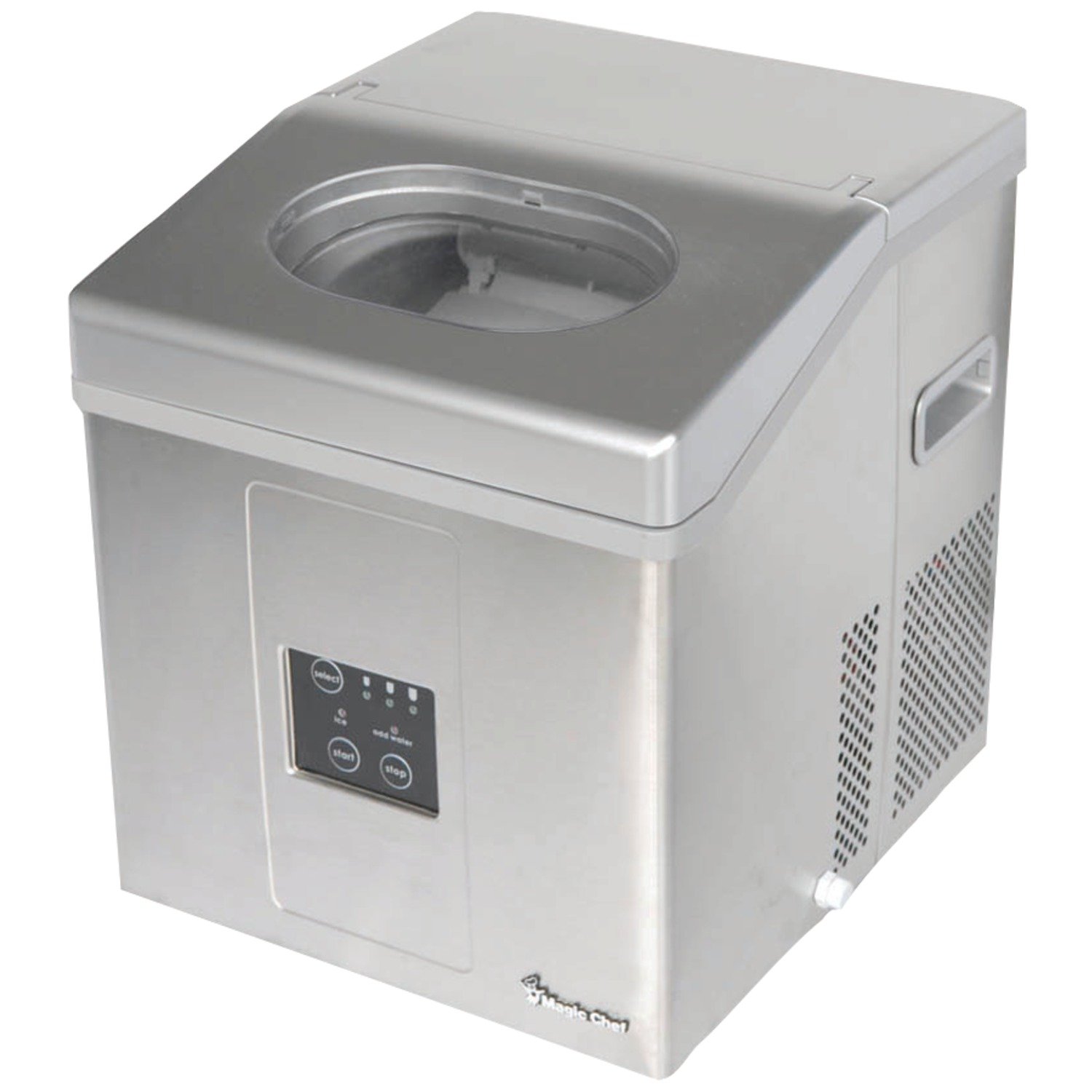
Figure 1: Front-right view of the Magic Chef Portable Mini Ice Maker. The image shows the stainless steel exterior, the control panel on the front, and the transparent lid on top. The side panel has ventilation grilles.
Setup
- Unpacking: Carefully remove all packaging materials. Inspect the ice maker for any shipping damage.
- Placement: Place the ice maker on a flat, stable, and level surface away from direct sunlight and heat sources (e.g., stove, furnace, radiator). Ensure at least 4 inches (10 cm) of space around the unit for proper ventilation.
- Initial Cleaning: Before first use, clean the interior of the ice maker with a soft cloth and warm, soapy water. Rinse thoroughly and wipe dry.
- First Use Preparation: After transporting the unit, allow it to stand upright for at least 4 hours before plugging it in. This allows the refrigerant to settle.
- Power Connection: Plug the ice maker into a grounded electrical outlet.
Operating Instructions
Control Panel Overview
Figure 2: Detail of the control panel on the Magic Chef Portable Mini Ice Maker. The panel features "select", "start", and "stop" buttons, along with indicator lights for ice size, "ice full", and "add water".
- Select Button: Press to cycle through available ice cube sizes (e.g., small, medium, large). Indicator lights will show the selected size.
- Start Button: Press to begin the ice making cycle.
- Stop Button: Press to pause or stop the ice making cycle.
- Ice Full Indicator: Illuminates when the ice basket is full. The unit will automatically stop making ice.
- Add Water Indicator: Illuminates when the water reservoir needs refilling. The unit will pause operation.
Making Ice
- Fill Water Reservoir: Open the lid and fill the water reservoir with potable water up to the MAX fill line. Do not overfill.
- Select Ice Size: Press the "Select" button to choose your desired ice cube size.
- Start Operation: Press the "Start" button. The ice maker will begin its cycle.
- Ice Production: The first batch of ice may take slightly longer. Subsequent batches will be produced more quickly. The unit will automatically stop when the ice basket is full or when water needs to be added.
- Harvesting Ice: Use the provided ice scoop to remove ice from the basket. For best results, transfer ice to a freezer for long-term storage.
Maintenance and Cleaning
Regular cleaning and maintenance will ensure the longevity and optimal performance of your ice maker.
- Daily Cleaning:
- Unplug the unit.
- Remove the ice basket.
- Drain any remaining water from the reservoir using the drain plug located at the bottom or side of the unit.
- Wipe the interior with a soft cloth and a mild detergent solution. Rinse thoroughly.
- Clean the exterior with a damp cloth.
- Descaling (Monthly or as needed):
- Prepare a solution of water and vinegar (10:1 ratio) or a commercial ice maker descaler.
- Pour the solution into the water reservoir.
- Run a few ice-making cycles (without consuming the ice) to circulate the solution.
- Drain the solution completely and rinse the reservoir multiple times with fresh water.
- Run 2-3 cycles with fresh water to ensure all descaling solution is removed.
- Storage: If storing the ice maker for an extended period, ensure it is completely drained and dry. Store in a cool, dry place.
Troubleshooting
| Problem | Possible Cause | Solution |
|---|---|---|
| "Add Water" indicator light is on. | Water reservoir is empty or low. | Fill the water reservoir with potable water. |
| "Ice Full" indicator light is on. | Ice basket is full. | Remove ice from the basket. |
| Ice maker is not producing ice. |
|
|
| Ice cubes are small or cloudy. |
|
|
Specifications
| Model Number | MCPMCIM30SST |
| Brand | Magic Chef |
| Capacity | 30 Pounds (daily production) |
| Wattage | 1875 watts |
| Dimensions (L x W x H) | 48.26 x 47.75 x 44.2 cm (19 x 18.8 x 17.4 inches) |
| Weight | 17.4 kg (38.36 lbs) |
| ASIN | B00GOFPA46 |
Warranty and Customer Support
For warranty information or technical assistance, please refer to the warranty card included with your product or contact Magic Chef customer support directly. Keep your purchase receipt as proof of purchase.
For the most up-to-date support information, please visit the official Magic Chef website or contact their customer service line.
Ask a question about this manual
Ask about setup, troubleshooting, compatibility, parts, safety, or missing instructions. Manuals+ will review the question and use this page’s manual context to help answer it.