
Utilitech 242159
Utilitech 3-Outlet Lighted Adapter
Model: 242159
Product Overview
The Utilitech 3-Outlet Lighted Adapter (Model 242159) is designed to expand a single grounded wall outlet into three, providing convenient power access. Its low-profile design integrates seamlessly with standard wall plates, and the built-in light offers enhanced visibility, particularly in low-light conditions.
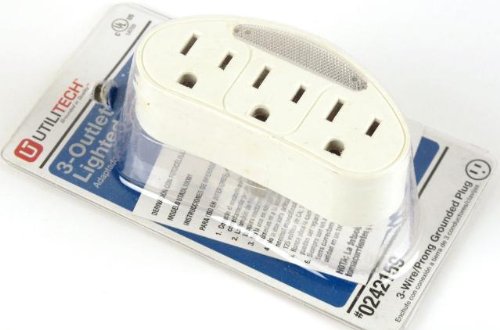
Image: The Utilitech 3-Outlet Lighted Adapter, white in color, shown in its clear plastic retail packaging. The adapter features three grounded outlets and a translucent light panel at the top. The packaging displays the "Utilitech" brand and product details.
Important Safety Information
Please read and understand all safety instructions before using this product. Failure to follow these instructions may result in electric shock, fire, or serious injury.
- Indoor Use Only: This adapter is intended for indoor use in dry locations only. Do not expose to moisture or water.
- Electrical Rating: Do not exceed the electrical rating of 15 Amps, 125 Volts, 1875 Watts. Overloading the adapter can cause overheating and fire.
- Grounding: This adapter is a 3-wire grounding type. Ensure it is plugged into a properly grounded 3-prong wall outlet. Do not defeat the grounding feature.
- Children: Keep out of reach of children.
- Damage: Do not use if the adapter or cord (if applicable) is damaged.
- Extension Cords: If using an extension cord, ensure it is rated for the power requirements of the devices connected to the adapter.
Setup and Installation
- Unpack: Carefully remove the Utilitech 3-Outlet Lighted Adapter from its packaging.
- Locate Outlet: Identify a standard 3-prong grounded wall outlet where you wish to expand power access.
- Plug In: Insert the adapter's 3-prong plug firmly into the wall outlet. Ensure it is fully seated.
- Verify Light: The built-in light will illuminate when the adapter is properly plugged into a live outlet, indicating power is available.
The low-profile design allows the adapter to sit flush against the wall, minimizing obstruction.
Operating Instructions
Once the adapter is plugged into a live wall outlet, it is ready for use.
- Connecting Devices: Plug up to three electrical devices directly into the available outlets on the adapter. Ensure the total power draw of all connected devices does not exceed the adapter's maximum rating (15 Amps / 1875 Watts).
- Lighted Feature: The adapter features a built-in light for night visibility. This light automatically illuminates when the adapter is plugged in, providing a soft glow for easy location of outlets in dark environments.
Maintenance
The Utilitech 3-Outlet Lighted Adapter requires minimal maintenance.
- Cleaning: To clean the adapter, unplug it from the wall outlet. Use a soft, dry cloth to wipe the exterior. Do not use liquid cleaners or abrasive materials.
- Inspection: Periodically inspect the adapter for any signs of damage, such as cracks, frayed wires, or discoloration. If damage is observed, discontinue use immediately and replace the adapter.
- Storage: When not in use, store the adapter in a cool, dry place away from direct sunlight and moisture.
Troubleshooting
| Problem | Possible Cause | Solution |
|---|---|---|
| No power from outlets. | Wall outlet is not live; circuit breaker tripped; adapter not fully plugged in. | Check the wall outlet with another device. Reset the circuit breaker. Ensure the adapter is firmly plugged into the wall outlet. |
| Light on adapter is not illuminated. | No power to the adapter; internal light malfunction. | Verify power to the wall outlet. If power is present and the light still doesn't work, the light may be faulty, but the outlets might still function. Consider replacement if the light is a critical feature for you. |
| Adapter feels warm. | Overloaded circuit; normal operation for slight warmth. | Unplug some devices to reduce load. If it feels excessively hot, unplug immediately and discontinue use. Ensure total wattage does not exceed 1875 Watts. |
Specifications
- Model: 242159
- Brand: Utilitech
- Type: 3-Outlet Lighted Adapter
- Outlets: 3 Grounded Outlets
- Electrical Rating: 15 Amps, 125 Volts, 1875 Watts
- Plug Type: 3-Prong Grounded
- Color: White
- Package Dimensions: 6.5 x 3 x 2 inches
- Item Weight: 3.2 ounces
- ASIN: B00GMOCB96
- Date First Available: August 1, 2015
Warranty and Support
Limited Warranty
Utilitech warrants this product against defects in material and workmanship for a period of one (1) year from the original date of purchase. This warranty does not cover damage resulting from accident, misuse, abuse, neglect, improper installation, or normal wear and tear. For warranty service, please retain your proof of purchase.
Customer Support
For technical assistance, troubleshooting, or warranty inquiries, please contact Utilitech customer service. Refer to the product packaging or the official Utilitech website for the most current contact information.
Please note: Product specifications and appearance are subject to change without notice.
Ask a question about this manual
Ask about setup, troubleshooting, compatibility, parts, safety, or missing instructions. Manuals+ will review the question and use this page’s manual context to help answer it.