
Miele W 5872 EDITION 111
Miele W 5872 Edition 111 Washing Machine User Manual
Model: W 5872 EDITION 111
1. Introduction
Thank you for choosing the Miele W 5872 Edition 111 washing machine. This manual provides comprehensive instructions for the safe and efficient operation, installation, and maintenance of your appliance. Please read this manual carefully before using the washing machine for the first time to ensure proper usage and to prevent damage.
Keep this manual in a safe place for future reference.
2. Safety Instructions
Always observe the following safety precautions to reduce the risk of fire, electric shock, injury to persons, or damage to the appliance.
- Electrical Safety: Ensure the washing machine is connected to a properly grounded outlet. Do not use extension cords or adapters. Disconnect the power supply before any cleaning or maintenance.
- Water Connection: Connect the water inlet hose securely to a cold water tap. Ensure all connections are tight to prevent leaks.
- Child Safety: This appliance is equipped with a child lock feature. Activate the child lock to prevent unintended operation by children. Supervise children to ensure they do not play with the appliance.
- Installation: The appliance must be installed on a firm, level surface. Ensure adequate ventilation around the machine.
- Operation: Do not wash items that are soiled with flammable substances. Do not open the door forcefully during operation.
- Maintenance: Only perform maintenance tasks described in this manual. For repairs, contact authorized service personnel.
Refer to the "Child Lock" feature mentioned in the product specifications.
3. Setup and Installation
3.1 Unpacking
Carefully remove all packaging materials. Inspect the appliance for any transport damage. Report any damage immediately to your dealer.
3.2 Removing Transit Bars
Before first use, remove all transit bars from the rear of the machine. Failure to do so will cause severe vibration and damage during operation. Store the transit bars for future transport.
3.3 Positioning and Leveling
Place the washing machine on a stable, level floor. Adjust the leveling feet until the machine is perfectly level and stable. Use a spirit level to verify.
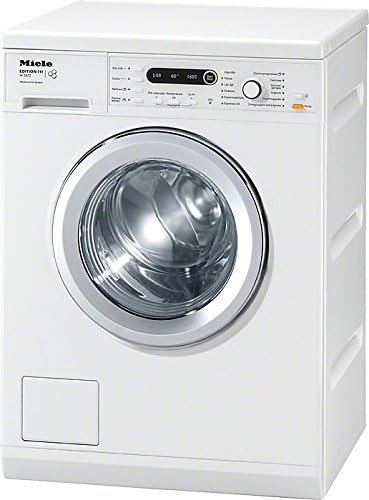
Figure 1: Angled view of the Miele W 5872 Edition 111 washing machine, illustrating its compact design suitable for various placements. This view helps in understanding the overall dimensions and connections.
3.4 Water Connection
Connect the supplied inlet hose to a cold water tap with a 3/4" thread. Ensure the connection is tight to prevent leaks. Position the drain hose into a standpipe or over the edge of a sink, ensuring it is securely fastened to prevent displacement during draining.
3.5 Electrical Connection
Plug the power cord into a grounded electrical outlet. Ensure the voltage and frequency match the specifications on the appliance's rating plate.
4. Operating Instructions
4.1 Control Panel Overview

Figure 2: Front view of the Miele W 5872 Edition 111 washing machine, highlighting the intuitive control panel and large front-loading door. This image is useful for identifying buttons and display elements.
The control panel features a program selector dial, a display, and various touch buttons for options such as temperature, spin speed, and additional functions.
4.2 Loading Laundry
Open the door and load laundry loosely into the drum. Do not overload the machine; refer to the maximum load capacity of 8 kg. Close the door firmly until it clicks.
4.3 Adding Detergent and Fabric Softener
Pull out the detergent dispenser drawer. Add the appropriate amount of detergent to the main wash compartment and fabric softener to its designated compartment. Close the drawer gently.
4.4 Selecting a Wash Program
Turn the program selector dial to choose your desired wash program (e.g., Cotton, Synthetics, Delicates). The display will show the default temperature and spin speed for the selected program.
4.5 Adjusting Settings
Use the touch buttons to adjust the temperature, spin speed (up to 1600 rpm), and add any desired options (e.g., Pre-wash, Extra Rinse).
4.6 Starting a Wash Cycle
Press the Start/Stop button to begin the wash cycle. The door will lock, and the program will commence.
4.7 Child Lock Function
To activate the child lock, press and hold the designated child lock button (refer to control panel diagram) for a few seconds until the indicator light illuminates. This prevents accidental changes to settings or starting/stopping the machine. Repeat the process to deactivate.
5. Maintenance and Cleaning
5.1 Cleaning the Exterior
Wipe the exterior surfaces with a soft, damp cloth. Do not use abrasive cleaners or solvents.
5.2 Cleaning the Detergent Dispenser Drawer
Regularly remove and clean the detergent dispenser drawer under running water to prevent detergent residue buildup.
5.3 Cleaning the Drum
Run a maintenance wash cycle (e.g., a hot wash with no laundry and a descaling agent) periodically to clean the drum and remove any odors or residue.
5.4 Cleaning the Drain Filter
Locate the drain filter at the bottom front of the machine. Place a shallow container underneath to catch any water. Unscrew the filter cover and carefully remove any lint or foreign objects. Clean the filter under running water and reinsert it securely.
6. Troubleshooting
| Problem | Possible Cause | Solution |
|---|---|---|
| Machine does not start | No power supply; Door not closed properly; Child lock active. | Check power plug and circuit breaker; Ensure door is firmly closed; Deactivate child lock. |
| Excessive vibration during spin cycle | Transit bars not removed; Machine not level; Uneven load. | Remove transit bars; Adjust leveling feet; Redistribute laundry evenly in the drum. |
| Water leakage | Loose hose connections; Clogged drain filter. | Check and tighten all hose connections; Clean the drain filter. |
| Detergent residue in dispenser | Insufficient water pressure; Clogged dispenser. | Check water supply; Clean the detergent dispenser drawer. |
If the problem persists after attempting these solutions, please contact Miele customer service or an authorized service technician.
7. Technical Specifications
- Model: W 5872 Edition 111
- Type: Freestanding Front-loader Washing Machine
- Capacity: 8 kg
- Max. Spin Speed: 1600 rpm
- Energy Efficiency Class: A+++
- Special Features: Child Lock
- Manufacturer: Miele
- ASIN: B00GIYDV1C
8. Warranty and Support
Miele provides a manufacturer's warranty for this appliance. Please refer to the warranty card included with your purchase for specific terms and conditions, including warranty period and coverage details. Keep your proof of purchase for warranty claims.
For technical support, service requests, or to order spare parts, please contact Miele customer service. Contact information can typically be found on the Miele official website or in the documentation provided with your appliance.
Miele Official Website: www.miele.com
Related documentsW 5872 EDITION 111


Ask a question about this manual
Ask about setup, troubleshooting, compatibility, parts, safety, or missing instructions. Manuals+ will review the question and use this page’s manual context to help answer it.