1. Product Overview
The BAOFENG GT-3 Mark-II is a dual-band two-way radio designed for reliable communication. It features an upgraded chipset for enhanced anti-interference capabilities and noise reduction. This manual provides essential information for the proper setup, operation, and maintenance of your device.

Image 1: BAOFENG GT-3 Mark-II Two Way Radio with included remote speaker and car charger.
Key Features:
- Frequency Range: 65-108 MHz (FM radio reception), VHF: 136-174 MHz, UHF: 400-520 MHz.
- Broad (Wide) / Narrowband (Narrow) selectable.
- High power / Low power (5W/1W) selectable.
- Selectable frequency step: 2.5/5/6.25/10/12.5/25 KHz.
- Voice Operated Transmission (VOX) function.
- Frequency offset for repeater access.
- Busy Channel Lock Out (BCLO) function.
- DTMF encoded.
- 105 DCS codes and 50 CTCSS privacy codes programmable.
- Timer Transmission (TOT) programmable.
- Built-in RX CTCSS/DCS scan, LED flashlight.
- Dual Watch/dual reception.
- Squelch Level Threshold adjustable from 0 to 9.
- Crossband reception.
2. Package Contents
Verify that all items listed below are included in your package:
- 1 x BAOFENG GT-3 Mark-II Two Way Radio
- 1 x 7.4V 1800mAh Li-ion Battery Pack
- 1 x SainSonic INF-641 Antenna
- 1 x Belt Clip
- 1 x User Manual
- 1 x Power Adapter
- 1 x Desktop Charger
- 1 x Headset
- 1 x Remote Speaker

Image 2: Complete package contents of the BAOFENG GT-3 Mark-II.
3. Setup
3.1 Battery Installation and Charging
- Align the 7.4V 1800mAh Li-ion Battery Pack with the battery compartment on the back of the radio.
- Slide the battery upwards until it clicks into place securely.
- To charge, place the radio with the installed battery into the Desktop Charger. Ensure the charging contacts align.
- Connect the Power Adapter to the Desktop Charger and plug it into a standard electrical outlet. The charger indicator light will show charging status.
- A full charge typically takes several hours. Do not overcharge the battery.
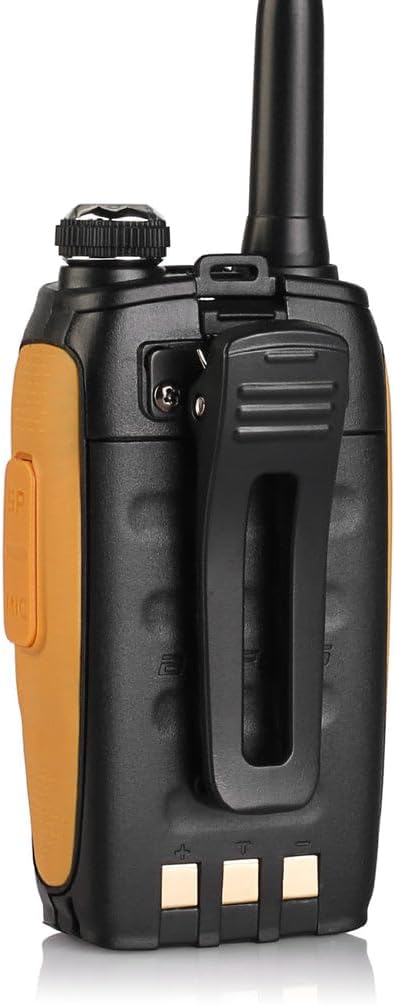
Image 3: Back of the radio showing the battery compartment area.

Image 4: The 7.4V 1800mAh Li-ion Battery Pack.
3.2 Antenna Attachment
- Locate the antenna connector on the top of the radio.
- Screw the SainSonic INF-641 Antenna clockwise onto the connector until it is finger-tight. Do not overtighten.
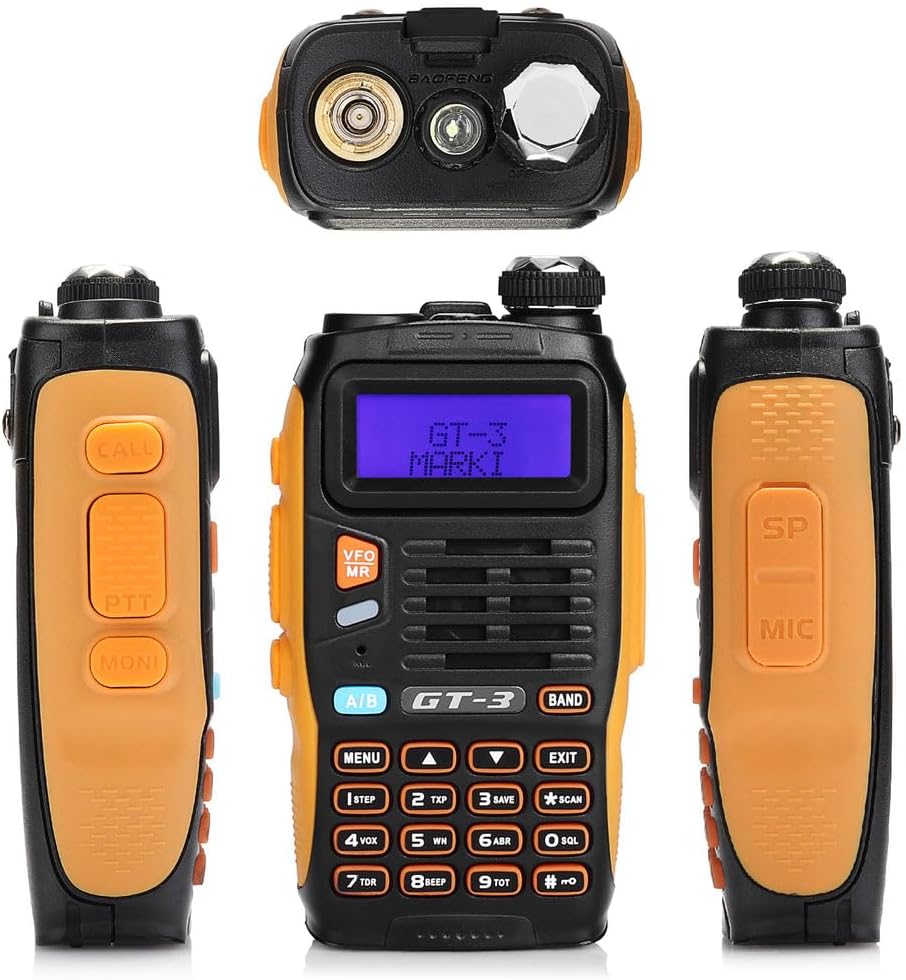
Image 5: Top of the radio with antenna port and flashlight.
3.3 Attaching Belt Clip
- Align the belt clip with the two screw holes on the back of the radio, above the battery compartment.
- Secure the belt clip using the provided screws.
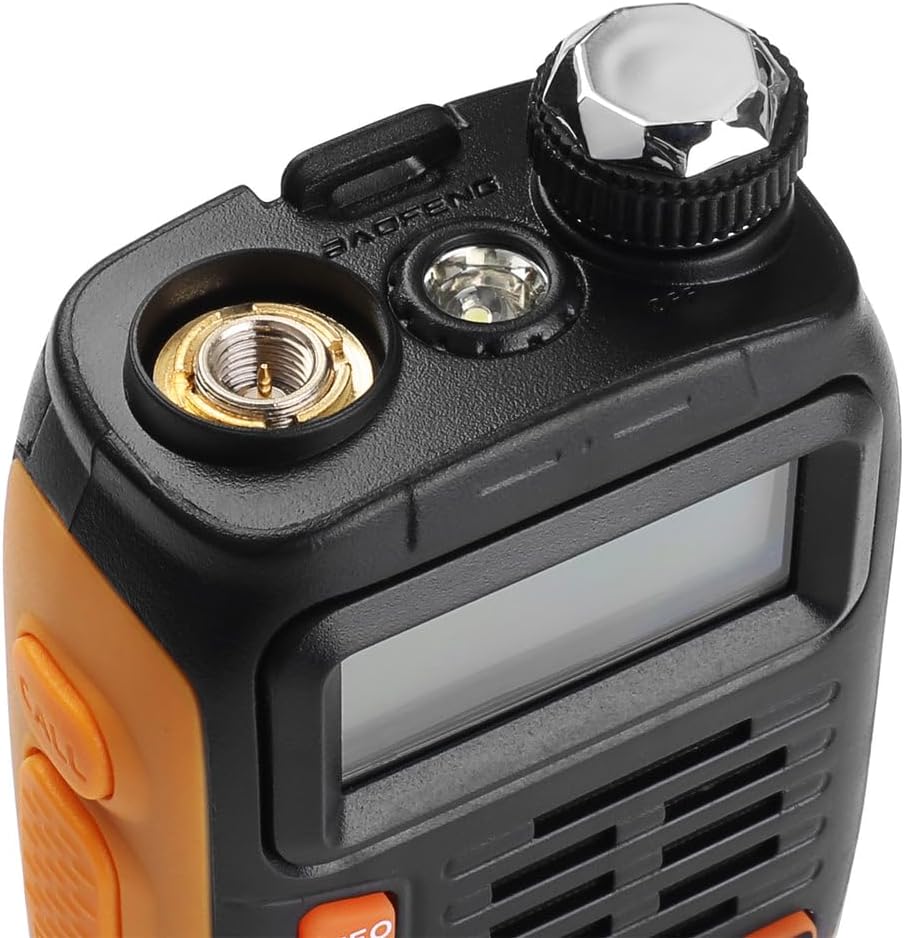
Image 6: Side view of the radio with the belt clip.
4. Operating Instructions
4.1 Power On/Off and Volume Control
- Power On: Rotate the volume knob (top right) clockwise until you hear a click. The display will light up.
- Power Off: Rotate the volume knob counter-clockwise until you hear a click.
- Volume Adjustment: Rotate the volume knob clockwise to increase volume and counter-clockwise to decrease it.
4.2 Frequency Selection (VFO/MR Mode)
- Press the VFO/MR button to switch between Frequency Mode (VFO) and Channel Mode (MR).
- In VFO mode, you can manually enter frequencies using the keypad or use the Up/Down arrow keys to scan.
- In MR mode, you can select pre-programmed channels using the Up/Down arrow keys.
4.3 Transmitting and Receiving
- Receiving: The radio will automatically receive signals on the selected frequency/channel. The signal strength indicator will show activity.
- Transmitting: Press and hold the PTT (Push-To-Talk) button on the left side of the radio. Speak clearly into the microphone. Release the PTT button to listen.
4.4 Menu Navigation
- Press the MENU button to enter the main menu.
- Use the Up/Down arrow keys to navigate through menu options.
- Press MENU again to select an option.
- Use the Up/Down arrow keys to change settings.
- Press MENU to confirm the setting or EXIT to cancel.
4.5 Keypad Functions
The keypad provides quick access to various functions:
- A/B: Switches between the upper and lower frequency display.
- BAND: Switches between VHF and UHF bands.
- 1 STEP: Adjusts frequency step.
- 2 TXP: Toggles transmit power (High/Low).
- 3 SAVE: Saves current frequency to a channel.
- * SCAN: Initiates scan function.
- 4 VOX: Activates/deactivates VOX function.
- 5 WN: Toggles Wide/Narrowband.
- 6 ABR: Adjusts display backlight time.
- 0 SQL: Adjusts Squelch level.
- 7 TDR: Activates/deactivates Dual Watch.
- 8 BEEP: Toggles keypad beep sound.
- 9 TOT: Sets Transmission Time Out Timer.
- # RPT: Activates/deactivates Repeater function.
5. Maintenance
- Cleaning: Use a soft, damp cloth to clean the radio's exterior. Do not use harsh chemicals or solvents.
- Storage: Store the radio in a cool, dry place away from direct sunlight and extreme temperatures. Remove the battery if storing for extended periods.
- Battery Care: Avoid fully discharging the Li-ion battery. Recharge it regularly, even if not in use, to maintain battery health. Do not expose the battery to fire or extreme heat.
- Antenna: Ensure the antenna is securely attached but do not bend or force it, as this can damage the connector.
6. Troubleshooting
Refer to the table below for common issues and their solutions:
| Problem | Possible Cause | Solution |
|---|---|---|
| Radio does not power on | Battery is low or not installed correctly. | Charge the battery or re-install it securely. |
| Cannot transmit or receive | Incorrect frequency/channel, antenna not attached, low battery, or squelch too high. | Verify frequency/channel, attach antenna, charge battery, adjust squelch level. |
| Poor audio quality | Weak signal, incorrect narrowband/wideband setting, or antenna issue. | Move to an area with better signal, check WN setting, ensure antenna is secure. |
| Keypad unresponsive | Keypad lock activated. | Press and hold the '#' key to unlock the keypad. |
7. Specifications
| Feature | Detail |
|---|---|
| Product Dimensions | 2.3 x 1.3 x 4.3 inches |
| Item Weight | 4.2 ounces |
| Model Number | GT-3 Mark-II |
| Batteries | 1 Lithium Ion battery required (included) |
| Special Features | Noise Reduction |
| Number of Channels | 128 |
| Frequency Range | 136 - 174 MHz, 400 - 520 MHz, 65 - 108 MHz |
| Talking Range Maximum | 5 Miles |
| Voltage | 7.4V |
| Water Resistance Level | Not Water Resistant |
| Operating Temperature | -20 ~ +60 °C |
| Frequency Stability | 2.5ppm |
| Antenna Impedance | 50 ohm |
8. Warranty and Support
For warranty information, technical support, or service inquiries, please refer to the documentation included with your purchase or visit the official BAOFENG website. Keep your purchase receipt as proof of purchase for warranty claims.


