
Introduction
The Tascam TM-2X Stereo X-Y Microphone is designed for capturing high-quality audio directly with DSLR cameras. This microphone utilizes cardioid capsules in an X-Y pattern to provide a true stereo sound experience, making it suitable for various video recording applications. It is engineered to integrate seamlessly with compatible cameras, enhancing audio capture for both amateur and professional filmmakers.
1. Setup
Follow these steps to correctly set up your Tascam TM-2X microphone with your DSLR camera:
- Attach the Microphone: The TM-2X includes a shoe adapter. Slide this adapter into your camera's accessory shoe. For tripod mounting, utilize the integrated tripod mounting threads.
- Connect the Audio Cable: Connect the microphone's integrated 3.5mm cable directly to your camera's microphone input jack. This simple connection allows for immediate high-quality audio recording without additional power sources.
- Install Windscreen (Optional): For outdoor recording or in windy conditions, cover the microphone unit with the included windscreen to reduce unwanted wind noise.
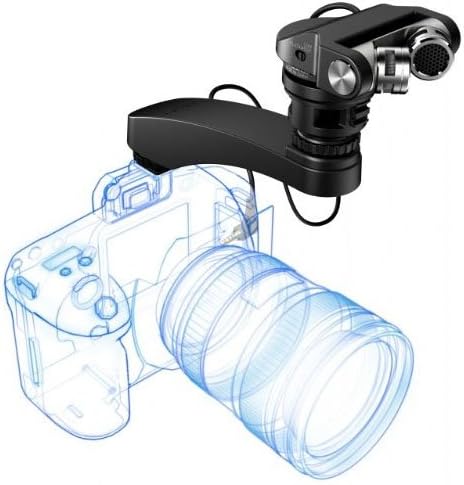
Image: The Tascam TM-2X microphone securely mounted on top of a DSLR camera, illustrating the hot shoe attachment.
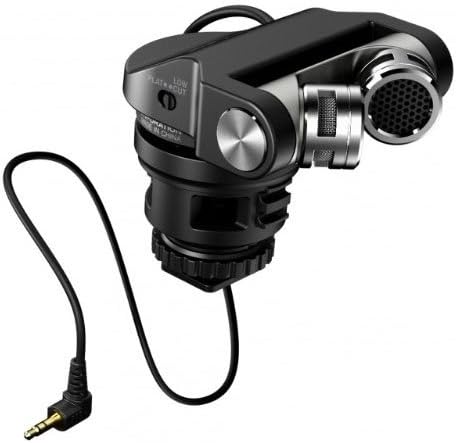
Image: A detailed view of the Tascam TM-2X microphone, highlighting the 3.5mm audio jack for camera connection and the hot shoe mount.
2. Operating Instructions
The Tascam TM-2X offers several features to optimize your audio recording:
- X-Y Pattern Microphones: The two cardioid mic capsules are arranged in an X-Y pattern, which is ideal for capturing a realistic stereo sound field, providing depth and spatial accuracy to your recordings.
- High Sound Pressure Level (SPL) Handling: This microphone can handle high sound pressures up to 120 dB SPL, making it suitable for recording in loud environments without distortion.
- Output Level Adjustment: A two-stage output level adjustment switch is included to ensure compatibility with various camera input sensitivities. Adjust this switch to match your camera's requirements and prevent clipping.
- Low-Cut Filter: An on-board low-cut filter can be activated to reduce unwanted low-frequency background noise, such as wind rumble or air conditioning hum. Switch it on or off as needed for cleaner audio.
- Adjustable Mic Capsules: The microphone capsules can be swiveled by 180 degrees, allowing for flexible positioning to optimize sound capture direction.

Image: A close-up view of the Tascam TM-2X, detailing the low-cut filter switch and the output level adjustment for precise audio control.
3. Maintenance
- Windscreen Use: Always use the included windscreen when recording outdoors or in windy conditions to minimize wind noise and protect the microphone capsules.
- Noise Isolation: The microphone features a floating support structure and a noise isolation arm designed to absorb handling and mechanical noise. Ensure these components are intact and functioning correctly for optimal performance.
- Cleaning: Gently wipe the microphone body with a soft, dry cloth. Avoid using liquid cleaners or solvents.
4. Troubleshooting
- Audible Hiss/Noise Floor: If you experience an audible hiss, especially in quiet rooms, this may be due to the camera's pre-amp or phantom power supply, not the microphone itself. When recording at decent audio levels, this hiss should not be evident.
- Autofocus Motor Noise: With the included noise isolation arm, sounds from autofocus motors should be barely audible, primarily in extremely quiet surroundings. If noise persists, ensure the isolation arm is correctly positioned.
- Interference/Crackling Sound: Some cameras may exhibit noise or interference when used with the TM-2X. This can be due to compatibility issues with the camera's circuitry. Test the microphone with different cameras or recording devices to isolate the source of the interference.
- Physical Damage to Shoe Mount: The shoe mount is designed for secure attachment. Handle the microphone carefully when mounting or dismounting to prevent damage to the plastic components.
5. Specifications
| Feature | Detail |
|---|---|
| Audio Sensitivity | 120 Decibels |
| Item Weight (Pounds) | 0.55 Pounds |
| Microphone Form Factor | Shotgun |
| Item dimensions L x W x H | 6.06 x 3.19 x 8.5 inches |
| Power Source | Corded Electric |
| Material | Metal |
| Signal-to-Noise Ratio | 85 dB |
| Hardware Platform | Camera |
| Number of Channels | 1 |
| Frequency Response | 20000 Hz |
| Manufacturer | Tascam |
| UPC | 700814500306 043774030392 |
| Item Weight (ounces) | 8.8 ounces |
| Product Dimensions | 6.06 x 3.19 x 8.5 inches |
| Is Discontinued By Manufacturer | No |
| Date First Available | October 21, 2013 |
| Color | Black |
| Recommended Uses For Product | Recording |
| Model Name | TASCAM TM-2X - X-Y Pattern Stereo Cardioid Mic fo |
| Connectivity Technology | Wired |
| Connector Type | 3.5mm mini-jack |
| Special Feature | Swivel by 180-Degrees |
| Compatible Devices | Camera |
| Included Components | microphone |
| Polar Pattern | Unidirectional |
6. Product Videos
Tascam TM-2X Stereo X-Y Microphone for DSLR Cameras Overview
Video description: An official product video demonstrating the features and usage of the Tascam TM-2X Stereo X-Y Microphone for DSLR Cameras. This video provides a visual guide to the microphone's design and functionality.
7. Warranty and Support
Specific warranty and support information for the Tascam TM-2X microphone is not detailed in the provided product data. Please refer to the official Tascam website or contact their customer support for the most up-to-date information regarding warranty coverage and technical assistance.


