
TIMEX T5K421
TIMEX Marathon Digital Grey Dial Men's Watch - T5K421
Instruction Manual
Product Overview
The TIMEX Marathon T5K421 is a robust digital watch designed for men, featuring an alarm and chronograph functions. It is built for durability and ease of use, making it suitable for daily wear and sports activities.
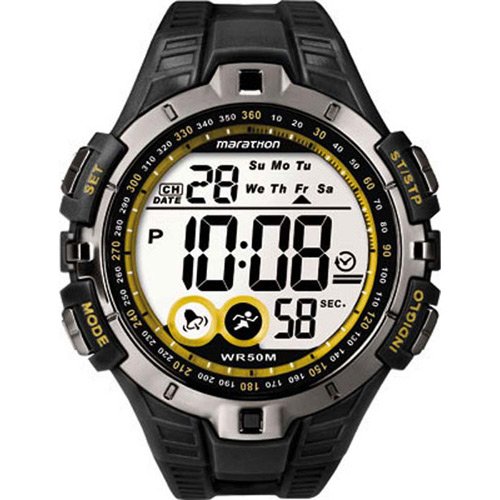
Figure 1: Front view of the TIMEX Marathon Digital Grey Dial Men's Watch T5K421, showing the digital display, mode buttons, and strap.
Setup
Before using your watch, ensure it is properly set up for accurate timekeeping and functionality.
Setting Time and Date
- Press the MODE button repeatedly until the time setting mode is displayed.
- Use the SET button to cycle through hours, minutes, seconds, year, month, and day.
- Press the ST/STP button to adjust the selected value.
- Once all settings are complete, press the MODE button to exit the setting mode.
Setting the Alarm
- Press the MODE button until the alarm setting mode is displayed.
- Use the SET button to select the hour or minute to adjust.
- Press the ST/STP button to change the alarm time.
- To activate or deactivate the alarm, press the INDIGLO button while in alarm mode. An alarm icon will appear or disappear.
- Press the MODE button to exit.
Operating Instructions
Using the Chronograph (Stopwatch)
- Press the MODE button until the chronograph mode is displayed.
- Press the ST/STP button to start the stopwatch.
- Press ST/STP again to pause the stopwatch.
- To reset the stopwatch, press the SET button while the stopwatch is paused.
Using INDIGLO® Night-Light
The INDIGLO® night-light illuminates the watch display for easy viewing in low-light conditions.
- Press the INDIGLO button (typically located on the top right or bottom right of the watch) to activate the backlight.
- The light will remain on for a few seconds.
Water Resistance
This watch has a water resistance depth of 50 meters (WR50M). This means it is suitable for recreational swimming in shallow water. It is not suitable for diving or snorkeling. Do not operate buttons while the watch is wet or submerged.
Maintenance
Cleaning Your Watch
To maintain the appearance and functionality of your watch:
- Wipe the watch case and band with a soft, damp cloth.
- Avoid using harsh chemicals or abrasive cleaners, as these can damage the watch's finish or seals.
- For resin bands, mild soap and water can be used, then rinse thoroughly and dry.
Battery Replacement
The watch is powered by a quartz movement, which requires a battery. When the display dims or functions become erratic, the battery may need replacement. It is recommended to have the battery replaced by a qualified watch technician to ensure proper sealing and maintain water resistance.
Troubleshooting
| Problem | Possible Cause | Solution |
|---|---|---|
| Display is blank or dim. | Low battery. | Replace battery. |
| Buttons are unresponsive. | Watch may be in a locked mode or internal issue. | Try pressing all buttons to see if any respond. If not, a reset may be required (consult a technician). |
| Water inside the watch. | Buttons operated underwater or seals compromised. | Immediately take to a qualified watch repair center to prevent further damage. |
Specifications
| Feature | Detail |
|---|---|
| Model Number | T5K421 |
| Brand | TIMEX |
| Display Type | Digital |
| Movement Type | Quartz |
| Dial Color | Grey |
| Case Shape | Round |
| Dial Glass Material | Mineral |
| Band Color | Black |
| Band Material | Resin |
| Water Resistance Depth | 50 meters |
| Case Diameter | 46 Millimetres |
| Item Weight | 159 g |
| Package Dimensions | 9 x 8.8 x 8.8 cm |
| First Available | 8 November 2013 |
Warranty and Support
This TIMEX Marathon watch comes with a manufacturer's warranty.
- Warranty Type: Manufacturer
- Warranty Period: 1 Year Manufacturer Warranty
For warranty claims, technical support, or service inquiries, please contact TIMEX customer service or visit their official website. Keep your proof of purchase for warranty validation.
Note: Warranty terms and conditions may vary by region. Please refer to the official TIMEX warranty documentation provided with your purchase for complete details.
Related documentsT5K421

Ask a question about this manual
Ask about setup, troubleshooting, compatibility, parts, safety, or missing instructions. Manuals+ will review the question and use this page’s manual context to help answer it.