
Harman Kardon Esquire
Harman/Kardon Esquire Wireless Speaker System User Manual
Model: Esquire
1. Introduction
The Harman/Kardon Esquire is a sophisticated, portable wireless speaker and conference system designed for exceptional audio quality and hands-free communication. Crafted with premium materials like leather and metal, it offers a blend of elegant design and advanced technology, including Bluetooth, NFC, and a versatile conference phone system with echo and noise reduction.

Figure 1.1: Front view of the Harman/Kardon Esquire speaker, showcasing its distinctive grill and Harman/Kardon branding.
2. What's in the Box
Upon unboxing your Harman/Kardon Esquire, please ensure all the following components are present:
- 1 x Harman/Kardon Esquire Wireless Speaker System
- 1 x 3-port USB Adapter
- 1 x Quick Start Guide
- 1 x Transport Case
- 1 x USB Cable

Figure 2.1: The Harman/Kardon Esquire speaker alongside its included protective transport case, highlighting its portability.
3. Product Features
- Hi-Fi Harman Kardon Audio: Equipped with two high-performance 45mm drivers and a built-in bass port for clear, dynamic sound.
- Wireless Bluetooth Streaming: Seamlessly connect your smartphone or tablet via Bluetooth for audio playback.
- NFC Connectivity: Enjoy easy, one-touch pairing with NFC-enabled devices.
- Versatile Conference System: Features intelligent orientation identification and advanced echo/noise reduction technology for crystal-clear hands-free calls and conference meetings.
- Long Battery Life: An integrated Li-Ion battery provides up to 8-10 hours of music playback and conference calls, ensuring maximum portability.
- Multi-Device Charging: The included 3-port USB adapter allows you to charge multiple devices simultaneously.
- Premium Design: Stylish aluminum and leather finish with a patented speaker grill, reflecting Harman Kardon's commitment to aesthetics.

Figure 3.1: Angled view of the Harman/Kardon Esquire, highlighting its premium materials and speaker grill design.
4. Setup
4.1. Charging the Battery
Before first use, fully charge the Esquire speaker. Connect the supplied USB cable to the speaker's charging port and the other end to the 3-port USB adapter. Plug the adapter into a power outlet. The charging indicator lights will illuminate, indicating the charging status. A full charge takes approximately 5 hours.
4.2. Powering On/Off
To power on the Esquire, press and hold the Power button (⏻) located on the side panel until the indicator lights illuminate. To power off, press and hold the Power button again until the lights turn off.
4.3. Bluetooth Pairing
- Ensure the Esquire is powered on.
- Press the Bluetooth button (Ⓑ) on the side panel. The Bluetooth indicator light will flash, indicating it's in pairing mode.
- On your smartphone or tablet, navigate to the Bluetooth settings and select "Harman/Kardon Esquire" from the list of available devices.
- Once paired, the Bluetooth indicator light will glow solid.
4.4. NFC Pairing (Near Field Communication)
If your device supports NFC, you can pair it by simply tapping your NFC-enabled device against the NFC logo on the Esquire speaker. Follow the on-screen prompts on your device to complete the pairing process.
4.5. Auxiliary Connection
For devices without Bluetooth, connect them using a 3.5mm audio cable (not included) to the Aux-in port on the side of the Esquire speaker. The speaker will automatically switch to auxiliary input mode.

Figure 4.1: Side view of the Harman/Kardon Esquire, illustrating the charging port, auxiliary input, and indicator lights.
5. Operating the Esquire
5.1. Music Playback
Once connected via Bluetooth or Aux-in, you can control music playback directly from your source device. Use the volume buttons on the Esquire to adjust the speaker's output volume.
5.2. Hands-Free Calling and Conference System
The Esquire's built-in microphone system allows for clear hands-free calls. When a call comes in, music playback will pause. Press the Call button (📞) to answer or end a call. The intelligent orientation identification and echo/noise reduction technology ensure clear communication for all participants in a conference call.
5.3. Controls
The Esquire features intuitive controls on its side panel:
- Power Button (⏻): Press and hold to turn the speaker on or off.
- Bluetooth Button (Ⓑ): Press to enter Bluetooth pairing mode.
- Volume Down (-): Decrease playback volume.
- Volume Up (+): Increase playback volume.
- Mute Button (🔇): Mute or unmute the microphone during a call.
- Call Button (📞): Answer incoming calls or end active calls.
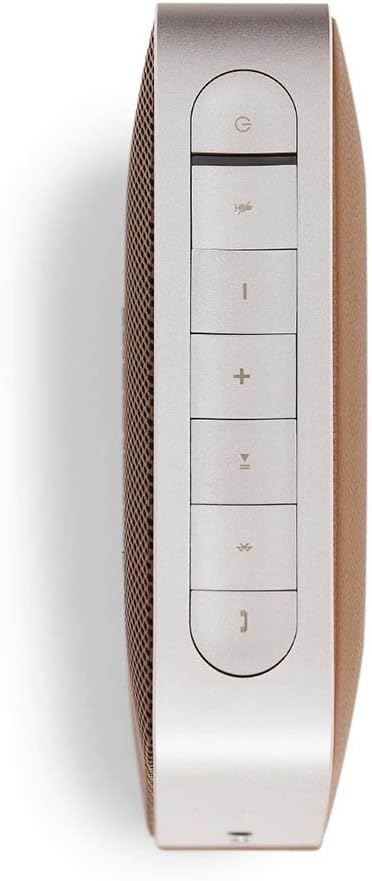
Figure 5.1: Top view of the Harman/Kardon Esquire, detailing the layout of its control buttons for power, Bluetooth, volume, mute, and call management.
6. Maintenance
To ensure the longevity and optimal performance of your Harman/Kardon Esquire, follow these maintenance guidelines:
- Cleaning: Use a soft, dry cloth to clean the speaker's surfaces. Avoid using abrasive cleaners, solvents, or strong chemicals.
- Storage: When not in use for extended periods, store the speaker in its transport case in a cool, dry place.
- Battery Care: To preserve battery life, avoid fully discharging the battery frequently. Recharge the speaker regularly, even if not in constant use.
- Avoid Extremes: Do not expose the speaker to extreme temperatures, direct sunlight, high humidity, or water.
7. Troubleshooting
| Problem | Possible Cause | Solution |
|---|---|---|
| No power | Battery is depleted | Charge the speaker using the supplied USB cable and adapter. |
| No sound | Volume is too low or muted; Incorrect input selected; Device not connected | Increase volume on both the speaker and source device. Ensure correct input (Bluetooth/Aux) is active. Re-pair Bluetooth or check Aux cable connection. |
| Bluetooth pairing fails | Speaker not in pairing mode; Device too far; Interference | Ensure speaker is in pairing mode (flashing Bluetooth light). Move device closer to speaker. Turn off other Bluetooth devices nearby. |
| Poor call quality | Microphone muted; Environmental noise | Ensure microphone is not muted. Reduce background noise or move closer to the speaker. |
8. Specifications
| Feature | Detail |
|---|---|
| Speaker Drivers | 2 x 45mm |
| Frequency Range | 80Hz – 22kHz |
| Amplifier Power | 2 x 10 Watts |
| Signal-to-Noise Ratio | 80dB |
| Battery Type | Li-Ion (7.4 Volt, 4000mA) |
| Playtime (Battery) | Up to 10 hours |
| Charging Time | Approximately 5 hours |
| Inputs | Bluetooth Wireless, Aux-in (3.5mm Jack) |
| Dimensions (W x D x H) | 147 x 147 x 46.5mm |
| Weight | 1.6 kg |
| Bluetooth Frequency | 2402 ~ 2480 GHz |
9. Warranty and Support
Harman Kardon products are built to the highest quality standards. For information regarding warranty coverage, technical support, or service, please refer to the warranty card included with your product or visit the official Harman Kardon website. Keep your proof of purchase for warranty claims.
Related documentsEsquire


Ask a question about this manual
Ask about setup, troubleshooting, compatibility, parts, safety, or missing instructions. Manuals+ will review the question and use this page’s manual context to help answer it.