
Bernette 4260366210536
Bernette Chicago 7 Sewing and Embroidery Machine User Manual
Model: 4260366210536
Product Overview
The Bernette Chicago 7 is a versatile and robust sewing and embroidery machine designed for both beginners and experienced users. It combines high-quality construction with a wide range of features to support various creative projects, from basic sewing to intricate embroidery.

Figure 1: Overview of the Bernette Chicago 7 Sewing and Embroidery Machine.
Key features include:
- 200 programmed stitch patterns, including 10 buttonholes and 2 sewing fonts.
- 100 integrated embroidery designs and 1 embroidery font.
- Maximum sewing speed of 800 stitches per minute (spm) and embroidery speed of 600 spm.
- Maximum stitch width of 7 mm and stitch length of 4.5 mm.
- Large embroidery area of 110 x 170 mm.
- LCD display with backlight for easy navigation.
- Automatic needle threader and convenient drop-in bobbin system.
- Free arm capability for sewing sleeves and pant legs.
- Strong fabric transport system, suitable for heavy fabrics like denim.
Setup and Initial Use
Before operating your Bernette Chicago 7, ensure it is properly set up. Follow these steps for initial preparation:
- Unpacking: Carefully remove the machine and all accessories from the packaging. Retain the original packaging for future transport or storage.
- Placement: Place the machine on a stable, flat surface. Ensure there is adequate space around the machine for comfortable operation.
- Power Connection: Connect the power cord to the machine and then to a suitable electrical outlet. Use only the power cord supplied with the machine.
- Foot Pedal Connection: Connect the foot pedal to the designated port on the machine.
- Attaching the Slide-on Table/Free Arm: The machine comes with a removable slide-on table. For general sewing, attach this table to extend your work surface. To use the free arm for circular sewing (e.g., sleeves, pant legs), simply remove the slide-on table.
- Attaching the Embroidery Module: When performing embroidery, the slide-on table must be removed. The embroidery module can then be easily attached to the machine. Ensure it clicks securely into place.

Figure 2: Front view of the machine, showing the main body and the area for attaching the slide-on table or embroidery module.

Figure 3: Side view illustrating the power and foot pedal connection points.
Operating Instructions
Threading the Machine
Proper threading is crucial for optimal sewing performance. The Bernette Chicago 7 features an automatic needle threader and a convenient drop-in bobbin system.
- Upper Threading: Follow the numbered guides on the machine to thread the upper thread from the spool pin through the tension discs and take-up lever.
- Automatic Needle Threader: Utilize the built-in automatic needle threader for quick and easy threading of the needle eye.
- Bobbin Winding: Wind the bobbin according to the instructions provided in the full manual.
- Drop-in Bobbin: Open the bobbin cover plate and insert the wound bobbin into the bobbin case. Ensure the thread is correctly routed through the tension spring. The transparent cover allows for easy monitoring of bobbin thread supply.
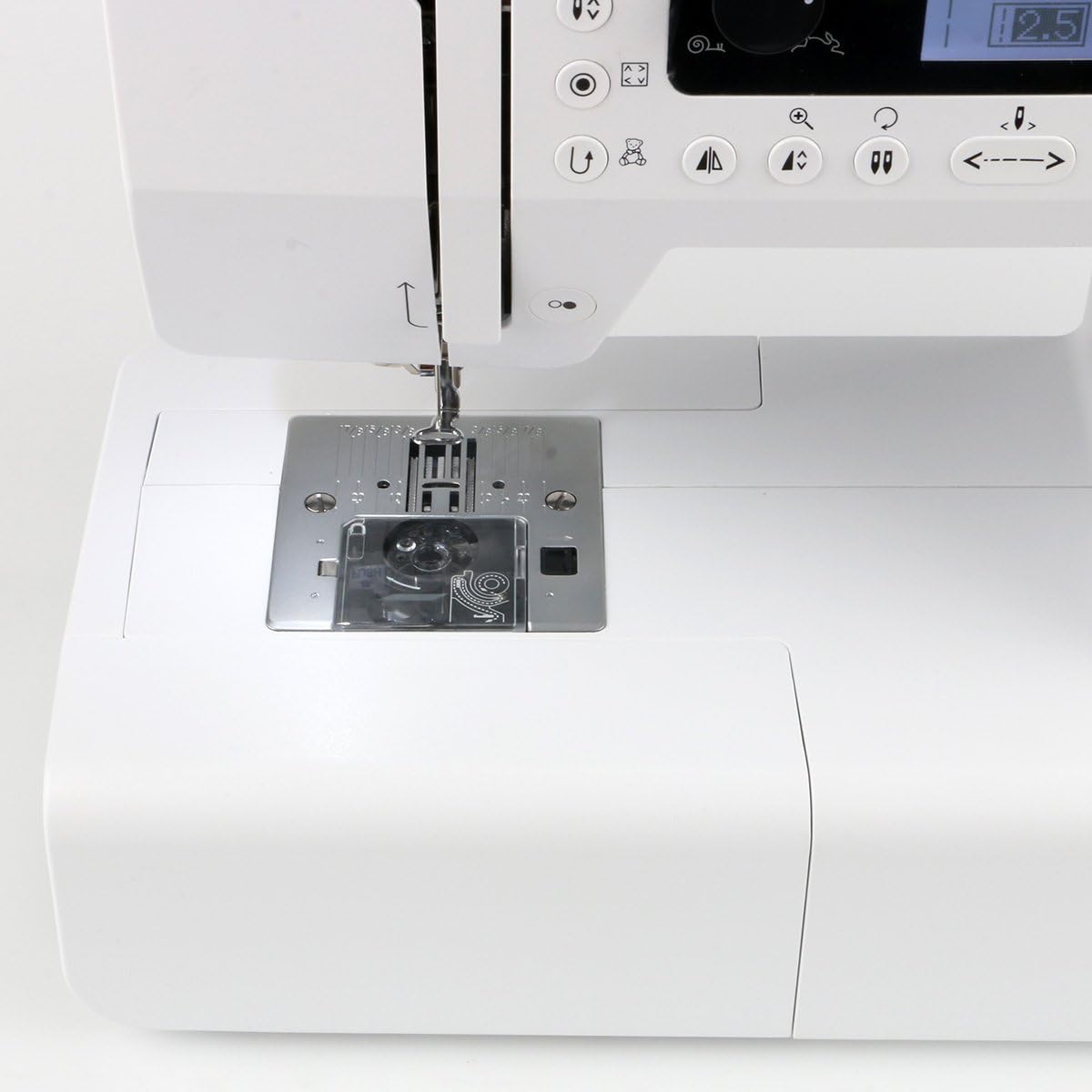
Figure 4: View of the bobbin area with the transparent cover and needle plate, showing the drop-in bobbin system.

Figure 5: Detailed view of the needle and presser foot, highlighting the threading path and needle threader.
Selecting Stitches and Settings
The machine's LCD display and control panel allow for easy selection and adjustment of stitches and settings.

Figure 6: The control panel with LCD display for stitch selection and machine settings.
- Direct Stitch Selection: Use the direct selection buttons to quickly choose frequently used stitches.
- Navigation Buttons: Use the arrow buttons to navigate through the extensive stitch library displayed on the LCD screen.
- Stitch Width and Length: Adjust stitch width (up to 7mm) and length (up to 4.5mm) using the dedicated buttons or the slider for zigzag width adjustment.
- Speed Control: The stepless speed adjustment slider allows you to control the sewing speed precisely.
- Needle Stop Position: Set the needle to stop in the up or down position using the needle stop button.
- Start/Stop Button: Operate the machine without the foot pedal using the Start/Stop button.
- Reverse Sewing: Use the reverse button for securing stitches at the beginning and end of seams.
- Memory Function: Store frequently used stitch combinations in the machine's memory (4 memories, 20 slots).
Embroidery Functionality
The Bernette Chicago 7 transforms into an embroidery machine by attaching the embroidery module.

Figure 7: The machine actively embroidering a design on fabric within the embroidery hoop.
- Embroidery Module Attachment: Ensure the embroidery module is securely attached and the slide-on table is removed.
- Hooping Fabric: Place your fabric, along with appropriate stabilizer, into the embroidery hoop. The maximum embroidery area is 110 x 170 mm.
- Design Selection: Choose from 100 integrated embroidery designs or load designs via USB stick (EXP format supported).
- Design Editing: Utilize functions like mirroring, moving, and 90° rotation to customize your designs.
- Embroidery Speed: The machine operates at a maximum embroidery speed of 600 spm.
- Color Segment Skipping: Skip color segments during embroidery if desired.
Maintenance and Care
Regular maintenance ensures the longevity and optimal performance of your Bernette Chicago 7.
- Cleaning: Regularly clean the bobbin area and feed dog teeth to remove lint and dust. Use the brush provided with your accessories.
- Needle Replacement: Replace the needle frequently, especially when starting a new project or if the needle shows signs of wear or bending.
- Lubrication: Refer to the full instruction manual for specific lubrication points and frequency.
- Storage: When not in use, cover the machine with the dust cover to protect it from dust and debris.

Figure 8: The accessory drawer, containing tools useful for maintenance and general operation.

Figure 9: A comprehensive view of all accessories included with the Bernette Chicago 7, including various presser feet, bobbins, and cleaning tools.
Troubleshooting
This section addresses common issues you might encounter during operation. For detailed troubleshooting, consult the comprehensive manual.
| Problem | Possible Cause | Solution |
|---|---|---|
| Skipped Stitches | Incorrect needle, bent needle, improper threading, wrong thread tension. | Ensure correct needle type for fabric, replace bent needle, re-thread machine, adjust tension. |
| Thread Breaking | Incorrect threading, too high tension, poor quality thread, burr on needle plate. | Re-thread machine, reduce upper thread tension, use quality thread, check for burrs. |
| Fabric Not Feeding | Feed dogs lowered, lint accumulation, presser foot pressure too low. | Raise feed dogs, clean feed dog area, increase presser foot pressure. |
Technical Specifications
| Feature | Specification |
|---|---|
| Model Number | 4260366210536 |
| Product Dimensions (L x W x H) | 44 x 15 x 32 cm |
| Item Weight | 11.6 Kilograms |
| Number of Stitch Patterns | 200 (sewing) |
| Number of Embroidery Designs | 100 (integrated) |
| Max. Stitch Width | 7 mm |
| Max. Stitch Length | 4.5 mm |
| Max. Embroidery Area | 110 x 170 mm |
| Power Source | Electric with cord |
| Material | Metal |
Warranty and Support
The Bernette Chicago 7 comes with a 2-year warranty. For warranty claims, technical support, or service inquiries, please contact Bernette customer service or your authorized dealer.
It is recommended to register your product on the official Bernette website to ensure you receive updates and support information.
For additional resources, including detailed video tutorials and a comprehensive digital manual, please visit the official Bernette support page. Keep your purchase receipt as proof of purchase for warranty purposes.
Related documents4260366210536


Ask a question about this manual
Ask about setup, troubleshooting, compatibility, parts, safety, or missing instructions. Manuals+ will review the question and use this page’s manual context to help answer it.