
Introduction
This manual provides comprehensive instructions for the proper use and maintenance of your Takstar PCM-5550 Condenser KTV Microphone. Please read this manual thoroughly before operating the microphone to ensure optimal performance and longevity.
Key Features
- Excellent audio processing circuitry for natural and smooth sound reproduction.
- High sensitivity and low output impedance for clear recording performance.
- Integrated windscreen to minimize plosives and wind noise.
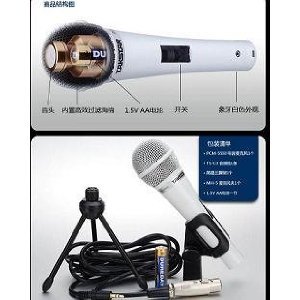
- Operates on 1.5V AA batteries, providing extended playtime.
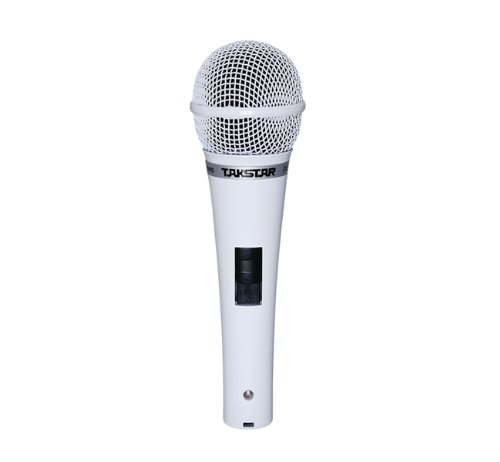
- Stylish ivory design.
- Suitable for internet karaoke and PC recording applications.
Package Contents
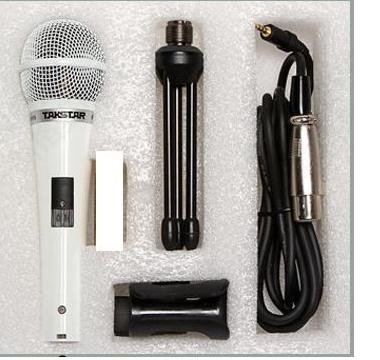
Upon unpacking, please verify that all the following items are included:
- Takstar PCM-5550 Condenser Microphone
- Microphone Stand (mini tripod)
- Microphone Cable
- Microphone Clip/Holder
Setup Instructions
- Install Battery: Locate the battery compartment on the microphone handle. Insert one 1.5V AA battery, ensuring correct polarity (+/-).
- Attach Microphone Clip: Secure the microphone clip to the included mini tripod stand or a compatible microphone stand.
- Mount Microphone: Carefully place the Takstar PCM-5550 microphone into the clip.
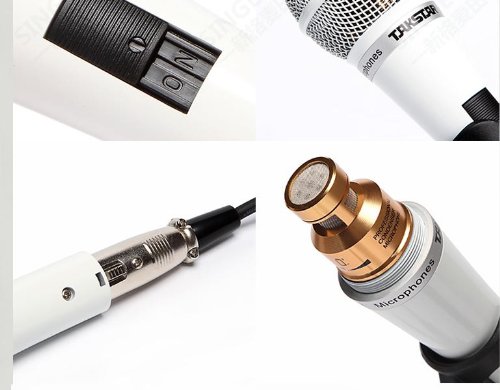
- Connect Cable: Plug one end of the microphone cable into the microphone's output port (usually at the bottom). Connect the other end to your audio interface, mixer, or computer's microphone input.
Operating Instructions
- Power On: Locate the ON/OFF switch on the microphone handle and slide it to the "ON" position.
- Positioning: For optimal sound quality, position the microphone approximately 5-15 cm (2-6 inches) from the sound source (e.g., your mouth for vocals).
- Adjust Levels: Adjust the input gain on your connected audio device (mixer, computer) to achieve a clear signal without distortion. Avoid setting the gain too high, which can lead to clipping.
- Power Off: When not in use, slide the ON/OFF switch to the "OFF" position to conserve battery life.

Maintenance
- Cleaning: Use a soft, dry cloth to wipe the microphone body. Do not use liquid cleaners or solvents, as they may damage the finish or internal components.
- Storage: Store the microphone in a dry, cool place, away from direct sunlight and extreme temperatures. If storing for an extended period, remove the AA battery to prevent leakage.
- Handling: Avoid dropping the microphone or subjecting it to strong impacts, which can damage the sensitive condenser capsule.
Troubleshooting
| Problem | Possible Cause | Solution |
|---|---|---|
| No sound output |
|
|
| Low or distorted sound |
|
|
| Excessive background noise |
|
|
Specifications
| Model | PCM-5550 |
| Type | Condenser Microphone |
| Polar Pattern | Omnidirectional |
| Frequency Response | 30Hz-20kHz |
| Sensitivity | -38±3dB |
| Output Impedance | 350Ω±30% |
| Load Impedance | >1000Ω |
| Power Requirements | 1.5V AA battery |
| Net Weight | 300g |
| Color | White |
| Compatible Devices | Karaoke Machine, Personal Computer |
Warranty and Support
For warranty information and technical support, please refer to the official Takstar website or contact your local distributor. Keep your purchase receipt as proof of purchase for any warranty claims.
For further assistance, you may visit the Takstar Store on Amazon.


