1. Introduction
The Tenda CP6 is a 2K indoor wireless pan-tilt camera designed for comprehensive home security, baby monitoring, and pet surveillance. It offers a 360° panoramic view, high-resolution video, and advanced features to keep your home safe and connected.

Image: The Tenda CP6 camera, showcasing its compact design.

Image: Overview of Tenda CP6 features including 2K resolution, 360° vision, night vision, two-way audio, and smart detection.
2. What's in the Box
The Tenda CP6 package includes the following items:
- Tenda CP6 Camera
- Power Adapter
- Installation Template
- Mounting Base
- Quick Installation Guide
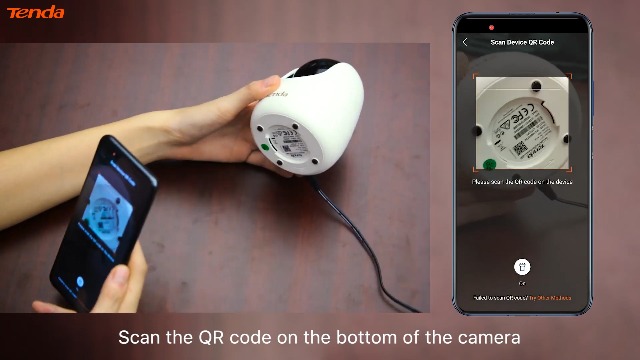
Image: Contents of the Tenda CP6 package, showing the camera, power adapter, and installation accessories.
3. Setup
3.1. Inserting the Micro SD Card
- Gently push the camera lens upwards until the Micro SD card slot is visible.
- Insert a Class 10 Micro SD card (up to 128GB) into the slot until it clicks into place.
- Return the camera lens to its original position.

Image: Demonstrates inserting a Micro SD card into the camera.
3.2. Powering On the Device
Connect the power adapter to the camera's power port and then plug it into a power outlet. The camera will perform a self-check, and you will hear a voice prompt indicating it's ready for connection.
Note: The Tenda CP6 is not battery-powered and requires a continuous power source.
3.3. App Installation and Device Connection
- Download and install the TDSEE App from your smartphone's app store.
- Open the TDSEE App and create an account or log in.
- Tap "Add a device" and scan the QR code located on the bottom of your Tenda CP6 camera.
- Follow the on-screen instructions to connect the camera to your 2.4GHz Wi-Fi network. Ensure your smartphone is connected to the same 2.4GHz Wi-Fi network.
Video: A step-by-step tutorial on setting up the Tenda Wireless Camera for Home Security, including app installation and connection.
3.4. Installation Methods
The Tenda CP6 camera offers flexible installation options:
- Desk Installation: Place the camera on a flat surface like a table or shelf.
- Wall Installation: Use the provided mounting base and screws to secure the camera to a wall.
- Ceiling Installation: Attach the camera to the ceiling using the mounting base for an overhead view.

Image: Various installation methods for the Tenda CP6 camera: desktop, wall-mounted, and ceiling-mounted.
4. Operating the Camera
Video: Overview of the Tenda Wireless Camera for Home Security features, including 360° view, two-way talk, and smart detection.
4.1. Remote Monitoring and Pan/Tilt Control
Access live video feed from your smartphone using the TDSEE App. Use the on-screen controls to pan (360° horizontal) and tilt (155° vertical) the camera for a full panoramic view of your space.

Image: Visual representation of the camera's 360° pan and 155° tilt for comprehensive coverage.
4.2. Two-Way Audio Communication
The camera features a built-in microphone and speaker, allowing for two-way real-time communication. Speak through the app to interact with family members, pets, or visitors in the camera's vicinity.
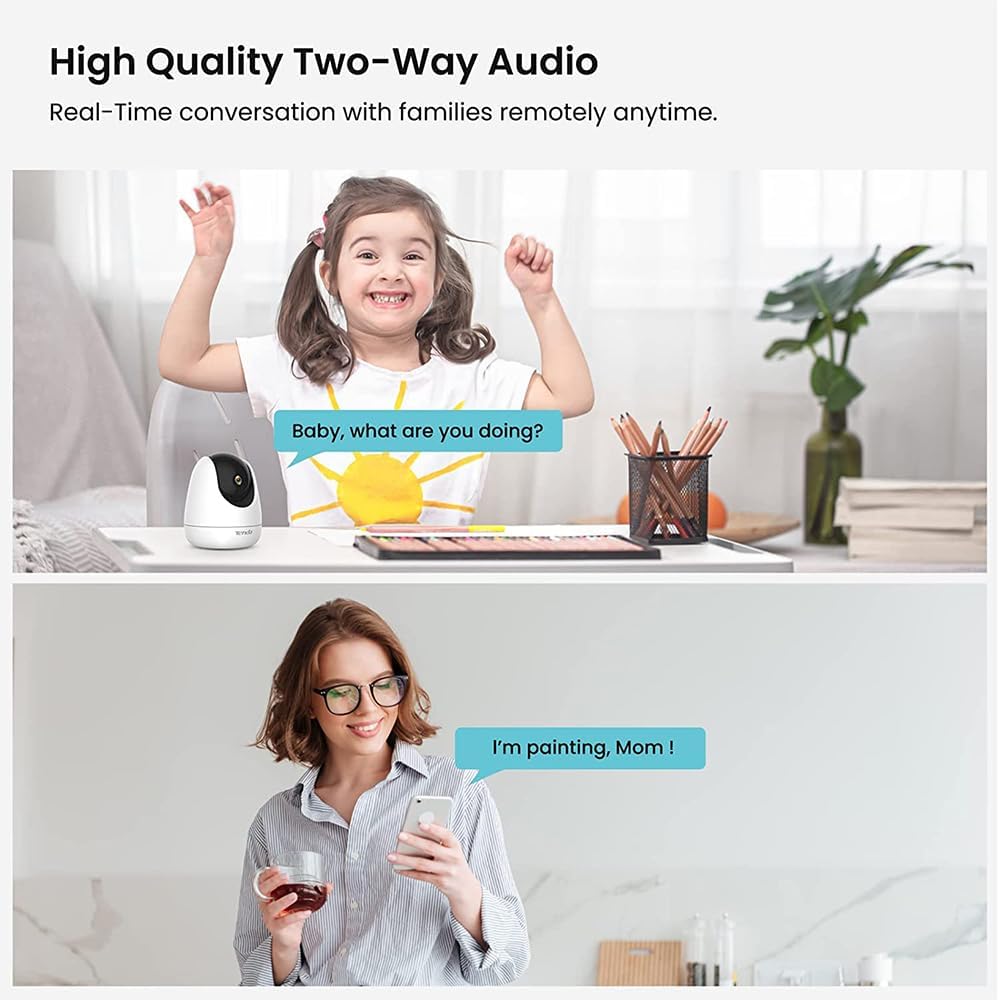
Image: Demonstrates the two-way audio function, showing a child speaking to a parent through the camera.
4.3. Intelligent Detection and Alerts
The CP6 camera utilizes AI-powered human detection and smart tracking. It can identify human shapes and follow moving objects, sending real-time alerts to your phone for any detected activity.

Image: Visual of the camera's AI human detection capability for security.

Image: Smart tracking feature showing a dog being tracked by the camera and a corresponding motion detection alert on a smartphone.
4.4. Siren and Warning Light
In case of detected intrusion, the camera can activate an integrated siren and warning light to deter unwelcome visitors and notify you immediately.

Image: The camera's active light and sound alarm feature for enhanced defense against intruders.
4.5. Night Vision
The camera is equipped with smart IR night vision, providing clear, crisp 2K full HD video up to 40ft (12m) even in pitch-black conditions. It also supports full-color viewing in low-light environments.

Image: Superior night vision capability of the camera, showing a clear view of a sleeping baby in darkness.

Image: Comparison of normal low-light vision and enhanced full-color low-light vision.
4.6. Privacy Occlusion
For privacy, the camera features a one-click occlusion function. You can hide the camera lens via the app when you are home, ensuring your privacy.

Image: The one-click occlusion feature, showing the camera lens retracting to protect privacy, along with data security measures.
4.7. Storage Options
The Tenda CP6 supports two storage options for recorded video:
- Local Storage: Using a Micro SD card (up to 128GB).
- Cloud Storage: Encrypted cloud storage is available (3 months free trial included).

Image: Depicts the two available storage options: Micro SD card and cloud storage.
5. Maintenance
- Keep the camera clean by wiping it with a soft, dry cloth. Avoid using harsh chemicals or abrasive cleaners.
- Ensure the camera is placed in a stable environment, away from extreme temperatures, direct sunlight, and moisture.
- Regularly check for firmware updates through the TDSEE App to ensure optimal performance and security.
- Periodically review recorded footage and storage capacity, especially if using a Micro SD card, to prevent data loss.
6. Troubleshooting
6.1. Camera Not Connecting to Wi-Fi
- Ensure your Wi-Fi network is 2.4GHz. The CP6 does not support 5GHz Wi-Fi.
- Verify the Wi-Fi password is correct.
- Place the camera closer to your Wi-Fi router during setup.
- Restart both your router and the camera.
- Check if the camera's LED indicator is blinking blue fast, indicating it's ready for connection.
6.2. No Video Recording
- Check if a Micro SD card is properly inserted and formatted within the TDSEE App.
- Ensure the Micro SD card has sufficient storage space.
- Verify your cloud storage subscription is active if you are using cloud recording.
- Check recording settings in the TDSEE App to ensure continuous recording or motion-triggered recording is enabled.
6.3. Poor Video Quality
- Ensure a strong Wi-Fi signal where the camera is located.
- Clean the camera lens with a soft cloth.
- Adjust video quality settings in the TDSEE App if your network bandwidth is limited.
6.4. No Audio or Two-Way Talk Issues
- Check the volume settings on your smartphone and within the TDSEE App.
- Ensure the microphone and speaker on the camera are not obstructed.
- Verify that microphone permissions are granted to the TDSEE App on your smartphone.
7. Specifications
| Feature | Detail |
|---|---|
| Model Name | Tenda CP6 |
| Indoor/Outdoor Usage | Indoor |
| Video Capture Resolution | 2K (2304x1296) |
| Connectivity Protocol | Wi-Fi (2.4GHz only) |
| Power Source | Corded Electric |
| Mounting Type | Desk, Wall Mount, Ceiling Mount |
| Compatible Devices | Smartphone (TDSEE App) |
| Controller Type | Amazon Alexa (Voice Control) |
| Frame Rate | 30 fps |
| Storage | Micro SD (up to 128GB), Cloud Storage |
| Night Vision | Smart IR Night Vision (up to 40ft/12m), Full Color in Low-light |
| Detection | AI Human Detection, Motion Detection, Auto Tracking |
| Alerts | Real-time Phone Alerts, Integrated Siren and Warning Light |
| Audio | Two-Way Real-Time Talk, Customizable Voice Alerts |
| Privacy Feature | One-Click Occlusion (Privacy Shutter) |
| Dimensions (L x W x H) | 3.46 inches (approx. 88mm) |
| Item Weight | 212 Grams (7.5 ounces) |
| Water Resistance Level | Not Water Resistant (Indoor Use Only) |
| UPC | 885397273271 |

Image: Detailed view of the Tenda CP6 camera with dimensions and port labels.
8. Warranty and Support
8.1. Product Warranty
Tenda provides a three-year manufacturer warranty for the CP6 camera. During this period, free replacement service will be provided for any non-artificial quality problems.
8.2. Technical Support
For technical assistance or warranty claims, please contact Tenda support:
- Email: support.us@tenda.cn
- Visit the official Tenda website for additional resources and FAQs.


