
Introduction
This manual provides detailed instructions for the installation, operation, and maintenance of your Ameritron RCS-8V 5-Position Remote Coax Antenna Switch. Please read this manual thoroughly before operating the device to ensure proper function and safety.
The Ameritron RCS-8V is designed to allow remote selection of up to five different antennas using a single coaxial cable run to your radio equipment. This system consists of a weatherproof relay box for outdoor installation and a control unit for indoor operation.
Safety Information
- Always disconnect power before making any connections or performing maintenance.
- Ensure proper grounding of the antenna system and the relay box to protect against lightning and static discharge.
- Do not operate the switch with power levels exceeding its specifications.
- Installation of outdoor components should be performed by qualified personnel, especially when working at heights or near power lines.
- Keep the control unit away from moisture and extreme temperatures.
Package Contents
Verify that all items are present in the package:
- Ameritron RCS-8V Relay Box
Note: The control unit and connecting cable are typically sold separately or as part of a complete system. Please check your specific purchase details.
Setup and Installation
The Ameritron RCS-8V system consists of two main components: the outdoor relay box and the indoor control unit. This section details the installation process for both.
1. Relay Box Mounting
The relay box is designed for outdoor use and should be mounted in a location that allows easy access for antenna connections while minimizing cable runs. Consider mounting it on an antenna mast, tower, or a sturdy wall.
- Choose a secure, weather-protected location.
- Use appropriate mounting hardware (not included) to firmly attach the relay box.
- Ensure the box is easily accessible for connecting coaxial cables.
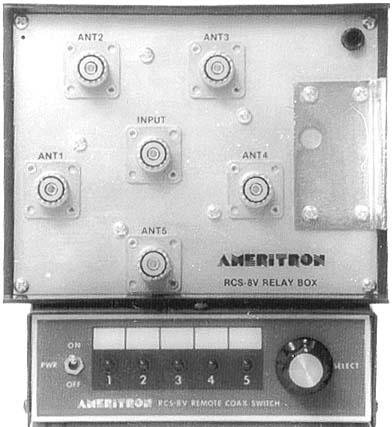
Figure 1: Ameritron RCS-8V Relay Box. This image shows the compact, beige-colored relay box with multiple coaxial connectors, designed for outdoor installation to switch between up to five antennas.
2. Antenna Connections
Connect your antennas to the designated input ports on the relay box. The relay box typically has one common output port and multiple input ports (1-5).
- Connect each antenna's coaxial cable to one of the "ANT 1" through "ANT 5" connectors on the relay box.
- Ensure all connections are tight and weatherproofed using appropriate methods (e.g., self-amalgamating tape).
- Connect your main coaxial cable from your radio equipment to the "COMMON" output connector on the relay box.
3. Control Cable Connection
A multi-conductor control cable (not included) is required to connect the outdoor relay box to the indoor control unit.
- Run the control cable from the relay box to the location of your control unit.
- Connect the control cable wires to the corresponding terminals on both the relay box and the control unit, following the wiring diagram provided with your control unit.
- Ensure all connections are secure and properly insulated.
4. Power Connection
The Ameritron RCS-8V operates on 8 Volts DC. The control unit typically provides this power to the relay box via the control cable.
- Connect the control unit to a suitable 110V AC power source using the provided power adapter (if applicable).
- Verify that the control unit powers on and its indicators are functioning correctly.
Operating Instructions
Once the Ameritron RCS-8V is properly installed, operating it is straightforward.
Antenna Selection
The control unit allows you to select which of the five connected antennas is active. Typically, the control unit will have a rotary switch or push buttons corresponding to each antenna position (1-5).
- Turn on the control unit.
- Select the desired antenna position (1 through 5) using the selector on the control unit.
- An indicator light on the control unit will typically confirm the currently selected antenna.
- The relay box will switch the internal relays to connect the selected antenna to the common output.
Note: It is recommended to switch antennas when your radio is not transmitting to avoid potential damage to the switch or radio.
Maintenance
The Ameritron RCS-8V is designed for reliable, long-term operation with minimal maintenance.
- Periodic Inspection: Annually inspect the relay box and all coaxial connections for signs of corrosion, water ingress, or physical damage. Ensure all cables are securely fastened.
- Cleaning: Keep the control unit clean and free of dust. Use a soft, dry cloth. Do not use liquid cleaners directly on the unit.
- Weatherproofing: Regularly check the weatherproofing of outdoor coaxial connections and the relay box enclosure. Reapply weatherproofing materials as needed.
Troubleshooting
| Problem | Possible Cause | Solution |
|---|---|---|
| No antenna selection response | No power to control unit; faulty control cable; relay box issue. | Check power supply to control unit. Inspect control cable for breaks or loose connections. |
| High SWR on all antennas | Faulty common coax cable; relay box internal issue. | Check the main coax cable from the relay box to the radio. Ensure all connectors are tight. |
| High SWR on a specific antenna | Problem with that specific antenna or its coax connection to the relay box. | Inspect the antenna and its coaxial cable. Check the connection at the relay box. |
| Intermittent operation | Loose connections; moisture ingress; damaged control cable. | Check all connections (coax and control). Inspect for water damage. |
Specifications
- Model: RCS-8V
- Brand: Ameritron
- Number of Channels: 5
- Frequency Range: 136-470 MHz
- Voltage: 8 Volts DC (for relay box operation)
- Tuner Type: UHF, VHF
- Special Feature: Remote Control
- Included Components: Relay Box
- Manufacturer: Ameritron
- UPC: 701630972513
Warranty and Support
Ameritron products are designed for quality and reliability. For specific warranty information, please refer to the warranty card included with your purchase or visit the official Ameritron website. For technical support or service inquiries, please contact Ameritron customer service directly.
Please retain your proof of purchase for warranty claims.