
1. Introduction and Overview
The ZTE Awe N800 is a prepaid smartphone designed for use with Virgin Mobile services. This device offers essential smartphone functionalities including a touchscreen display, camera capabilities, and access to the Android operating system. It is built to provide a reliable mobile experience for communication and basic multimedia tasks.
Key features include:
- 4.0-inch Touchscreen Display
- 5-MP Rear Camera and Front-facing Camera
- Android 4.1 Operating System
- Bluetooth Connectivity
- 720p HD Video Recording
2. Setup
2.1. Unboxing and Initial Inspection
Upon opening the package, ensure all components are present: the ZTE Awe N800 smartphone, battery, and charger. Inspect the device for any physical damage before proceeding with setup.
2.2. Inserting the SIM Card and Battery
The ZTE Awe N800 requires a SIM card for cellular service. Please note that the SIM card is not included with the device and must be obtained separately from your service provider. To insert the SIM card and battery:
- Carefully remove the back cover of the phone.
- Locate the SIM card slot and gently insert your Virgin Mobile SIM card, ensuring it is correctly oriented.
- Insert the battery into its compartment, aligning the gold contacts.
- Replace the back cover until it clicks securely into place.
2.3. Charging the Device
Before first use, fully charge the ZTE Awe N800. Connect the charger to the phone's charging port and plug it into a power outlet. The battery indicator on the screen will show charging progress. A full charge typically takes a few hours.
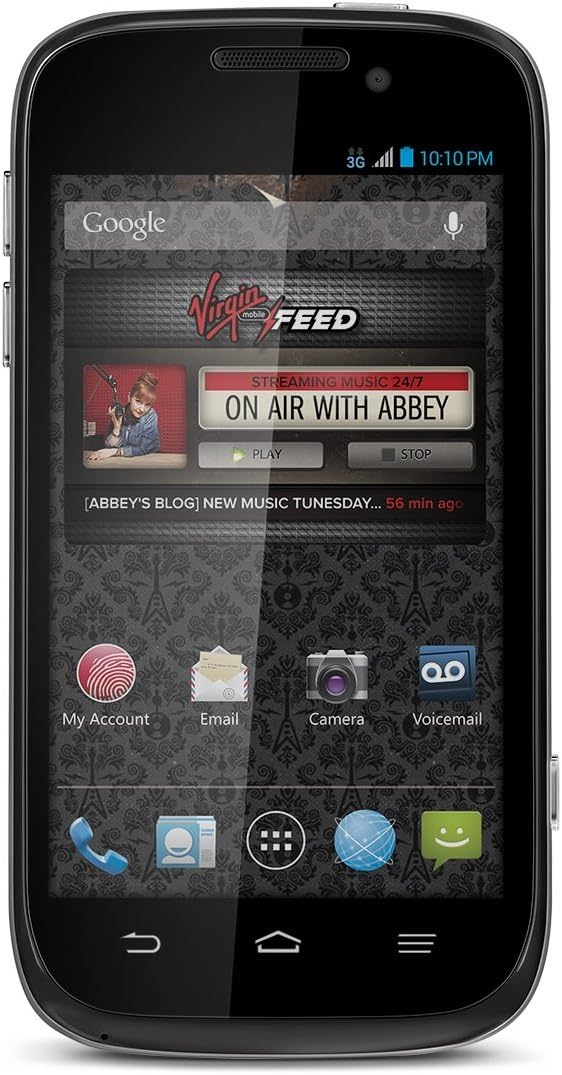
This image shows the front view of the ZTE Awe N800 smartphone, highlighting its 4.0-inch touchscreen display with the Virgin Mobile 'FEED' application visible, along with icons for My Account, Email, Camera, and Voicemail.
2.4. Initial Power On and Setup Wizard
Press and hold the Power button until the phone vibrates and the screen turns on. Follow the on-screen instructions of the Android setup wizard to configure your language, Wi-Fi connection, Google account, and other initial settings.
3. Operating the Device
3.1. Touchscreen Navigation
The ZTE Awe N800 features a capacitive touchscreen. Use the following gestures for navigation:
- Tap: To select an item, open an app, or press a button.
- Touch and Hold: To access contextual menus or move icons.
- Swipe: To scroll through lists, switch between home screens, or dismiss notifications.
- Pinch: To zoom in or out on photos and web pages.
3.2. Making Calls and Sending Messages
To make a call, tap the Phone icon, enter the number using the dial pad, and tap the Call button. To send a text message, tap the Messaging icon, select a contact or enter a number, type your message, and tap Send.
3.3. Using the Camera
The phone is equipped with a 5-megapixel rear camera and a front-facing camera. To open the camera, tap the Camera icon. You can switch between photo and video modes, adjust settings, and view your captured media in the Gallery.
3.4. Connectivity
The ZTE Awe N800 supports Wi-Fi and Bluetooth connectivity.
- Wi-Fi: To connect to a Wi-Fi network, go to Settings > Wi-Fi, turn Wi-Fi on, and select your desired network.
- Bluetooth: To pair with Bluetooth devices (e.g., headsets, speakers), go to Settings > Bluetooth, turn Bluetooth on, and select the device you wish to pair with.

This image displays an advertisement for Virgin Mobile's unlimited plans, detailing various data and talk/text options. It highlights 'Unlimited Music' and 'Limitless Music' features, along with pricing for different data tiers, which are relevant for understanding the phone's service options.
4. Maintenance
4.1. Battery Care
To prolong battery life, avoid exposing the phone to extreme temperatures. It is recommended to use only the charger provided or a compatible charger. Avoid completely draining the battery frequently.
4.2. Cleaning the Device
Use a soft, lint-free cloth to clean the screen and body of the phone. Avoid using harsh chemicals or abrasive materials, which can damage the display or finish.
4.3. Software Updates
Periodically check for software updates to ensure your device has the latest features and security enhancements. You can usually find this option in Settings > About phone > System updates.
4.4. Storage Management
The ZTE Awe N800 comes with 2 GB of internal storage. To manage storage, regularly clear cached data from apps, uninstall unused applications, and transfer photos and videos to a computer or cloud storage. The device supports expandable storage via a microSD card, allowing for additional space up to 32 GB for media and files.
5. Troubleshooting
This section addresses common issues you might encounter with your ZTE Awe N800.
- Phone not turning on: Ensure the battery is charged. If the battery is completely drained, it may take a few minutes of charging before the phone responds.
- Phone not charging: Check the charger and charging cable for damage. Ensure the charging port on the phone is clean and free of debris. Try a different power outlet.
- Poor network connection: Verify that your SIM card is properly inserted. Check your signal strength. If in an area with poor coverage, move to a location with better reception. Restarting the phone can often resolve temporary network issues.
- Apps crashing or freezing: Close and reopen the app. If the issue persists, clear the app's cache (Settings > Apps > [App Name] > Storage > Clear cache). If still problematic, consider uninstalling and reinstalling the app.
- Slow performance: Close unnecessary background apps. Free up storage space by deleting old files or uninstalling unused apps. A factory reset (Settings > Backup & reset > Factory data reset) can resolve persistent performance issues, but remember to back up your data first as this will erase all personal information.
6. Specifications
| Feature | Specification |
|---|---|
| Model Name | Awe N800 |
| Operating System | Android 4.1 |
| Display | 4.0 Inches Touchscreen |
| CPU Speed | 1.2 GHz |
| Internal Memory | 2 GB |
| Camera | 5 MP Rear, Front-facing |
| Connectivity | Bluetooth, Wi-Fi, 3G Cellular |
| Dimensions (L x W x H) | 4.96 x 2.57 x 0.42 inches |
| Item Weight | 4.4 ounces |
7. Warranty and Support
For warranty information and technical support, please refer to the documentation provided with your purchase or visit the official ZTE website. Keep your proof of purchase for warranty claims. Online resources and FAQs may also be available to assist with common inquiries.


